
Security
Securely Store Your Personal Files with OpenAI’s ChatGPT Library


The Latest Feature ‘Library’ on OpenAI’s ChatGPT
OpenAI has introduced a new feature for ChatGPT users called ‘Library.’ This feature enables users to securely store personal files and images on OpenAI’s cloud storage system.
According to OpenAI, the ChatGPT Library feature is available for Plus, Pro, and Business users. This feature is being rolled out to customers globally, excluding the European Economic Area, Switzerland, and the United Kingdom.
Upon refreshing the ChatGPT web page, users have reported that the Library feature automatically appears on the sidebar for easy access.
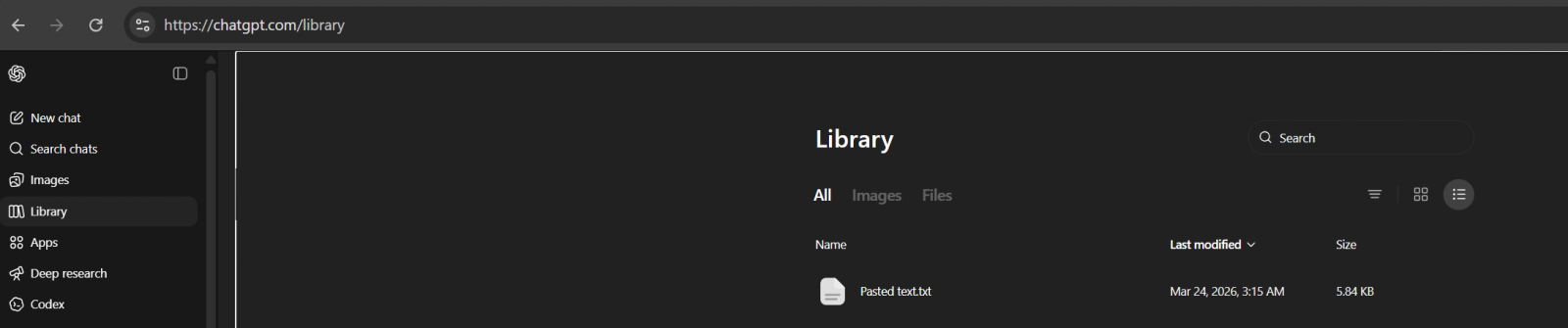
Surprisingly, the Library is not empty for many users as ChatGPT has already stored some of the files uploaded in the past two weeks.
It appears that this behavior is intentional. By default, ChatGPT saves uploaded files in a secure location for future reference during chats.
OpenAI has mentioned that ChatGPT automatically saves uploaded and created files, such as documents, spreadsheets, presentations, and images, in a secure location for easy access later on.
If users generate AI images using ChatGPT, these images will continue to appear in the Images tab rather than the Library.
The Library section specifically contains files that users have uploaded. To upload files, users can follow these steps:
- Open the composer menu (the attachment/add button).
- Select Add from library.
- Choose the file you want to use.
OpenAI reiterates that uploaded files remain in the user’s account until manually deleted. Deleting a chat that contains a file does not remove the file from the Library.
To delete a file from the Library, users can:
- Select the file in the “Library” tab.
- Click Delete or use the trash icon next to the file.
OpenAI assures users that files will be removed from their servers within 30 days of deletion, likely for legal compliance reasons.
While the reason for the 30-day retention period is not explicitly stated, it is presumably to adhere to legal requirements.

Malware threats are evolving. The Red Report 2026 sheds light on new techniques used by malware to evade detection and conceal themselves within systems.
Download the analysis of 1.1 million malicious samples to uncover the top 10 techniques and assess the effectiveness of your security measures.













Unveiling iOS 27.2: Enhanced features, official release date, and much more

THE BEST PHONE HTC EVER MADE?

Revolutionizing Luxury: The 2027 Bentley Torcal – A Fusion of British Elegance and Porsche Performance

Activision’s Halo Takeover: A Game-Changing Xbox Overhaul

AI Revolution: Amazon’s Seller Tools Embrace Anthropic’s Claude

Ragdoll Rampage: The Malicious Mod Menace

Apple Reportedly Developing a Fitbit Air Competitor, Tech Advisor Reports

AI: A Threat to Employee Retention?

AI Sentry: Enhancing Military Logistics Security with U.S. TRANSCOM’s Deployed Technology

EU Takes Action Against Instagram and Facebook for Violating Illegal Content Rules

Warning: Facebook Creators Face Monetization Loss for Stealing and Reposting Videos

Facebook’s New Look: A Blend of Instagram’s Style

Facebook Compliance: ICE-tracking Page Removed After US Government Intervention

Facebook and Instagram to Reduce Personalized Ads for European Users

InstaDub: Meta’s AI Translation Tool for Instagram Videos

Reclaim Your Account: Facebook and Instagram Launch New Hub for Account Recovery

Meta discontinues Messenger apps for Windows and macOS

Breaking Updates: Meta Connect 2025 Unveils Latest Developments
THE BEST PHONE HTC EVER MADE?

The Truth about Google?

Samsung S9/ S9+ vs iPhone X vs Galaxy Note 8 Battery Life DRAIN TEST

Samsung S9 / S9+ vs Mate 10 Pro vs iPhone X Charging SPEED Test

The BEST APPS in 2018 – ft. MKBHD, UrAvgConsumer, iJustine + More

The ULTIMATE Smartphone Unboxing!!

HOW GOOD can a $250 Smartphone Camera be!?

10 Android Apps you NEED to try in 2018

They could not believe how cheap this Phone is
-
 Facebook11 months ago
EU Takes Action Against Instagram and Facebook for Violating Illegal Content Rules
-
 Facebook11 months ago
Warning: Facebook Creators Face Monetization Loss for Stealing and Reposting Videos
-
 Facebook10 months ago
Facebook’s New Look: A Blend of Instagram’s Style
-
 Facebook11 months ago
Facebook Compliance: ICE-tracking Page Removed After US Government Intervention
-
 Facebook10 months ago
Facebook and Instagram to Reduce Personalized Ads for European Users
-
 Facebook11 months ago
InstaDub: Meta’s AI Translation Tool for Instagram Videos
-
 Facebook10 months ago
Reclaim Your Account: Facebook and Instagram Launch New Hub for Account Recovery
-
 Apple11 months ago
Meta discontinues Messenger apps for Windows and macOS
