
Apple
Introducing Apple’s Latest Innovation: A Toggle to Transform Liquid Glass into a Matte Finish

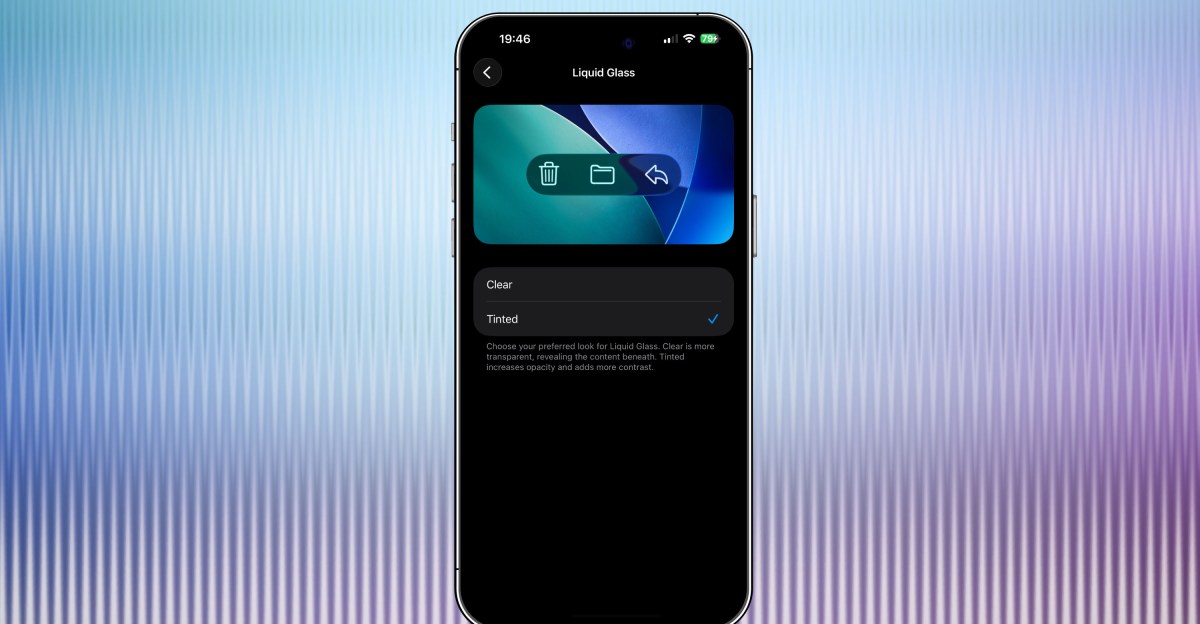
Apple Introduces New Tinted Liquid Glass Option in iOS 26.1 Beta
Apple has unveiled a new feature in the latest iOS 26.1 beta that allows users to tint Liquid Glass elements for a more opaque effect. This update follows the initial announcement of Liquid Glass at WWDC earlier this year, with Apple continuously refining the glassy appearance based on user feedback. The new setting now provides users with the option to adjust the transparency level of Liquid Glass, offering a choice between a clear or frosted look.
Customize Your Display with Liquid Glass Tinting
The tinted Liquid Glass feature is currently available in the iOS 26.1 developer beta released by Apple on Monday. To access this option, users can navigate to Settings > Display & Brightness > Liquid Glass, where they can select either “Clear” or “Tinted.” Additionally, the latest developer betas for iPadOS 26.1 and macOS 26.1 also offer the same tinting functionality, as reported by MacRumors.
Visual Comparison of Clear vs. Tinted Liquid Glass
Several image sliders demonstrate the differences between the clear and tinted Liquid Glass options. Each set of screenshots showcases the app with the “Clear” setting on the left and the “Tinted” setting on the right. While the variances are subtle, many users prefer the tinted versions for a sleeker aesthetic.
Enhanced Privacy and Security Features
In addition to the Liquid Glass customization, the iOS 26.1 beta introduces a new option to disable the swipe-to-camera feature on the lock screen. This added security measure prevents unauthorized access to the camera functionality, even if someone gains physical access to the device without unlocking it. Users can manage this toggle in Settings > Camera > Lock Screen Swipe to Open Camera.












AirPods Enhancements: The Long-Awaited Update

The Evolution of the ALPINA X5: From Secret Prototype to BMW X5 4.6iS

Microsoft’s Revolutionary Copilot: A Game-Changer in the Battle Against Anthropic and OpenAI – GeekWire

Building the Future: The Evolution of Europe’s First Digital Experimentation Infrastructure

Titan Quest II: Rise of the Gods – Official Launch in January 2027

Ultimate Guide to Googlebook: Everything You Need to Know about Price, Release Date, Key Specs & Features

Apple’s Latest Challenge: A Fitbit Air and Whoop Rival in the Works

The Importance of Understanding Your Business’s Value Before Making a Big Financial Move

Google’s Groundbreaking AI Satellite Launching into Space Next Week

EU Takes Action Against Instagram and Facebook for Violating Illegal Content Rules

Warning: Facebook Creators Face Monetization Loss for Stealing and Reposting Videos

Facebook’s New Look: A Blend of Instagram’s Style

Facebook Compliance: ICE-tracking Page Removed After US Government Intervention

Facebook and Instagram to Reduce Personalized Ads for European Users

InstaDub: Meta’s AI Translation Tool for Instagram Videos

Reclaim Your Account: Facebook and Instagram Launch New Hub for Account Recovery

Meta discontinues Messenger apps for Windows and macOS

Breaking Updates: Meta Connect 2025 Unveils Latest Developments

Samsung Galaxy S9 Plus vs iPhone X

The BEST $300 Phone (2018) ft. MKBHD, Technical Guruji, iJustine + More

Samsung Galaxy S9 Plus Gaming Review! (vs OnePlus 5T)

THE BEST PHONE HTC EVER MADE?

The Truth about Google?

Samsung S9/ S9+ vs iPhone X vs Galaxy Note 8 Battery Life DRAIN TEST

Samsung S9 / S9+ vs Mate 10 Pro vs iPhone X Charging SPEED Test

The BEST APPS in 2018 – ft. MKBHD, UrAvgConsumer, iJustine + More

The ULTIMATE Smartphone Unboxing!!
-
 Facebook11 months ago
EU Takes Action Against Instagram and Facebook for Violating Illegal Content Rules
-
 Facebook12 months ago
Warning: Facebook Creators Face Monetization Loss for Stealing and Reposting Videos
-
 Facebook10 months ago
Facebook’s New Look: A Blend of Instagram’s Style
-
 Facebook12 months ago
Facebook Compliance: ICE-tracking Page Removed After US Government Intervention
-
 Facebook10 months ago
Facebook and Instagram to Reduce Personalized Ads for European Users
-
 Facebook12 months ago
InstaDub: Meta’s AI Translation Tool for Instagram Videos
-
 Facebook10 months ago
Reclaim Your Account: Facebook and Instagram Launch New Hub for Account Recovery
-
 Apple11 months ago
Meta discontinues Messenger apps for Windows and macOS
