
Gadgets
Acer Connect M6E 5G Mobile WiFi Router: A Comprehensive Review

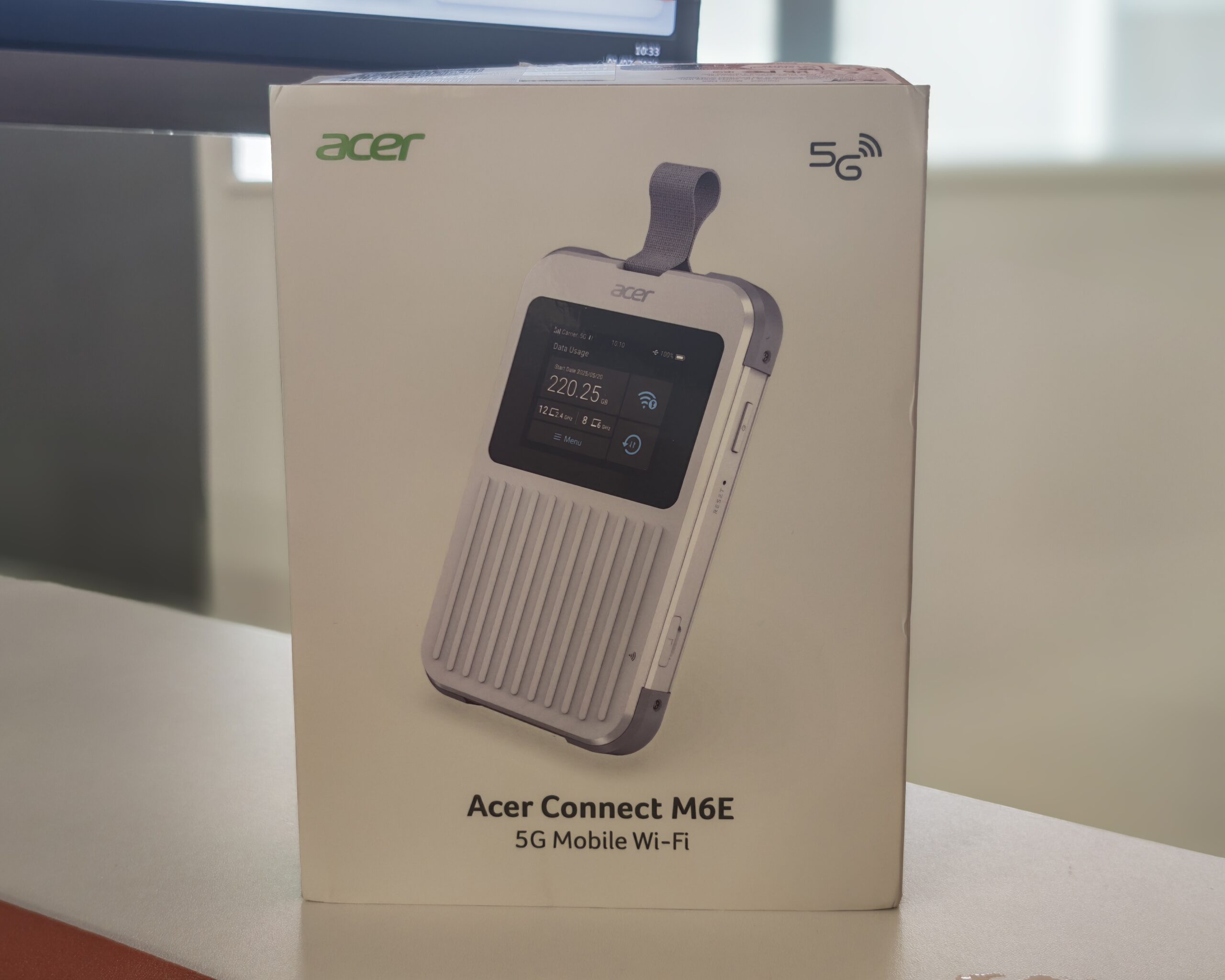
It has been some time since I last assessed a mobile router, but I have covered a few in the past, such as the high-priced Nighthawk M6 Pro and the budget-friendly Vodafone / ZTE MU5001 5G Mobile Hotspot Review.
Acer isn’t particularly recognized for its networking products, but the company has been in the industry for a few years now, and its most recent launch is the Acer Connect M6E 5G Mobile WiFi Router.
The M6E made its debut at CES 2025, where it received Laptop Mag’s Best Router of CES award, and it has also been honored with a Red Dot Design Award for its design. Initially launched in the US at $249, it has now made its way to the UK with a retail price of £199.99.
On paper, the M6E boasts a rugged design rated to IP68 and MIL-STD-810H, a sizable 8,000mAh battery with a claimed 28 hours of usage, tri-band WiFi 6E, and three different connectivity options using a physical Nano SIM, eSIM, or the SIMO virtual SIM service. This combination is quite unusual at this price point, so I have been eager to test its performance in day-to-day use.
Specification
| Specification | Details |
| — | — |
| Model Number | FF.G2VTA.001 |
| Device Type | 5G Mobile Wi-Fi Hotspot |
| Connected Devices | Up to 20 |
| Display | 2.4-inch color touchscreen |
| Management Interface | acer-connect.com or 192.168.76.1 |
| Default Password | Printed on device label |
| USB Tethering | Yes |
| Modem Chipset | MediaTek Dimensity 7300 |
| 5G Support | Sub-6 GHz |
| 5G Sub-6 Bands | n1, n2, n3, n5, n7, n8, n20, n28, n38, n40, n41, n66, n71, n75, n77, n78, n79 |
| 5G mmWave Support | No |
| 4G LTE Bands | B1, B2, B3, B4, B5, B7, B8, B12, B13, B14, B17, B18, B19, B20, B26, B28, B29, B30, B32, B38, B40, B41, B42, B48, B66, B71 |
| Maximum 5G Download Speed | 3.27 Gbps |
| Maximum 5G Upload Speed | 1.75 Gbps |
| 5G Carrier Aggregation | 3x CA, up to 140 MHz bandwidth |
| LTE Category | Not specified (estimated Cat 19/Cat 20) |
| LTE Carrier Aggregation | Yes (minimum 4x CA) |
| MIMO | 4×4 internal (cellular), 2×2 (Wi-Fi) |
| External Antenna Ports | None |
| Wi-Fi Standard | Wi-Fi 6E (IEEE 802.11ax, 2.4 GHz / 5 GHz / 6 GHz) |
| NFC | Yes, touch-to-connect |
| Battery Capacity | 8,000 mAh |
| Battery Life | Up to 28 hours |
| Operation Without Battery | Not specified |
| Battery Part Number | Not specified |
| Replacement Battery | Not specified |
| SIM Support | 1 x Nano SIM, eSIM and SIMO vSIM |
| Durability | IP68 and MIL-STD-810H |
| Weight | Under 300 g |
| Dimensions | 139.7 x 86.4 x 18.8 mm |
Features
The M6E is powered by the MediaTek Dimensity 7300, a smartphone-class chip with an integrated 5G modem. It supports 3GPP Release 16, 3x carrier aggregation with up to 140MHz of bandwidth, and a theoretical peak of 3.27Gbps down and 1.75Gbps up. In practical terms, this puts it in the same league as the Qualcomm Snapdragon X62 and X65 modems found in many competing hotspots. While it lacks mmWave support, this is not a significant drawback in the UK, where all networks operate on sub-6GHz 5G.
The device offers broad band coverage with 17 sub-6 5G bands and 26 LTE bands, covering all the bands used by UK networks, including n28 and B20 for low-band coverage in rural areas, as well as n78 for high-capacity 5G in the UK. It also provides coverage for the main US and Asian bands.
On the WiFi front, the M6E is a tri-band WiFi 6E device, broadcasting on 2.4GHz, 5GHz, and 6GHz with 2×2 MIMO and support for up to 20 connected devices. The 6GHz band is a standout feature, especially in congested environments like hotels and conference venues, where the 2.4GHz and 5GHz bands may be overloaded. However, it is essential to note that client devices must also support WiFi 6E or WiFi 7 to leverage this feature.
The device features a 2.4-inch color touchscreen on the front for checking data usage, viewing the WiFi password, switching bands, and adjusting basic settings. It offers NFC touch-to-connect, enabling Android users to connect to the network by tapping their phone against the device without entering a password.
Another noteworthy feature is the Wi-Fi Extending capability, allowing the M6E to connect to an existing WiFi network and share that connection with devices, similar to a travel router. This is particularly useful for hotel WiFi, enabling users to connect all devices through the M6E and authenticate only once. However, this setup may impact performance and battery life due to running radios for both upstream and downstream duties.
In terms of security, the M6E offers WPA3 encryption, a built-in firewall, SIM lock, and VPN support. The device receives firmware updates directly from Acer over the air, bypassing carrier restrictions.
Design and Build Quality
The M6E’s design is one of its key strengths. Measuring 139.7 x 86.4 x 18.8mm and weighing under 300g, it has a phone-like footprint but is twice as thick. The white casing features a ridged, suitcase-style groove pattern on the front and rear, with grey rubberized bumpers protecting each corner. Additionally, a fabric lanyard loop at the top provides convenience for attaching the device to a bag while traveling.
The corner bumpers and casing contribute to the MIL-STD-810H shock rating, while the IP68 rating ensures dustproofing and water resistance up to 1.5m for 30 minutes. While not recommended for intentional testing, this durability makes the device resilient to rain, spills, and dusty environments, offering peace of mind for users.
Physical controls are minimal, with the power button and Nano SIM tray located on one side, along with a reset pinhole. The USB-C port on the bottom edge, alongside a small microphone hole, caters to an optional microphone accessory for AI transcription features. USB-C serves dual purposes for charging and tethering.
The 2.4-inch touchscreen is bright and responsive, displaying carrier information, signal strength, battery status, data usage, and connected devices on each WiFi band. The touchscreen interface simplifies device management and settings adjustments.
No Ethernet Port
One significant drawback of the M6E is the absence of a built-in Ethernet port. For users like myself who utilize the device as a backup connection or prefer a wired connection while working from a hotel room, the lack of Ethernet connectivity may be inconvenient. However, the device supports USB tethering, which offers similar functionality and the added benefit of simultaneous charging and wired connectivity while traveling.
It is important to note that some routers can utilize a USB WAN connection, enabling the M6E to function as a failover connection based on the hardware’s compatibility. Although not as universal as Ethernet, USB tethering offers a viable alternative for users requiring a backup or secondary connection.
Set Up
The setup process for the M6E is straightforward. Inserting the Nano SIM into the tray and powering on the device initiates automatic network connection. Most UK SIMs are detected without manual configuration, although users can manually set the APN through the web interface if necessary.
Connecting devices can be accomplished in three ways: users can retrieve the WiFi password from the touchscreen, scan a QR code displayed on the device, or tap an Android phone against the NFC point for instant network access. NFC functionality enhances user convenience, particularly when sharing network access with multiple individuals.
Advanced settings and configurations can be accessed through the web interface at acer-connect.com or 192.168.76.1, with the default password provided on the device label. The interface allows users to manage SIM profiles, adjust WiFi settings, set data limits with usage alerts, configure the firewall, and enable the Wi-Fi Extending mode. Although the interface may not offer the extensive settings found on certain travel routers, it covers essential features for most users.
SIMO and eSIM Support
The M6E’s standout feature lies in its connectivity flexibility. In addition to the physical Nano SIM slot, the device supports eSIM profiles and SIMO vSIM, a cloud-based virtual SIM service. Acer’s SignalScan feature, combined with SIMO, automatically identifies and connects to the strongest available network across more than 135 countries.
This level of flexibility provides users with multiple connectivity options based on their location and data requirements. While a cost-effective PAYG data SIM may be suitable for domestic use, travelers can opt for local eSIMs through providers like Airalo or Holafly, or utilize the SIMO service for global data coverage without the need for physical SIM cards. SIMO data offers convenience, albeit at potentially higher costs compared to local SIM or eSIM options, making it ideal for short trips or immediate connectivity needs.
It is essential to note that only one SIM type can be active at a time, and switching between SIM profiles requires manual intervention, precluding automatic failover in case of network coverage loss. Enrolling an eSIM profile may be slightly complicated, as it necessitates online setup via an Acer portal while ensuring the M6E is already connected to a network or utilizing the Wi-Fi Extending feature. Prior arrangement of the eSIM before travel is advised to streamline the activation process.
Mobile Performance
Mobile router performance is influenced by network conditions, location, and signal strength, hence the following tests should be considered indicative rather than definitive. To establish baseline performance, speed tests were conducted with three SIMs:
- Three: 234Mbps download / 6Mbps upload
- Vodafone: 60Mbps download / 17Mbps upload
- EE: 27Mbps download / 6Mbps upload
Results indicate that Three offers the best download performance, while Vodafone excels in upload speeds, with EE lagging behind in the tested area.
Acer Connect M6E WiFi Performance
Connecting to the M6E via WiFi with the same SIMs yielded the following results:
- Three: 204Mbps download / 27Mbps upload
- Vodafone (5GHz WiFi): 127Mbps download / 30Mbps upload
- EE: 55Mbps download / 3Mbps upload
Performance closely mirrors SIM capabilities rather than router limitations, showcasing consistent performance across different network providers. While Three slightly underperforms on download speeds, it compensates with superior upload rates, while Vodafone and EE outperform the baseline results. Variations in performance are attributed to antenna efficiency, positioning, and network conditions, with the M6E demonstrating no significant bottleneck on typical UK 5G connections.
Acer Connect M6E Tethering Performance
Tethering the M6E to a laptop via USB produced optimal results:
- Three: 256Mbps download / 20.5Mbps upload
- Vodafone: 127Mbps download / 38Mbps upload
- EE: 55Mbps download / 3Mbps upload
Tethering performance surpassed WiFi connectivity, particularly enhancing speeds on Three and matching or exceeding WiFi performance on other networks. Tethering eliminates the WiFi link, enhancing overall performance and offering the added advantage of device charging during use.
While actual speeds fall short of the theoretical 3.27Gbps maximum, real-world UK network performance typically reaches multi-hundred-megabit rates, with the M6E demonstrating comparable or superior performance to smartphone counterparts. Notably, the device consistently outperformed phone speeds, especially in upload scenarios.
Battery Life
The M6E is equipped with an impressive 8,000mAh battery, larger than most mobile routers in its category. For comparison, the Nighthawk M6 Pro features a 5,040mAh battery, while budget hotspots average around 4,000 to 4,500mAh. Acer claims up to 28 hours of usage, with the actual duration varying based on usage patterns. During testing, the device easily sustained a full workday and beyond, alleviating concerns about battery life.
Charging is facilitated through USB-C with fast charging support, allowing users to maintain battery levels while tethering. However, the device’s ability to operate directly from USB power without a battery and the replaceability of the battery remain unspecified. Users intending to keep the device plugged in should note that lithium batteries are not suited for prolonged 100% charge retention, making the M6E better suited for portable use rather than permanent installations.
Price and Alternative Options
As of writing, the Acer Connect M6E 5G is available on Amazon for £205, Scan for £210, and Ballicom for £200, consistent with the £199.99 RRP.
- The previous Acer Connect M4 5G is priced at £170, offering WiFi 6, a smaller battery, and lacking rugged design compared to the M6E.
- Netgear’s Nighthawk series offers premium alternatives, with the Nighthawk M7 Pro priced at £900, Nighthawk M7 at £530, and Nighthawk M3 at £400. While lacking Ethernet ports, Netgear provides a separate Ethernet dongle for £30.
- The GL.iNet Mudi 7 is a compelling option at £370, boasting tri-band WiFi 7, 2.5Gbps Ethernet, and 700Mbps VPN performance.
- GlocalMe’s Numen Air Portable WiFi Hotspot 5G is priced at £300, featuring eSIM-only connectivity through GlocalMe services.
- ZTE’s U60 5G offers a budget-friendly option at £200, supporting WiFi 7 (dual-band) but lacking rugged construction, a large battery, and tri-SIM flexibility.
Overall
The Acer Connect M6E stands out as a reliable 5G mobile router, offering a balanced blend of performance, durability, and flexibility. While it may not match premium models in expandability, its rugged design, extended battery life, tri-band Wi-Fi 6E, and support for Nano SIM, eSIM, and SIMO make it a compelling option at around £200. Although missing an Ethernet port and external antenna support, the M6E excels in performance and value for most travelers and mobile professionals. Its competitive price, combined with robust features, positions it as an appealing choice in the mobile router market.












Finally Fixing my Wi-Fi – Zyxel Multy X!

Lost in the Living Maze: Unraveling Hidden Terrain Magic Through Copy-Paste

Samsung Unveils Exclusive Galaxy Z Fold 8 BTS Edition

Navigating the Digital World: Expert Tech Advice for Everyman

OMass Therapeutics Secures €275 Million Funding to Advance Innovative Small-Molecule Therapies

The Evolution of Apple’s Smart Home Strategy: A Closer Look at Their Own Devices

Unveiling the Imposter: The Truth Behind the Fake WhatsApp Clone on the Play Store

Digital Protection: How a 1988 Law Could Safeguard Your Online Viewing Experience

BMW Unlocks Greater Range for i7 Model Through Innovative Technology

EU Takes Action Against Instagram and Facebook for Violating Illegal Content Rules

Warning: Facebook Creators Face Monetization Loss for Stealing and Reposting Videos

Facebook’s New Look: A Blend of Instagram’s Style

Facebook Compliance: ICE-tracking Page Removed After US Government Intervention

Facebook and Instagram to Reduce Personalized Ads for European Users

InstaDub: Meta’s AI Translation Tool for Instagram Videos

Reclaim Your Account: Facebook and Instagram Launch New Hub for Account Recovery

Meta discontinues Messenger apps for Windows and macOS

Breaking Updates: Meta Connect 2025 Unveils Latest Developments
Finally Fixing my Wi-Fi – Zyxel Multy X!

$25,000 Gaming Setup – EVOLUTION!

The Maze Alpha X is HERE!

Cool Tech under $100 – December!

MYSTERY UNBOXING FROM GOOGLE!

TOP 6 Smartphones from Companies you NEVER Expected!

A Surprise Smartphone from EE!

DOOGEE MIX 2 VS DOOGEE MIX 1!

INCREDIBLE Smartphone Gadgets on Amazon!
-
 Facebook12 months ago
EU Takes Action Against Instagram and Facebook for Violating Illegal Content Rules
-
 Facebook1 year ago
Warning: Facebook Creators Face Monetization Loss for Stealing and Reposting Videos
-
 Facebook10 months ago
Facebook’s New Look: A Blend of Instagram’s Style
-
 Facebook1 year ago
Facebook Compliance: ICE-tracking Page Removed After US Government Intervention
-
 Facebook10 months ago
Facebook and Instagram to Reduce Personalized Ads for European Users
-
 Facebook1 year ago
InstaDub: Meta’s AI Translation Tool for Instagram Videos
-
 Facebook11 months ago
Reclaim Your Account: Facebook and Instagram Launch New Hub for Account Recovery
-
 Apple12 months ago
Meta discontinues Messenger apps for Windows and macOS
