
Mobile Tech
How to Customize Your AirPods EQ Settings in iOS 27 Public Beta

Apple recently unveiled the first public betas for iOS 27 and other major software releases for 2026. While these betas are still a work in progress and may contain some bugs and glitches, the public beta cycle is designed to encourage more users to participate.
Installing a public beta is a fairly straightforward process. New beta testers can visit Apple’s Beta Software Program website to enroll their Apple Account. If you have signed up for public betas in the past, you are already covered.
Once enrolled, accessing the public beta involves changing the Beta Updates setting on the standard software update screen (located at Settings > General > Software Update). Select “iOS 27 Public Beta” for your iPhone, and the standard Software Update process will download the appropriate public beta instead of waiting for the final release.
After installation, you can explore the new features in iOS 27, except for one crucial aspect.
Installing Beta Firmware for AirPods
iOS 27 introduces several new features for modern AirPods, but you also need to ensure that your AirPods are running the latest beta firmware to access these features.
Unlike installing iOS 27 on your iPhone, updating the firmware for your AirPods requires a separate process. Your iPhone must fetch the beta firmware for your AirPods, which can be done by toggling a switch that controls beta updates for your AirPods. Here’s how to do it:
- Make sure your iPhone is updated to the iOS 27 Public Beta.
- Connect your AirPods to your iPhone by opening their case or taking your AirPods Max out of the case.
- Open the Settings app on your iPhone.
- Locate your AirPods in the settings and tap on them.
- Scroll down and tap on AirPods Beta Updates (this option will only appear if you’re enrolled in the beta programs).
- Turn on AirPods Beta Updates.
- Wait for the update to install.
These updates will install automatically when ready, and you can check the current firmware version in the AirPods settings. Make sure your AirPods are within range of your iPhone, connected to Wi-Fi, and charging for the update to occur.
New Features for AirPods in iOS 27
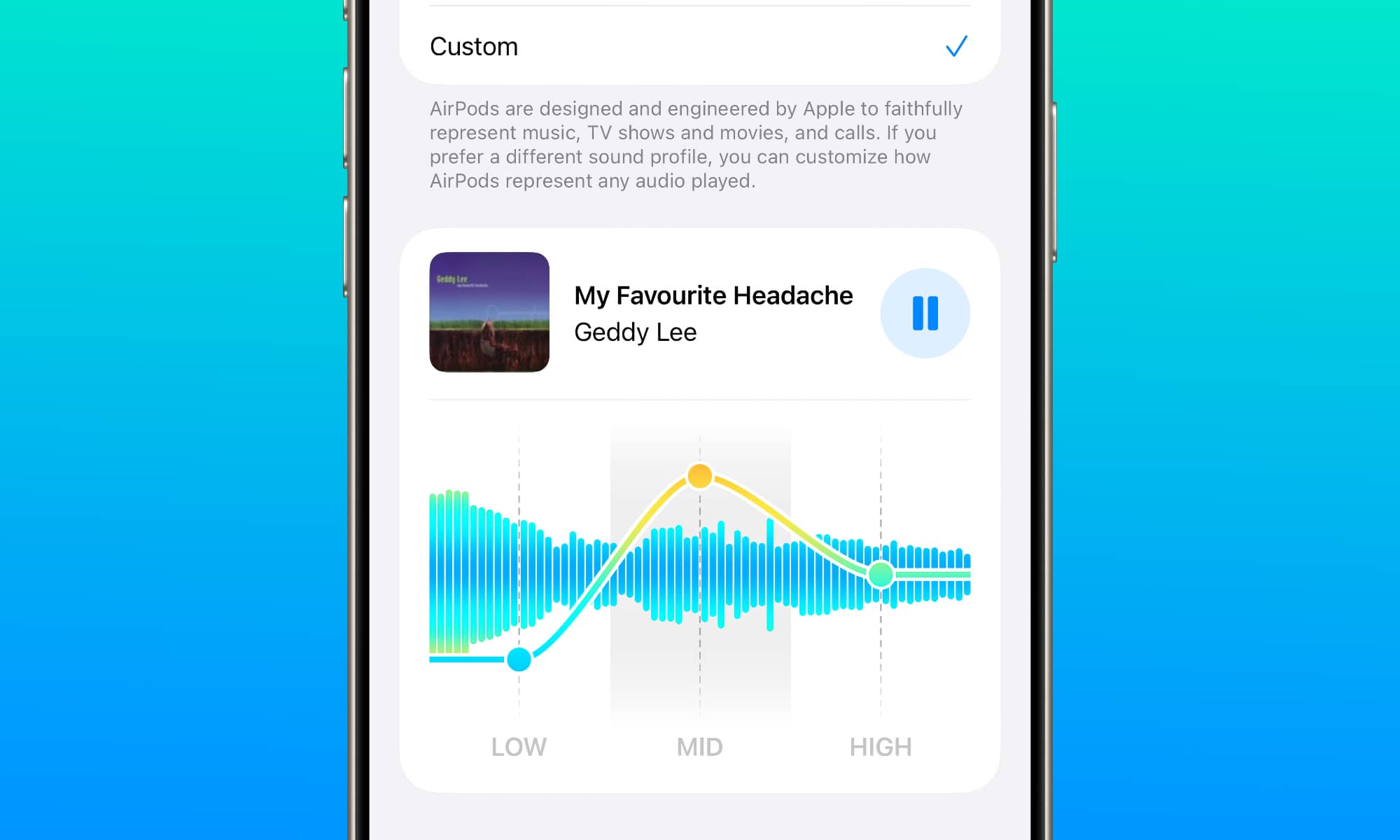
The new AirPods features in iOS 27 include a redesigned configuration screen on the iPhone and a custom equalizer with three bands. These features are available for AirPods models with the H2 chip, such as AirPods Max 2, AirPods Pro 3, and AirPods 4. Additionally, AirPods Pro 2 are also compatible with these features due to the H2 chip, despite not being listed by Apple.
![Apple releases fourth iOS 27.2 developer beta for iPhone [U: Public]](https://bennetttechinnovation.com/wp-content/uploads/2026/10/Apple-unveils-latest-iOS-272-developer-beta-for-iPhone-Now-400x240.jpg)
![Apple releases fourth iOS 27.2 developer beta for iPhone [U: Public]](https://bennetttechinnovation.com/wp-content/uploads/2026/10/Apple-unveils-latest-iOS-272-developer-beta-for-iPhone-Now-80x80.jpg)










Upgrade Alert: HomePod Mini 2 and HomePod 2 Set to Become Default Mac Speakers

Finally Fixing my Wi-Fi – Zyxel Multy X!

Lost in the Living Maze: Unraveling Hidden Terrain Magic Through Copy-Paste

Samsung Unveils Exclusive Galaxy Z Fold 8 BTS Edition

Navigating the Digital World: Expert Tech Advice for Everyman

OMass Therapeutics Secures €275 Million Funding to Advance Innovative Small-Molecule Therapies

The Evolution of Apple’s Smart Home Strategy: A Closer Look at Their Own Devices

Unveiling the Imposter: The Truth Behind the Fake WhatsApp Clone on the Play Store

Digital Protection: How a 1988 Law Could Safeguard Your Online Viewing Experience

EU Takes Action Against Instagram and Facebook for Violating Illegal Content Rules

Warning: Facebook Creators Face Monetization Loss for Stealing and Reposting Videos

Facebook’s New Look: A Blend of Instagram’s Style

Facebook Compliance: ICE-tracking Page Removed After US Government Intervention

Facebook and Instagram to Reduce Personalized Ads for European Users

InstaDub: Meta’s AI Translation Tool for Instagram Videos

Reclaim Your Account: Facebook and Instagram Launch New Hub for Account Recovery

Meta discontinues Messenger apps for Windows and macOS

Breaking Updates: Meta Connect 2025 Unveils Latest Developments
Finally Fixing my Wi-Fi – Zyxel Multy X!

$25,000 Gaming Setup – EVOLUTION!

The Maze Alpha X is HERE!

Cool Tech under $100 – December!

MYSTERY UNBOXING FROM GOOGLE!

TOP 6 Smartphones from Companies you NEVER Expected!

A Surprise Smartphone from EE!

DOOGEE MIX 2 VS DOOGEE MIX 1!

INCREDIBLE Smartphone Gadgets on Amazon!
-
 Facebook12 months ago
EU Takes Action Against Instagram and Facebook for Violating Illegal Content Rules
-
 Facebook1 year ago
Warning: Facebook Creators Face Monetization Loss for Stealing and Reposting Videos
-
 Facebook10 months ago
Facebook’s New Look: A Blend of Instagram’s Style
-
 Facebook1 year ago
Facebook Compliance: ICE-tracking Page Removed After US Government Intervention
-
 Facebook10 months ago
Facebook and Instagram to Reduce Personalized Ads for European Users
-
 Facebook1 year ago
InstaDub: Meta’s AI Translation Tool for Instagram Videos
-
 Facebook11 months ago
Reclaim Your Account: Facebook and Instagram Launch New Hub for Account Recovery
-
 Apple12 months ago
Meta discontinues Messenger apps for Windows and macOS
