
Revolutionizing the HiLight Feature on the Pixel 11 Pro with a Groundbreaking App

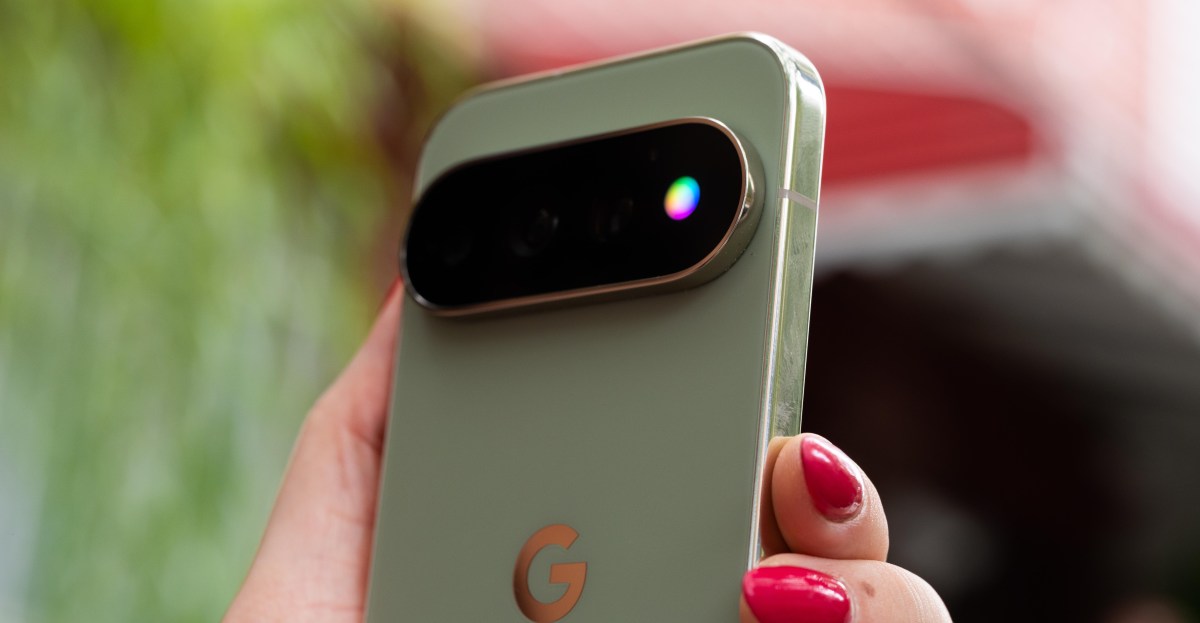
Google’s Pixel 11 Pro HiLight LED: A Missed Opportunity
Google’s latest HiLight notification LED feature on the Pixel 11 Pro has left users feeling underwhelmed. The limited functionality out of the box, with only two triggering events and a restricted color palette, has disappointed many.
HiLight Studio: Taking Control of Your Pixel 11 Pro’s LED
In response to Google’s lackluster LED implementation, developer Dhananjay_Tech has created HiLight Studio, an app that empowers users to customize their Pixel 11 Pro’s LED array to their heart’s content. Want your LED to pulse in a rainbow array for specific Slack notifications or spin in a wave of green for incoming texts? With HiLight Studio, the possibilities are endless. Users can fine-tune settings such as timing, brightness, intensity, and saturation.
Enhanced Customization with HiLight Studio
Unlike Google’s official feature, HiLight Studio offers a wider color selection, including eight preselected colors and a classic color slider. The app also allows users to import and export presets, facilitating easy sharing with friends and fellow Pixel 11 Pro users.
Installation and Usage
While HiLight Studio is not yet available on the Play Store, interested users can download it from GitHub and sideload it onto their devices. Running the app requires unlocking developer settings and making a few adjustments on the phone, making it a more involved process than installing a typical app. However, for those willing to put in the effort, the enhanced LED customization capabilities are well worth it.
Photos by David Imel / The verge









Apple’s Testimony: The Case for Removing ICEBlocks

Tesla’s Groundbreaking Feature: Use at Your Own Risk

NO GAME NO LIFE: Grasshopper Manufacture’s Indie Leap

Strengthening Ties: GEC Enhances Ireland-UK Startup Network in the Midst of EU Discussions

Unbeatable Deal: The AirPods Pro 3 for Only $179

Breaking News: Exclusive Details on the Latest Fitbit Edge Features

Apple Store Security Alert: HK Police Demand Fix for $3.8M Fraud Loophole

Faraday Future FF 91 – 1050 Horsepower Madness!

Massive Recall: Thousands of Toyota Land Cruiser SUVs Pulled from UAE Roads

EU Takes Action Against Instagram and Facebook for Violating Illegal Content Rules

Warning: Facebook Creators Face Monetization Loss for Stealing and Reposting Videos

Facebook’s New Look: A Blend of Instagram’s Style

Facebook Compliance: ICE-tracking Page Removed After US Government Intervention

Facebook and Instagram to Reduce Personalized Ads for European Users

InstaDub: Meta’s AI Translation Tool for Instagram Videos

Reclaim Your Account: Facebook and Instagram Launch New Hub for Account Recovery

Meta discontinues Messenger apps for Windows and macOS

Breaking Updates: Meta Connect 2025 Unveils Latest Developments
Faraday Future FF 91 – 1050 Horsepower Madness!

The Truth about the OnePlus 5T – REAL Review.

Concept Smartphones that are better than Real Smartphones

Samsung Galaxy SII Unboxing!

The SECRET to Maximise Smartphone Battery Life?

We Designed the Ultimate Gaming Smartphone of 2018!

Using the Cheapest Smartphone in the World.

Samsung Galaxy S9+ Unboxing! (Clone)

Unboxing the First Ever Samsung Galaxy S!!
-
 Facebook12 months ago
EU Takes Action Against Instagram and Facebook for Violating Illegal Content Rules
-
 Facebook12 months ago
Warning: Facebook Creators Face Monetization Loss for Stealing and Reposting Videos
-
 Facebook10 months ago
Facebook’s New Look: A Blend of Instagram’s Style
-
 Facebook12 months ago
Facebook Compliance: ICE-tracking Page Removed After US Government Intervention
-
 Facebook10 months ago
Facebook and Instagram to Reduce Personalized Ads for European Users
-
 Facebook12 months ago
InstaDub: Meta’s AI Translation Tool for Instagram Videos
-
 Facebook10 months ago
Reclaim Your Account: Facebook and Instagram Launch New Hub for Account Recovery
-
 Apple12 months ago
Meta discontinues Messenger apps for Windows and macOS
