
Gadgets
ZimaBoard 2: The Ultimate Single Board NAS Server Review

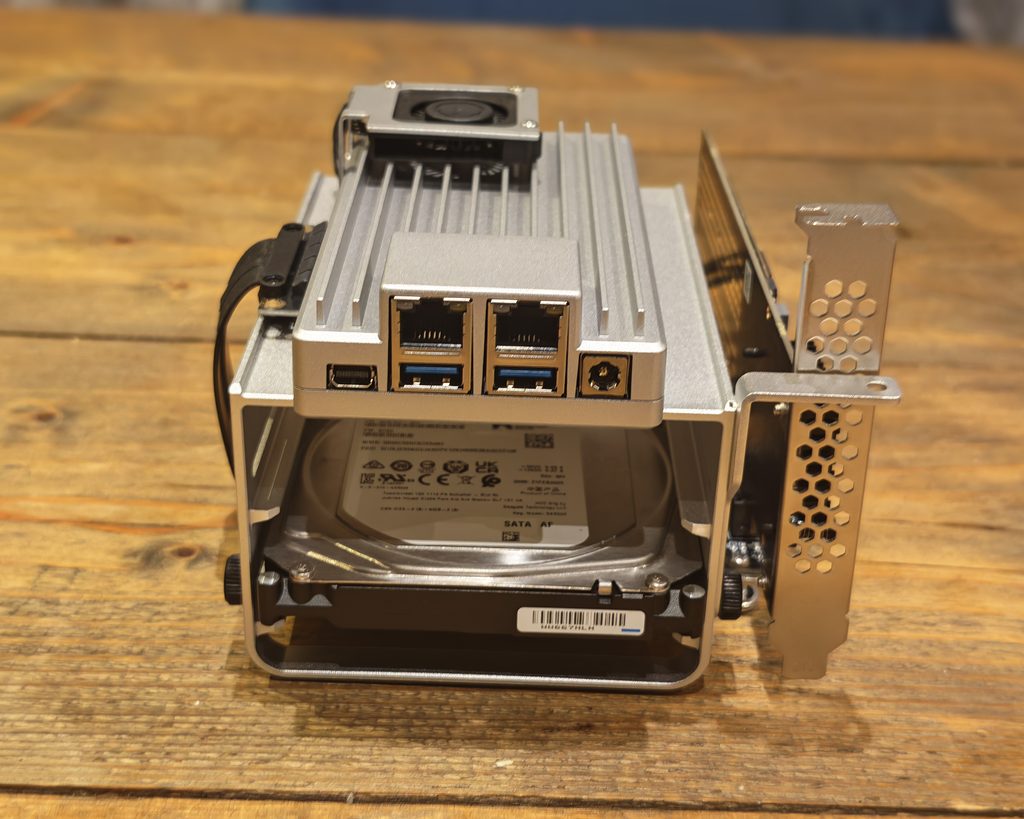
The ZimaBoard 2 is an interesting single-board server powered by an Intel N150 and running ZimaOS, a simplified NAS OS with a wide range of features comparable to Unraid.
The ZimaBoard 2 itself only has limited storage, so it’s not much use as a NAS on its own, but it has plenty of ports for expandability, and you can buy accessories, including a hard disk tray to turn it into a 2-bay NAS.
Due to the self-build nature of this, it is not as accessible as other NAS hardware such as Synology, QNAP, Ugreen, and TerraMaster, but it is reasonably well priced compared to the big brand names, and I have been particularly impressed with ZimaOS.
I was sent the Mini NAS Kit with 8GB of RAM and 32GB of eMMC storage, and I have run it with a 4TB Seagate IronWolf and a 256GB Kioxia NVMe drive fitted via the PCIe slot. That gave me a reasonable idea of how the board behaves both as a small file server and as a general Docker host, which is realistically how most people will use it. I already run a mix of mini PCs on Proxmox alongside UniFi networking at home, so I was mainly interested in whether ZimaOS could replace some of that with something simpler.
ZimaBoard 2 Specification
| Specification | ZimaBoard 2 |
| Models | 832 / 1664 |
| Pre-installed OS | ZimaOS |
| Compatible operating systems | CasaOS / Linux / Windows / OpenWrt / pfSense / Android / LibreELEC |
| Processor | Intel N150, 4 cores, 6 MB cache, up to 3.60 GHz |
| Memory | 8 GB (832) / 16 GB (1664), LPDDR5 4800 MHz |
| Onboard storage | 32 GB (832) / 64 GB (1664), eMMC |
| TDP | 10 W |
| SATA | 2 x SATA 3.0 6 Gb/s ports with power |
| Ethernet | 2 x 2.5GbE ports |
| USB | 2 x USB 3.1 ports |
| PCIe expansion | 1 x PCIe 3.0 slot |
| Display output | Mini DisplayPort 1.4, up to 4K at 60 Hz |
| Graphics frequency | Up to 1 GHz |
| Power supply | 12 V, 5 A (60 W), supporting two high-capacity HDDs |
| Onboard interfaces | 1 x 4-pin CPU fan connector, 1 x LPC, 1 x front panel connector |
| Cooling | Fanless |
| Virtualisation support | Intel VT-x and VT-d |
| Encryption acceleration | Intel AES New Instructions |
| Dimensions (W x D x H) | 140 x 83 x 31 mm |
The N150 is the part that does most of the work here, and it is worth being clear about what it is. It is a four core, four thread Alder Lake-N chip built entirely from efficiency cores, with a 6 W base power rating and a 3.6 GHz boost. In Geekbench 6 it lands at roughly 1,250 single core and 3,000 multi core, which puts it somewhere near a mid-range laptop chip from a few years ago for single threaded work and well behind anything modern for multi-threaded work. The integrated UHD Graphics 730 has 24 execution units and supports hardware decoding for H.264, HEVC, VP9 and AV1, which matters for media serving.
That is not a criticism, as it is the correct class of chip for a low-power always-on server. It does set expectations, though. This is a machine for running containers, serving files and handling a couple of transcodes, not for compiling code or running large language models.
ZimaBoard 2 Mini NAS Kit / Start Kit
IceWhale sells the ZimaBoard 2 in three configurations, and the differences are worth understanding before you order, because the accessories are not cheap to add later.
The Board Only option is the bare board with its aluminium heatsink chassis, the power supply and a mini DisplayPort to HDMI cable. It has both SATA ports and the PCIe slot, so it is fully functional, but you have nowhere to physically mount drives.
The Starter Bundle adds the cabling you need to actually connect storage, including the SATA Y-cable that splits the board’s single SATA power header for two drives.
The Mini NAS Kit is the one I was sent. It adds a metal hard disk tray that holds two 3.5in drives, a cooling fan that connects to the 4-pin header, and the higher rated 60 W power supply needed to spin up two mechanical drives. The tray bolts to the side of the board and turns the whole thing into something that looks like a proper, if slightly industrial, 2-bay NAS.
Design, Ports & Assembly
The assembly of the Mini NAS Kit was the most disappointing aspect of this review. There are no instructions included. It is not terribly difficult to figure out, but I don’t understand why any company would think this is acceptable. I ended up watching a YouTube video of another reviewer assembling it, and he also expressed frustration.
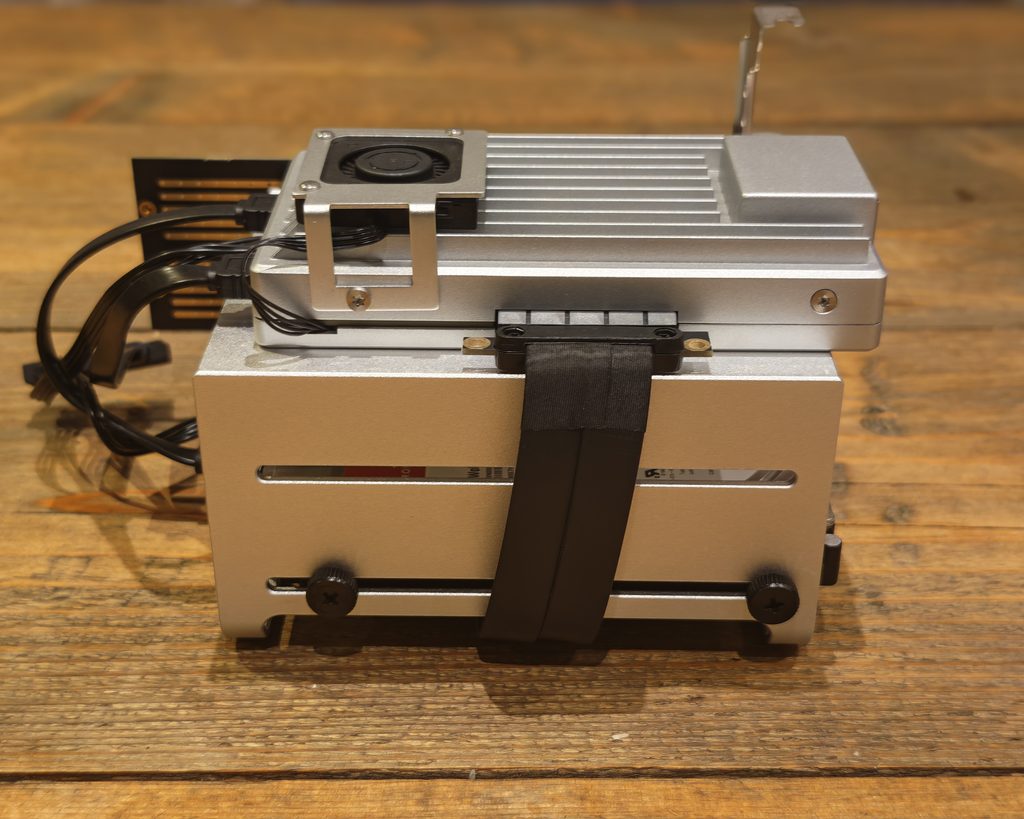
The parts themselves are fine. The chassis is a single piece of finned aluminium that acts as the heatsink for the CPU, which is why the board is fanless in its standard form. Build quality is good, the finish is even, and it feels considerably more solid than the plastic shells on most budget mini PCs. It measures 140 x 83 x 31 mm without the drive tray, so it is genuinely small.
Port selection is the strong point. On the rear you get two 2.5GbE RJ45 ports, two USB 3.1 Type-A ports, a mini DisplayPort 1.4 output good for 4K at 60 Hz, and the 12 V barrel jack. The front edge carries two SATA III connectors with 12 V power output alongside them, so drives are powered directly from the board rather than needing a separate supply. One side exposes a PCIe 3.0 x4 slot.
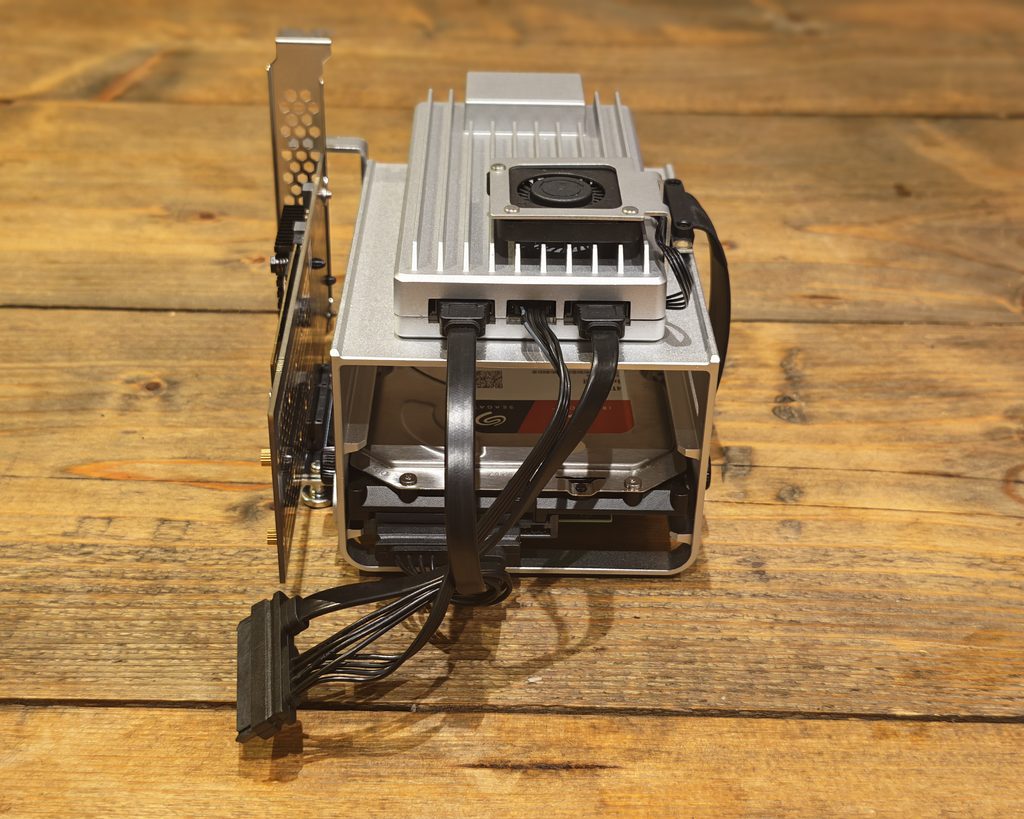
Two 2.5GbE ports is more useful than it first appears. It lets you run the board as a router or firewall with pfSense or OpenWrt, or keep management and storage traffic on separate networks, or simply bond the pair if your switch supports it.
I utilized 2.5GbE throughout my UniFi setup, dedicating one port for general access while leaving the second port free. However, I question the choice of the mini DisplayPort output as the primary port. While it works and comes with an adapter, HDMI would have been a more universally compatible option. Some users have also experienced issues with the bundled adapter not working with their displays. Fortunately, mine worked fine, but this issue may only become apparent when trying to access the BIOS.
Another concern I have is regarding the fan in the NAS kit. While it operates quietly, the lack of guidance on installation and its presence contradict the fanless selling point. However, once installed, temperatures significantly decrease, making it essential for those using mechanical drives.
In terms of storage and expansion options, the 32GB of eMMC storage is the weakest hardware specification. After the ZimaOS allocation, my board reported a 17.7GB ZimaOS-HD volume, with approximately 2.7GB used at initial boot. This storage may be sufficient for the OS and a few container images, but additional storage may be required for applications like Immich or Plex with extensive metadata libraries.
The 64GB model offers more storage space and, coupled with the 16GB of RAM, is the ideal choice if budget permits. The RAM is soldered LPDDR5 and cannot be upgraded later, necessitating careful consideration during purchase.
For actual storage, there are three options available. The two SATA ports accommodate 2.5in or 3.5in drives and are powered from the board. The PCIe 3.0 x4 slot supports the ZimaBoard Dual M.2 NVMe adapter for two NVMe drives or any low-profile card. While the USB ports can connect external drives, they are not recommended for NAS use.
The PCIe slot distinguishes the ZimaBoard 2, offering the flexibility to accommodate a 10GbE card, an HBA, or a low-profile GPU. With four PCIe 3.0 lanes providing ample bandwidth, users can expect reliable performance, although simultaneous use may impact saturation.
Regarding ZimaOS pricing, the licensing costs are minimal compared to Unraid. The ZimaBoard 2 includes the ZimaOS+ license, offering core features with unlimited disks and users for $29. This fee is reasonable considering the long-term benefits and features included.
In the comparison between ZimaOS and CasaOS, it is essential to differentiate between the two. CasaOS is a software layer installed on existing Linux distributions, while ZimaOS is a complete operating system built with Buildroot. ZimaOS provides comprehensive storage management features, including RAID management and SMB share management, which CasaOS lacks. The read-only root filesystem in ZimaOS adds a layer of security and ease of recovery, making it a preferred choice for NAS purposes.
In comparison to Unraid, both systems address storage concerns differently. Unraid’s array model allows for independent formatting of data disks with dedicated parity disks, while ZimaOS offers a read-only root filesystem for enhanced security and recovery. Ultimately, the choice between the two systems depends on the user’s preferences and requirements. Combining a 4TB drive with a 12TB drive is possible as long as the parity disk is equal to or larger than the largest data drive. You can add disks one by one without needing to rebuild anything, and if more drives fail than the parity can cover, only the data on those specific disks will be lost. This makes it an attractive option for anyone looking to recycle a variety of mismatched drives.
ZimaOS utilizes conventional RAID, offering RAID 5 as a balanced option requiring at least three disks and returning 66% or more of the raw capacity, RAID 1 as a safe option needing two disks and returning 50% or less, and JBOD for flexibility. RAID 5 supports expansion while RAID 1 does not. Mixed capacity drives can be used, but the usable capacity per member is determined by the smallest drive, resulting in wasted space.
On the application side, the gap between ZimaOS and other systems is narrowing. Unraid boasts a large community applications catalog and robust virtual machine support with GPU passthrough. ZimaOS, on the other hand, offers 146 apps in the official store and covers the essentials well, with additional community stores available. Unraid’s plug-in ecosystem is more extensive, and its user share and cache drive management are more advanced.
ZimaOS excels in accessibility and affordability. The interface is user-friendly, the setup process is smooth, and you don’t need to grasp the concept of parity before storing files. Unraid is the preferred choice for those with a mix of drives or requiring extensive virtualization capabilities, while ZimaOS is ideal for those building a small storage system with matched drives and seeking quick setup.
The ZimaOS setup process is straightforward – simply connect power and network, locate the device on the network or connect a display, and follow a brief web-based wizard. The interface is clean and intuitive, with a dashboard displaying essential information and notification cards for easy management of drives and shares. Setting up storage and file sharing is uncomplicated, and the system guides you through each step efficiently.
The Zima Client desktop application for Windows and macOS simplifies remote access to your ZimaOS device, allowing you to mount the storage as a local disk securely. This feature enhances the overall usability and convenience of the ZimaOS system. Instead of manually mapping a network drive, the client simply presents the device in Explorer or Finder, allowing you to work with the files as if they were connected to your machine. This method worked well over the local network, with performance comparable to a standard SMB mount.
The remote access feature is particularly intriguing. ZimaOS creates an encrypted peer-to-peer channel between the client and the device without requiring any port forwarding, dynamic DNS, or VPN setup on your end. In my testing, it connected reliably from outside the network without any adjustments to my firewall. This is especially convenient for those who prefer not to expose services to the internet or manage their own VPN.
I also have Tailscale installed on my device, both out of habit and for consistency across my home lab setup. Tailscale can be easily installed from the ZimaOS store with just one click. If you are already using a mesh VPN, you may find the Zima Client redundant.
It is worth noting two limitations. IceWhale does not offer a Linux client for ZimaOS, which is surprising for a Linux-based NAS platform, although there is a community project available. Additionally, ZimaOS frequently prompts you to install the client within the Files interface, including a full-screen promotional panel the first time you open an empty folder, which can become tiresome.
The Zima Client for Mobile is available on Android and iOS devices. The version I used was identified as 1.6.x in the release notes banner on the dashboard. The mobile client provides file browsing, file upload, photo backup from the phone’s camera roll, and remote access through the same encrypted channel as the desktop client. Media files stream smoothly, and the app handles large uploads over mobile data effectively.
The photo backup feature is likely the most commonly used, and it functions well. However, it is more basic compared to Immich or the Synology Photos app. If photo management is a priority for you, consider installing Immich from the app store and using its mobile app instead. The Zima Client is best viewed as a file manager with backup capabilities rather than a comprehensive photo solution.
Performance on the mobile app is satisfactory, with a clean interface that closely mirrors the web UI, ensuring a seamless user experience. While it may not be as polished as Synology’s mobile apps, it surpasses what TerraMaster and Ugreen offer.
In terms of file transfer performance, the ZimaBoard 2’s two 2.5GbE ports achieve impressive speeds, coming close to the theoretical ceiling. Large file transfers to different storage options yield varying results, with the network’s practical maximum reached when utilizing NVMe storage.
Small file performance, as expected with SMB, is lower but still acceptable. The onboard eMMC storage is the slowest component, unsuitable for heavy write tasks. For optimal performance, utilize SATA or NVMe storage for app data and database services.
In conclusion, the N150 performs well as a Docker host, exceeding expectations due to the typically low activity of self-hosted services. The device shows minimal CPU and RAM usage when idle, leaving ample room for additional lightweight containers. However, with memory being the primary limitation, consider opting for the 16GB model if you plan to run multiple services concurrently. Under sustained all-core load, the device experiences CPU throttling and temperature increases, highlighting the importance of monitoring resource usage during heavy usage. The behavior expected for a passively cooled 10 W part in an aluminum case is the reason why the NAS kit includes a fan. With the fan installed, my unit’s idle temperatures remained in the high 20s Celsius, and sustained load temperatures stayed well below the throttling point.
For transcoding, the UHD Graphics 730 can handle hardware decoding of H.264, HEVC, VP9, and AV1, as well as hardware encoding of H.264 and HEVC through Quick Sync. Typically, one 4K HEVC to 1080p transcode runs smoothly, and two can work if the source bitrates are reasonable. Attempting software transcoding on four efficiency cores is not recommended.
In terms of thermals and noise, without the fan, the ZimaBoard 2 operates silently. The aluminum chassis can handle idle and light loads without issue, making it suitable for running a few containers and serving files without noise concerns. However, when mechanical drives are added, the noise level increases, with the drives being more noticeable than the fan, especially in a quiet room.
The one configuration to avoid is running the board passively inside an enclosed cabinet under sustained load. The heatsink requires ambient airflow, and in a sealed space, it may throttle. Therefore, it is recommended to fit the fan for proper ventilation.
Regarding ZimaOS apps and features, the App Store within ZimaOS offers a wide range of applications for various purposes, making installation easy with just one click. Updates are also conveniently handled from a single screen, ensuring that the catalog is maintained. However, users must trust IceWhale’s packaging for these apps, and some apps may offer limited configuration options compared to running the container independently.
The Backup Tool within ZimaOS offers three distinct functions: backing up devices to the ZimaBoard, backing up the ZimaBoard itself to external storage, and migrating data from an existing NAS. While these features are useful, the lack of versioned snapshot support like ZFS on TrueNAS is a notable gap in protection against ransomware or accidental deletion.
For downloads and media management, ZimaOS provides a variety of tools for Usenet and BitTorrent users, including SABnzbd, Deluge, Sonarr, Radarr, and more. Plex can also be easily installed from the store, with hardware transcoding capabilities through Quick Sync. Direct play is smooth, but simultaneous transcoding of multiple high bitrate 4K streams may be unreliable. If you have a household that regularly watches several remote streams, you would benefit from a device with better graphics performance. Jellyfin and Emby are both available options, with Jellyfin offering free hardware acceleration and Emby providing builds with Nvidia GPU support if you use a graphics card in the PCIe slot.
When using Plex, it is recommended to keep the application data directory on faster storage to improve the overall experience, as the eMMC storage may show limitations during library scanning and metadata work.
Immich is a self-hosted alternative to Google Photos, ideal for those looking to move away from cloud photo services. The app is easy to install and offers features like camera roll backup, timeline view, map view, albums, sharing, and search. However, the machine learning features may run slower on the N150 due to CPU limitations.
For Home Assistant, the container version is available for easy installation and runs well on the N150. While the web interface is responsive, the lack of Add-on store may require installing additional containers for integrations like Zigbee2MQTT and Node-RED.
NextCloud is a suitable option for those needing a full file sync and collaboration platform, but it may be resource-heavy on the N150 hardware. Consider placing the data directory and database on NVMe storage for improved performance.
ZVM, the built-in virtual machine manager, allows for running virtual machines on the N150 but is best used sparingly due to limited resources. Power consumption of the N150 is relatively low, making it a cost-effective choice for a home server setup. Sustained CPU stress took the whole system to around 25 W without drives attached, and peak draw during simultaneous drive spin-up and CPU load reached the high 30s. The supplied 60 W power supply on the NAS kit has plenty of margin.
To put that in context, at an electricity rate of 25p per kWh, running the board with a single mechanical drive at around 22 W continuously costs roughly £48 a year. Running it as a diskless container host at 10 W costs around £22 a year. Those are figures I am comfortable with for an always-on device, and they compare well with the 30 to 40 W that a repurposed desktop would typically draw doing the same work.
Spinning down idle drives will reduce that further, though ZimaOS does not expose drive spin-down timing as prominently as Synology’s DSM does.
## Price and Alternative Options
You can buy directly from zimaspace.com or Amazon UK / Amazon US.
On zimaspace.com, pricing is as follows:
– ZimaBoard 2 Board Only / 8GB RAM / 32GB eMMC Storage – $339
– ZimaBoard 2 Board Only / 16GB RAM / 64GB eMMC Storage – $399
– ZimaBoard 2 Starter Bundle / 8GB RAM / 32GB eMMC Storage – $399 / $379
– ZimaBoard 2 Starter Bundle / 16GB RAM / 64GB eMMC Storage – $459.00 / $449.00
– ZimaBoard 2 Mini NAS Kit / 8GB RAM / 32GB eMMC Storage – $469.00 / $449.00
– ZimaBoard 2 Mini NAS Kit / 16GB RAM / 64GB eMMC Storage – $529.00 / $519.00
Based on the ZimaBoard 2 Mini NAS Kit / 8GB RAM / 32GB kit I was sent, the UK price would be £353, which is £40 cheaper than the Amazon UK price, though, in theory, you should pay import fees (I doubt this will happen).
On Amazon UK, the pricing is:
– ZimaBoard 2 8GB – £320
– ZimaBoard 2 16GB – £391
– ZimaBoard 2 8GB Mini NAS – £393
– ZimaBoard 2 16GB Mini NAS – £455
If you only get the board only, you can later add the other bits:
– HDD Tray – £50
– ZimaBoard Dual M.2 NVME SSD Adapter – £22
– ZimaBoard SATA Y-Cable ZimaBlade – £13
Competing NAS options include:
– Beelink ME Pro 2 – N150 / 16GB / 1TB SSD / Supports 3x M.2 + 2×3.5in – £419
– Terramaster F2-425 – N150 / 8GB / 5GbE / Supports 2x M.2 + 2×3.5in – £332
– UGREEN NASync DXP2800 GT – AMD Ryzen Embedded R2514 / 10GbE / 2x M.2 + 2×3.5in – £413
## Value for Money
Based on the above options, the ZimaBoard 2 Mini NAS Kit costs more than the TerraMaster F2-425, has slower 2.5GbE, and requires you to assemble the NAS.
The ZimaBoard does have some advantages, though. ZimaOS is superior to TOS, and I would say it’s better than the Ugreen UGOS as well. There are far more apps to install, and the UI is much nicer.
You can install UNRAID, or even ZimaOS, on the above options, but ZimaOS will set you back another $30, or UNRAID is $49 but only includes one year of updates now.
The ZimaBoard 2 also has the advantage of being able to use the PCIe port; if you use the Dual M.2 NVME SSD, it gives you the same storage options as above, but you could add a GPU, which gives it a lot more versatility.
If you are comfortable installing your own OS, I would say that the alternative options are better overall, but I think ZimaBoard 2 has a certain appeal to it and is a good option for people who like to tinker with things.
The Beelink ME Pro 2 is the one that makes the ZimaBoard 2 look expensive on paper. For £419 you get the same N150, double the RAM, a 1TB SSD included, and three M.2 slots in a considerably more finished enclosure. What it does not give you is the PCIe slot, and its M.2 slots run at reduced lane counts. The TerraMaster F2-425 undercuts everything at £332 with 5GbE networking, which is the better choice if raw file serving speed is your priority and you intend to replace TOS with something else.
The UGREEN DXP2800 GT is the most complete package of the three alternatives, and its AMD Ryzen Embedded chip is substantially more capable than the N150 for transcoding and virtualisation. UGOS has improved considerably, though I still find its app catalogue thin next to the ZimaOS store.
Where the ZimaBoard 2 justifies itself is in the flexibility of that PCIe slot and the quality of ZimaOS. If neither of those matters to you, one of the alternatives will serve you better for less money.
## Pros and Cons
What I liked:
– ZimaOS is the best simplified NAS operating system I have used, with a genuinely good app store
– PCIe 3.0 x4 slot for NVMe, 10GbE or a low profile GPU, which nothing else at this price offers
– Dual 2.5GbE ports that both hit close to line rate
– Low idle power draw of under 10 W for the board itself
– Solid aluminium chassis with fanless operation in its standard form
– No cloud account required during setup
– ZimaOS+ licence included with the hardware
What could be better:
– No assembly instructions at all with the Mini NAS Kit, which is inexcusable
– Soldered RAM means 8GB is a permanent limit on the cheaper model
– 32GB of eMMC leaves only about 17.7GB usable
– Mini DisplayPort rather than HDMI
– Thermal throttling under sustained load without the fan fitted
– No snapshot support and limited account security options in ZimaOS
– More expensive than better specified alternatives such as the TerraMaster F2-425
## Overall
My overall opinion is a bit mixed, as this is essentially two reviews: one for ZimaOS, which I think is superb, and another for the hardware, which I think is OK.
ZimaOS is the part I would recommend without hesitation. It manages the difficult trick of being simple enough for someone who has never run a server while still giving experienced users Docker Compose imports, SSH access and a virtual machine manager. The app store is broad, the storage management is clear, and the remote access works without any network configuration. When comparing ZimaBoard 2 to TerraMaster’s TOS or Ugreen’s UGOS, it emerges as the superior product. At a cost of $29 for a lifetime license, it is notably more affordable than Unraid.
In terms of hardware, there are some drawbacks to consider. While the build quality is commendable and the port selection is well-thought-out, the soldered memory, limited eMMC storage, absence of assembly instructions, and the price in relation to more comprehensive alternatives are all factors that detract from its appeal.
If you are in the market for a plug-and-play NAS solution, opting for a TerraMaster or Ugreen product may be the simpler choice. However, if you are seeking a compact, energy-efficient, expandable x86 server that allows for customization and prioritizes unobtrusive software, the ZimaBoard 2 presents a compelling argument. It is advisable to invest in the 16GB model over the 8GB variant and to allocate funds for an NVMe drive from the outset.
The ZimaBoard 2 review highlighted its strengths and weaknesses. ZimaOS stands out as a user-friendly interface with extensive app support, facilitating the management of NAS and Docker containers. The hardware features, such as dual 2.5GbE ports, PCIe expansion capabilities, and low power consumption, add practical value. However, drawbacks such as limited eMMC storage, non-upgradeable RAM, and the absence of assembly instructions may deter some users, especially considering that competing NAS systems offer better specifications at a lower price point. Enthusiasts who value flexibility and customization may find the ZimaBoard 2 appealing, with a recommendation to opt for the 16GB model and plan for additional storage.
Pros of the ZimaBoard 2 include its intuitive ZimaOS interface, extensive app support, flexible PCIe expansion, dual 2.5GbE networking capabilities, and low power consumption. On the other hand, cons include the availability of better-value alternatives, the lack of assembly instructions, non-upgradeable RAM, limited onboard storage, and the absence of native snapshot support.
Overall, the ZimaBoard 2 presents a viable option for users seeking a versatile home server with customization options. While there are some limitations to consider, particularly in comparison to alternative products, the ZimaBoard 2 offers a balance of software functionality and hardware flexibility for enthusiasts. Transform the following:
Original: The dog ran quickly to the park.
Transformed: Quickly, the dog ran to the park. Transform the following statement: “I am going to the store to buy groceries”
into a question.











Double the Excitement: Touchscreen MacBook Pro Launch and October Events

How to send ANY file Anywhere!

603 hp Anticipation: The iX3 M60 Reimagined

Microsoft’s Nadella Addresses White House Immigration Crackdown as Trump Commends Leadership

The Guillotine’s Shadow: A Tale of Survival in Revolutionary France

Unpacking the Potential Weakness of Alexa Tablets: A Tech Advisor’s Perspective

Revolutionize Your Live Streaming with OBSBOT Talent 2: The Ultimate All-In-One Production Switcher

From Inmate to Innovator: How a Former Prisoner is Revolutionizing the Ex-Con Market

Apple’s Unexpected ‘Welcome Home’ Launch Event Unveiled

EU Takes Action Against Instagram and Facebook for Violating Illegal Content Rules

Warning: Facebook Creators Face Monetization Loss for Stealing and Reposting Videos

Facebook’s New Look: A Blend of Instagram’s Style

Facebook Compliance: ICE-tracking Page Removed After US Government Intervention

Facebook and Instagram to Reduce Personalized Ads for European Users

InstaDub: Meta’s AI Translation Tool for Instagram Videos

Reclaim Your Account: Facebook and Instagram Launch New Hub for Account Recovery

Meta discontinues Messenger apps for Windows and macOS

Breaking Updates: Meta Connect 2025 Unveils Latest Developments
How to send ANY file Anywhere!

NEW Oneplus 5T Sandstone White Unboxing – The Ultimate Oneplus 5T?

HUAWEI P20 – THE SMARTPHONE REVOLUTION IS HERE?

How OnePlus succeeded when they should have failed.

Samsung sent us THIS! #AD

Ulefone Power 3 – Quad Camera Smartphone that last 2 weeks!

EPIC Smartphone FAILS that people will never forget.

The Best Android Launcher of 2018?

Faraday Future FF 91 – 1050 Horsepower Madness!
-
 Facebook12 months ago
EU Takes Action Against Instagram and Facebook for Violating Illegal Content Rules
-
 Facebook12 months ago
Warning: Facebook Creators Face Monetization Loss for Stealing and Reposting Videos
-
 Facebook10 months ago
Facebook’s New Look: A Blend of Instagram’s Style
-
 Facebook12 months ago
Facebook Compliance: ICE-tracking Page Removed After US Government Intervention
-
 Facebook10 months ago
Facebook and Instagram to Reduce Personalized Ads for European Users
-
 Facebook12 months ago
InstaDub: Meta’s AI Translation Tool for Instagram Videos
-
 Facebook10 months ago
Reclaim Your Account: Facebook and Instagram Launch New Hub for Account Recovery
-
 Apple12 months ago
Meta discontinues Messenger apps for Windows and macOS
