
Gadgets
Unleashing the Power of Netgear Orbi 370: A Comprehensive Wi-Fi 7 Mesh Router Review

Any links to online stores should be assumed to be affiliates. The company or PR agency provides all or most review samples. They have no control over my content, and I provide my honest opinion.
Just over a year ago, I reviewed the excellent Netgear Orbi 770, which had excellent WiFi 7 performance with impressive speeds on the mesh-connected satellites. The RRP made it almost 60% cheaper than the flagship model while still being able to achieve multi-gig WiFi connectivity.
However, at £900, now £600, it was still very expensive.
Netgear has now launched a much more affordable option for regular buyers who want good WiFi speeds but don’t need the absolute best performance.
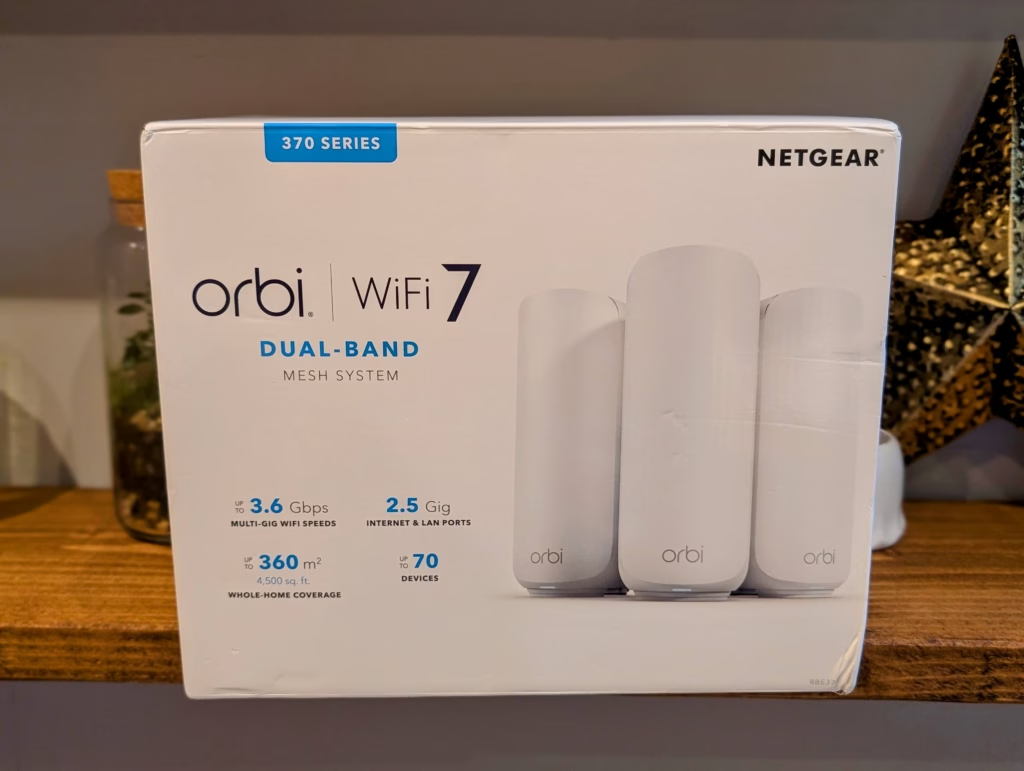
Priced at £300, it is one of the cheapest options on the market. You lose out on the 6GHz band, which provides ultra-fast connectivity at close range, mostly in the same room, but the system still includes 2.5 Gbps Ethernet ports, which should allow devices to achieve WiFi speeds in excess of 1 Gbps.
Related Reviews
Specification
| Specification | Netgear Orbi RBE373 |
| Model | Orbi RBE373 |
| Product Type | Whole Home Dual-Band Mesh WiFi 7 System (370 Series) |
| WiFi Standard | IEEE 802.11be (WiFi 7) |
| WiFi Speed | Up to 3.6 Gbps (combined) |
| Frequency Bands | Dual-Band (2.4 GHz and 5 GHz) |
| WiFi Streams | 4 streams (2 × 2 + 2 × 2) |
| Coverage Area | Up to 360 m² |
| Processor (Router) | Quad-core 1.5 GHz CPU |
| Memory (Router) | 512 MB Flash / 1 GB RAM |
| Ethernet Ports (Router) | 1 × Multi-Gig LAN (10/100/1000/2500 Mbps) 1 × Multi-Gig WAN (10/100/1000/2500 Mbps) |
| Ethernet Ports (Satellite) | 1 × Multi-Gig LAN (10/100/1000/2500 Mbps) each |
| Backhaul | Enhanced multi-link operation for improved speed |
| Security | WPA3 encryption, automatic firmware updates, VPN support |
| Management | NETGEAR Orbi app (iOS / Android) |
| Parental Controls | Via Orbi app (optional subscription) |
| Network Segmentation | Main network, Guest WiFi, IoT network |
| Smart Features | NETGEAR Armor™ powered by Bitdefender® (30-day trial) |
| Compatibility | Works with all Internet Service Providers |
| Dimensions (per unit) | 203.7 × 120 × 75 mm (H × W × D) |
| Weight | Router: 359 g Satellite: 354 g (each) |
| Power Supply | 3 × power adapters (included) |
| Package Contents | 1 × Orbi WiFi 7 Router (RBE371) 2 × Orbi WiFi 7 Satellites (RBE370) 1 × Ethernet cable 3 × Power adapters Quick start guide |
| Warranty | Limited warranty (valid if purchased from authorised reseller) |
| Support | 90-day complimentary technical support post-purchase |
The main thing to highlight with this system is that it is dual-band. That means no ultrafast 6GHz, and a shared backhaul. Which is to be expected at this price point.
Features
Up to 3.6 Gbps Speed
Achieve speeds of up to 3.6 Gbps with a mesh system designed to deliver fast and stable WiFi performance across multiple connected devices.
Exceptional Whole-Home Mesh WiFi
A high-performance mesh system with optimised antennas provides consistent WiFi coverage throughout your home, ensuring a strong connection in every room.
Dual-Band Technology
Dual-band operation with enhanced backhaul improves data distribution across the network, maintaining stable and responsive performance throughout the home.
4K Streaming, Gaming, and More
The Orbi system supports simultaneous 4K streaming, gaming, and video calling, allowing all users to enjoy a smooth and uninterrupted connection across devices.
Unleash Multi-Gig Connectivity
Equipped with a 2.5 Gigabit Ethernet port, this system supports high-speed fibre and cable internet services. It enables reliable performance for wired connections or can be used as a 2.5 Gigabit backhaul link between nodes.
Safeguard Data and Devices with NETGEAR Armor
Provides network-wide protection for your devices at home and on the move. Includes an extended warranty and priority support with a 30-day trial period.
Powerful Security Features
NETGEAR routers include advanced protection mechanisms such as automatic firmware updates, vulnerability monitoring, and built-in safety features designed to keep your network secure.
Easy Setup and Management
Compatible with any internet service provider, the Orbi app enables quick setup, network configuration, and ongoing WiFi management from your smartphone.
Unboxing / Design

The Orbi 370 arrives in typical Netgear packaging – a sturdy box with clear product imagery and key specifications prominently displayed. Inside, each unit is individually wrapped in protective plastic with the accessories neatly compartmentalised.
The design follows Netgear’s established Orbi aesthetic – tall, cylindrical units with a matte white finish that blends reasonably well with most home decor. At 203.7mm tall and 120mm wide, they’re noticeably more compact than the flagship Orbi models, which I appreciate. The smaller footprint makes them easier to position around the home without dominating shelf space.
Build quality feels solid, though not quite as premium as the higher-end models. The plastic casing has a slight flex when pressed firmly, and the units are considerably lighter at around 350g each compared to the hefty 770 series. That said, they don’t feel cheap – just appropriately built for the price point.
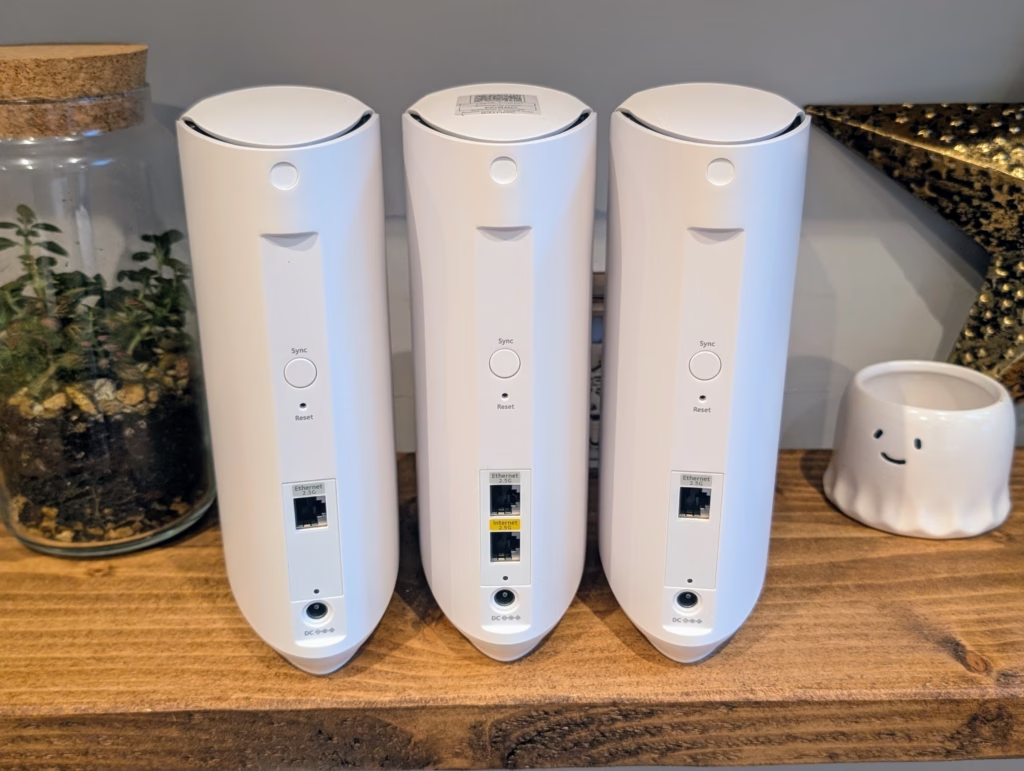
The LED status light on top provides clear visual feedback during setup and operation. It’s bright enough to see from across a room but not so intense that it becomes distracting at night. A simple press on top temporarily dims During testing, the units remained only warm to the touch even under heavy load, which is a significant improvement over older Orbi models that could become quite hot.
One drawback is the fixed internal antennas, which maintain a clean aesthetic but prevent optimizing antenna positioning for specific environments. However, in most home layouts, I found this limitation to be insignificant.
The setup process began with the mobile app, which Netgear prefers. After downloading the Orbi app and creating an account (required), the app quickly detected the router upon powering it on. The step-by-step wizard provided clear instructions and helpful animations.
The initial firmware update took about 8 minutes, longer than preferred but necessary for security and performance. The app remained connected throughout the process, displaying progress clearly.
Adding the satellites was mostly automated. The app guided me to power them on one by one, and they paired within about 90 seconds each. The app recommended optimal placement locations based on my home’s layout, although I made adjustments based on my own testing.
One frustration occurred when trying to import settings from my previous router. The backup file from my older Netgear router was incompatible, requiring me to manually recreate port forwarding rules, DHCP reservations, and device names. This additional 15 minutes of tedious work could have been avoided with better backwards compatibility.
For those who prefer it, the web-based setup option is still available. Accessing it requires typing orbilogin.com or the router’s default IP address. The interface is functional but feels outdated compared to the mobile app. However, it offers access to more advanced settings during initial configuration, which may be appreciated by power users.
Customizing the network name and password was straightforward, and the system automatically configured both bands with the same SSID by default, allowing for seamless roaming. Transform the following:
Original: The weather is very cold today.
Transformed: Today, the weather is extremely cold. Transform the following sentence:
Original: The cat is sleeping on the couch.
Transformed: On the couch, the cat is sleeping. Transform the following:
Original: She is singing a beautiful song.
Transformed: A beautiful song is being sung by her. The following transformation: Transform the following:
Original: The cat is sleeping on the windowsill.
Transformed: On the windowsill is where the cat is sleeping. Transform the following:
Original sentence: “She was running late for her meeting.”
Transformed sentence: “Running late for her meeting, she hurried to get there on time.” Can you please change the following Transform the following sentence:
Original: She went to the store to buy some groceries.
Transformed: To buy some groceries, she went to the store.












Rolls-Royce Cullinan Dominates Russian Luxury Car Market, Outselling Spectre, Ghost & Phantom Combined

Microsoft Appoints Brad Smith as Head of Corporate Communications

The Lord of the Rings: War in the North Legacy Edition – Patch One: The Beginning of a New Journey

Revolutionizing Android: 5 Innovative Features That Will Transform User Experience

Xiaomi 18 Pro: Global Launch Set for 2026, Confirmed by Tech Advisor

Comparing Farmtech Solutions: Poly Tape vs Electric Fence Wire

Unbeatable Deals on Top-tier Apps: Own Them Forever at a Fraction of the Cost

Does a Cheap 2018 Smartphone beat a 2013 Flagship?

Expert Tips for Buying a BMW X5: Insights from a Seasoned Owner of 103 Models

EU Takes Action Against Instagram and Facebook for Violating Illegal Content Rules

Warning: Facebook Creators Face Monetization Loss for Stealing and Reposting Videos

Facebook’s New Look: A Blend of Instagram’s Style

Facebook Compliance: ICE-tracking Page Removed After US Government Intervention

Facebook and Instagram to Reduce Personalized Ads for European Users

InstaDub: Meta’s AI Translation Tool for Instagram Videos

Reclaim Your Account: Facebook and Instagram Launch New Hub for Account Recovery

Meta discontinues Messenger apps for Windows and macOS

Breaking Updates: Meta Connect 2025 Unveils Latest Developments
Does a Cheap 2018 Smartphone beat a 2013 Flagship?

Samsung Galaxy S9 & S9+ UNBOXING!

Samsung Galaxy S9 Plus vs iPhone X

The BEST $300 Phone (2018) ft. MKBHD, Technical Guruji, iJustine + More

Samsung Galaxy S9 Plus Gaming Review! (vs OnePlus 5T)

THE BEST PHONE HTC EVER MADE?

The Truth about Google?

Samsung S9/ S9+ vs iPhone X vs Galaxy Note 8 Battery Life DRAIN TEST

Samsung S9 / S9+ vs Mate 10 Pro vs iPhone X Charging SPEED Test
-
 Facebook11 months ago
EU Takes Action Against Instagram and Facebook for Violating Illegal Content Rules
-
 Facebook12 months ago
Warning: Facebook Creators Face Monetization Loss for Stealing and Reposting Videos
-
 Facebook10 months ago
Facebook’s New Look: A Blend of Instagram’s Style
-
 Facebook12 months ago
Facebook Compliance: ICE-tracking Page Removed After US Government Intervention
-
 Facebook10 months ago
Facebook and Instagram to Reduce Personalized Ads for European Users
-
 Facebook12 months ago
InstaDub: Meta’s AI Translation Tool for Instagram Videos
-
 Facebook10 months ago
Reclaim Your Account: Facebook and Instagram Launch New Hub for Account Recovery
-
 Apple11 months ago
Meta discontinues Messenger apps for Windows and macOS
