
Apple
Enhanced Liquid Glass Editing with iOS 26.1: Available for Download

Exciting New Features in the Latest Software Update
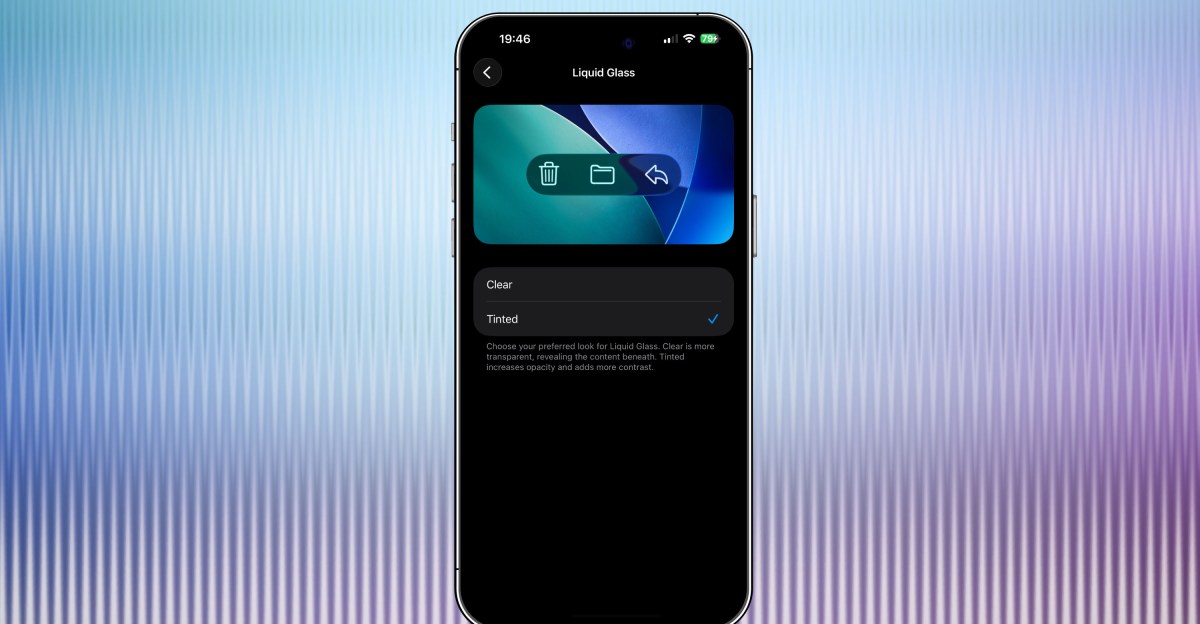
The latest software update introduces Liquid Glass setting, providing users with the option to select either the default clear look or a tinted look that enhances the opacity of materials in apps and notifications displayed on the Lock Screen.
Another notable feature is Live Translation with AirPods support for various languages including Chinese (Simplified and Traditional), Japanese, Korean, and Italian, making communication easier for users.
Music enthusiasts will appreciate the new Apple Music MiniPlayer swipe gesture, allowing for seamless navigation between tracks, as well as AutoMix support over AirPlay for a more personalized listening experience.
For users who enjoy recording audio, the update now includes gain control for external USB microphones during local capture, and the ability to save local capture files to a specific location for easy access.
Fitness enthusiasts can now log their workouts directly from the Fitness app, streamlining the process and making it more convenient.
In terms of camera functionality, a new setting allows users to toggle the Lock Screen swipe feature for easy access to the camera, enhancing the overall user experience.
FaceTime audio quality has been improved in low-bandwidth conditions, ensuring clear and crisp communication even in challenging network environments.
Furthermore, communication safety features and web content filters have been activated by default for existing child accounts aged 13-17, helping parents monitor and limit access to adult websites based on regional regulations.












Breaking News: Ferrari Amalfi Spider 2027 Price Revealed for Australian Market

Amazon’s Escape from the Virtual World: Breaking Free from the MMO Game

Enhancing Extortion: DeadLock Ransomware’s Utilization of Polygon Smart Contracts

Dark Visions: A Collaborative Sci-Fi Horror with Sam Barlow and Brandon Cronenberg

Top Three Reasons to Choose the Pixel 11 Over the Pro: A Tech Advisor’s Perspective

Navigating the Move: A Business Owner’s Guide to Relocating Your Company

Vibrant Miami Sunset: A Tech Advisor’s Guide

Huawei Mate 20 PRO – This is why you should be excited.

Google’s AMIE: Revolutionizing Clinical Video Consultations

EU Takes Action Against Instagram and Facebook for Violating Illegal Content Rules

Warning: Facebook Creators Face Monetization Loss for Stealing and Reposting Videos

Facebook’s New Look: A Blend of Instagram’s Style

Facebook Compliance: ICE-tracking Page Removed After US Government Intervention

Facebook and Instagram to Reduce Personalized Ads for European Users

InstaDub: Meta’s AI Translation Tool for Instagram Videos

Reclaim Your Account: Facebook and Instagram Launch New Hub for Account Recovery

Meta discontinues Messenger apps for Windows and macOS

Breaking Updates: Meta Connect 2025 Unveils Latest Developments
Huawei Mate 20 PRO – This is why you should be excited.

Huawei Mate 20 lite UNBOXING!

Top 10 Smartphone Gadgets – 2018!

iPhone XS / XS Max vs Galaxy Note 9 vs iPhone X Battery Life DRAIN TEST

iPhone XS / XS Max vs iPhone X vs Samsung Note 9 Camera TEST

iPhone XS Face ID vs Samsung Note 9 Intelligent Scan.

iPhone XS Drop Test – Can the Casetify Case Protect it?

The 13 Most Ridiculous Phone Cases.

Honor 8X UNBOXING
-
 Facebook10 months ago
EU Takes Action Against Instagram and Facebook for Violating Illegal Content Rules
-
 Facebook10 months ago
Warning: Facebook Creators Face Monetization Loss for Stealing and Reposting Videos
-
 Facebook8 months ago
Facebook’s New Look: A Blend of Instagram’s Style
-
 Facebook10 months ago
Facebook Compliance: ICE-tracking Page Removed After US Government Intervention
-
 Facebook8 months ago
Facebook and Instagram to Reduce Personalized Ads for European Users
-
 Facebook10 months ago
InstaDub: Meta’s AI Translation Tool for Instagram Videos
-
 Facebook8 months ago
Reclaim Your Account: Facebook and Instagram Launch New Hub for Account Recovery
-
 Apple10 months ago
Meta discontinues Messenger apps for Windows and macOS
