
Security
Locked Out: The Rise of DroidLock Malware and the Android Ransom Demand


New DroidLock Malware: Android Devices Held Ransom
A recent discovery in the realm of Android malware has unveiled a new threat dubbed DroidLock. This malicious software is designed to lock victims’ screens and demand a ransom, while also gaining access to sensitive information such as text messages, call logs, contacts, audio recordings, and the ability to erase data.
The modus operandi of DroidLock involves seizing complete control of the infected device through the VNC sharing system. It can also extract the device lock pattern by superimposing an overlay on the screen.
Researchers from Zimperium, a mobile security company, have shed light on the distribution of this malware. It primarily targets Spanish-speaking users and is disseminated through deceitful websites that promote fake applications masquerading as legitimate packages.
Zimperium’s report reveals that the infection begins with a dropper that tricks users into installing a secondary payload containing the actual malware.
Source: Zimperium
The malevolent apps introduce the primary payload through an update request and then request Device Admin and Accessibility Services permissions. These permissions enable the malware to engage in fraudulent activities.
Among the nefarious actions that DroidLock can execute include wiping the device, locking it, altering the PIN, password, or biometric data to bar user access.
Zimperium’s analysis has uncovered that DroidLock supports 15 commands, empowering it to send notifications, overlay the screen, mute the device, reset it to factory settings, activate the camera, or uninstall apps.
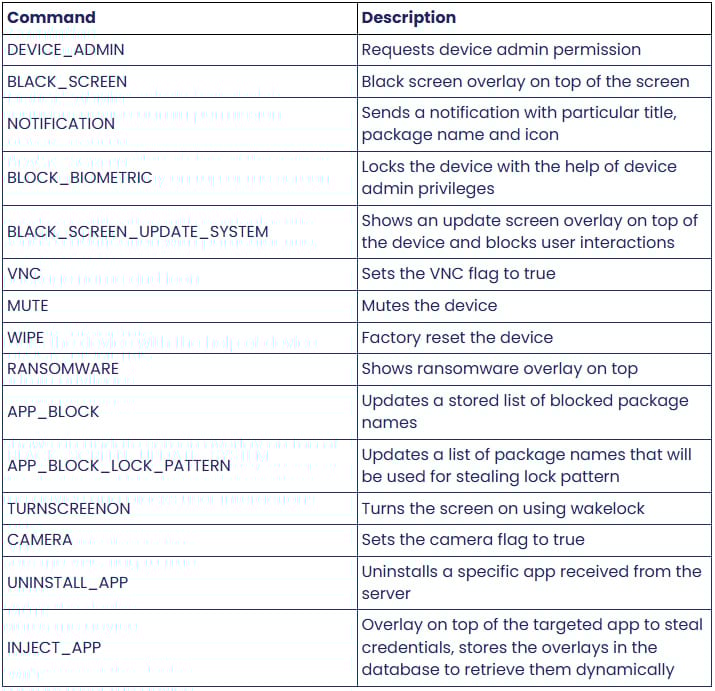
Source: Zimperium
Upon receiving a corresponding command, the ransomware overlay is promptly displayed via WebView, instructing the victim to contact the threat actor at a Proton email address. Failure to pay the ransom within 24 hours results in a threat to permanently erase the files.
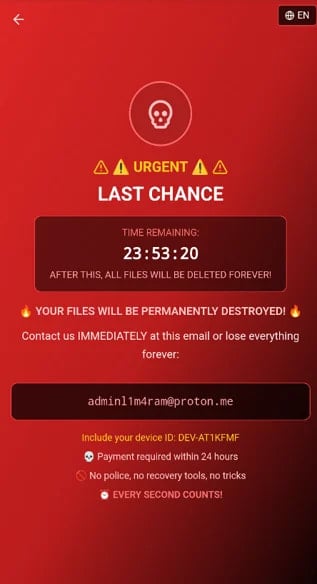
Source: Zimperium
Although DroidLock does not encrypt files, the threat of destruction unless a ransom is paid serves a similar purpose. Furthermore, the threat actor can block access to the device by altering the lock code.
DroidLock can pilfer the lock pattern by deploying another overlay sourced from the malicious APK’s assets. This feature allows remote access to the device through VNC during idle periods.
Zimperium, being a member of Google’s App Defense Alliance, promptly shares new malware discoveries with the Android security team, ensuring that Play Protect can detect and thwart this threat on updated devices.
Android users are strongly advised against sideloading APKs from sources outside Google Play unless the publisher is a trusted entity. It is crucial to scrutinize app permissions to ensure they align with the app’s intended functions and regularly scan devices using Play Protect.

Broken IAM isn’t solely an IT concern – its repercussions reverberate across your entire business.
This comprehensive guide delves into the shortcomings of traditional IAM practices in meeting modern demands, showcases examples of effective IAM strategies, and offers a simple checklist to formulate a scalable approach.











Revolutionary Safety Feature: Tesla Roadster with Retractable Movable Wing

Microsoft Announces Discontinuation of Copilot Plus PC Brand

Goblin Invasion: Hytale’s Chapter 1 Update Introduces Epic Boss Battles and Intricate Dungeons

Samsung Galaxy S27 Pro and Ultra: Enhanced with Larger Batteries

Innovative Health Benefits for Emerging Businesses

Comparing Apple Home’s AI Camera to Amazon and Google: A Test of Smart Home Technology

AirPods Enhancements: The Long-Awaited Update

The Evolution of the ALPINA X5: From Secret Prototype to BMW X5 4.6iS

Microsoft’s Revolutionary Copilot: A Game-Changer in the Battle Against Anthropic and OpenAI – GeekWire

EU Takes Action Against Instagram and Facebook for Violating Illegal Content Rules

Warning: Facebook Creators Face Monetization Loss for Stealing and Reposting Videos

Facebook’s New Look: A Blend of Instagram’s Style

Facebook Compliance: ICE-tracking Page Removed After US Government Intervention

Facebook and Instagram to Reduce Personalized Ads for European Users

InstaDub: Meta’s AI Translation Tool for Instagram Videos

Reclaim Your Account: Facebook and Instagram Launch New Hub for Account Recovery

Meta discontinues Messenger apps for Windows and macOS

Breaking Updates: Meta Connect 2025 Unveils Latest Developments

Samsung Galaxy S9 Plus vs iPhone X

The BEST $300 Phone (2018) ft. MKBHD, Technical Guruji, iJustine + More

Samsung Galaxy S9 Plus Gaming Review! (vs OnePlus 5T)

THE BEST PHONE HTC EVER MADE?

The Truth about Google?

Samsung S9/ S9+ vs iPhone X vs Galaxy Note 8 Battery Life DRAIN TEST

Samsung S9 / S9+ vs Mate 10 Pro vs iPhone X Charging SPEED Test

The BEST APPS in 2018 – ft. MKBHD, UrAvgConsumer, iJustine + More

The ULTIMATE Smartphone Unboxing!!
-
 Facebook11 months ago
EU Takes Action Against Instagram and Facebook for Violating Illegal Content Rules
-
 Facebook12 months ago
Warning: Facebook Creators Face Monetization Loss for Stealing and Reposting Videos
-
 Facebook10 months ago
Facebook’s New Look: A Blend of Instagram’s Style
-
 Facebook12 months ago
Facebook Compliance: ICE-tracking Page Removed After US Government Intervention
-
 Facebook10 months ago
Facebook and Instagram to Reduce Personalized Ads for European Users
-
 Facebook12 months ago
InstaDub: Meta’s AI Translation Tool for Instagram Videos
-
 Facebook10 months ago
Reclaim Your Account: Facebook and Instagram Launch New Hub for Account Recovery
-
 Apple11 months ago
Meta discontinues Messenger apps for Windows and macOS
