
Gadgets
GL.iNet Slate 7: The Ultimate Travel Router with AdGuard Home, Tailscale, and VPN Support

Any links to online stores should be assumed to be affiliates. The company or PR agency provides all or most review samples. They have no control over my content, and I provide my honest opinion.
GL.iNet Slate 7 Review
Summary
The GL.iNet Slate 7 is one of the most capable travel routers I have tested, combining strong hardware with genuinely useful software features that go far beyond basic connectivity. Its dual 2.5GbE ports, excellent VPN performance, Tailscale integration, and built-in AdGuard Home make it particularly well suited to frequent travellers, remote workers, and anyone who values privacy on untrusted networks. While the Wi-Fi 7 branding is somewhat diluted by the lack of 6GHz support, real-world performance is more than adequate for hotel rooms and temporary workspaces. At discounted pricing it represents good value, though more casual users may find the older Slate AX sufficient for less money.
Pros
-
Excellent VPN support including WireGuard, OpenVPN, and seamless Tailscale integration.
-
Dual 2.5GbE ports are rare on travel routers and add genuine flexibility.
-
AdGuard Home provides effective network-wide ad and tracker blocking.
-
OpenWRT-based firmware offers strong flexibility without sacrificing usability.
-
USB-C power and low power draw make it ideal for travel and mobile setups.
Cons
-
No 6GHz band or 320MHz channels despite Wi-Fi 7 branding.
-
Touchscreen introduces an additional security consideration, even with PIN protection.
-
Full RRP is harder to justify given strong Wi-Fi 6 alternatives at lower prices.
Last month, I reviewed the GL.iNet Flint 3 Wi-Fi 7 Router, and it is probably my favourite consumer-focused router I have reviewed in a long time. The extensive VPN support, Tailscale, and AdGuard Home are all ideal inclusions for a modern home router for modern needs. The Slate 7 takes many of these same features and packages them into a compact, travel-friendly form factor that I have been testing over the past few weeks.
The GL.iNet GL-BE3600 Slate 7 is positioned as the company’s flagship travel router, bringing Wi-Fi 7 support, dual 2.5GbE ports, and a host of advanced networking features into a remarkably small package. While the travel router market has become increasingly competitive, with options from ASUS, TP-Link, and others vying for attention, GL.iNet has carved out a niche by focusing on privacy-conscious users and those who need robust VPN functionality on the go.
What makes the Slate 7 particularly interesting is its combination of hardware specifications and software capabilities. Unlike many consumer routers that lock you into proprietary ecosystems, the Slate 7 runs on a customised version of OpenWRT, giving advanced users access to a wealth of configuration options while still providing a user-friendly interface for those who just want things to work.
Related Reviews
Specification
The Slate 7 is built around a Qualcomm quad-core processor running at 1.1GHz, paired with 1GB of DDR4 RAM and 512MB of NAND flash storage. While these specifications might seem modest compared to full-size routers, they are well-suited to the travel router use case and allow the device to maintain low power consumption whilst still handling multiple simultaneous connections and VPN tunnels.
On the wireless side, the router supports IEEE 802.11a/b/g/n/ac/ax/be protocols, covering the full range of Wi-Fi standards up to Wi-Fi 7. The dual-band configuration offers 688Mbps on the 2.4GHz band and up to 2882Mbps on the 5GHz band when using 160MHz channel width. It is worth noting that whilst the router is marketed as Wi-Fi 7, it does not include support for the 6GHz band or 320MHz channel width, which are key features of the full Wi-Fi 7 specification. This means you will not get the absolute peak speeds that tri-band Wi-Fi 7 routers can achieve, though for most real-world travel scenarios, this is unlikely to be a limiting factor.
The router does support Multi-Link Operation (MLO), one of the more practical Wi-Fi 7 features, which allows devices to connect to multiple bands simultaneously for improved stability and throughput. This can be particularly useful when dealing with congested wireless environments, as is often the case in hotels and conference venues.
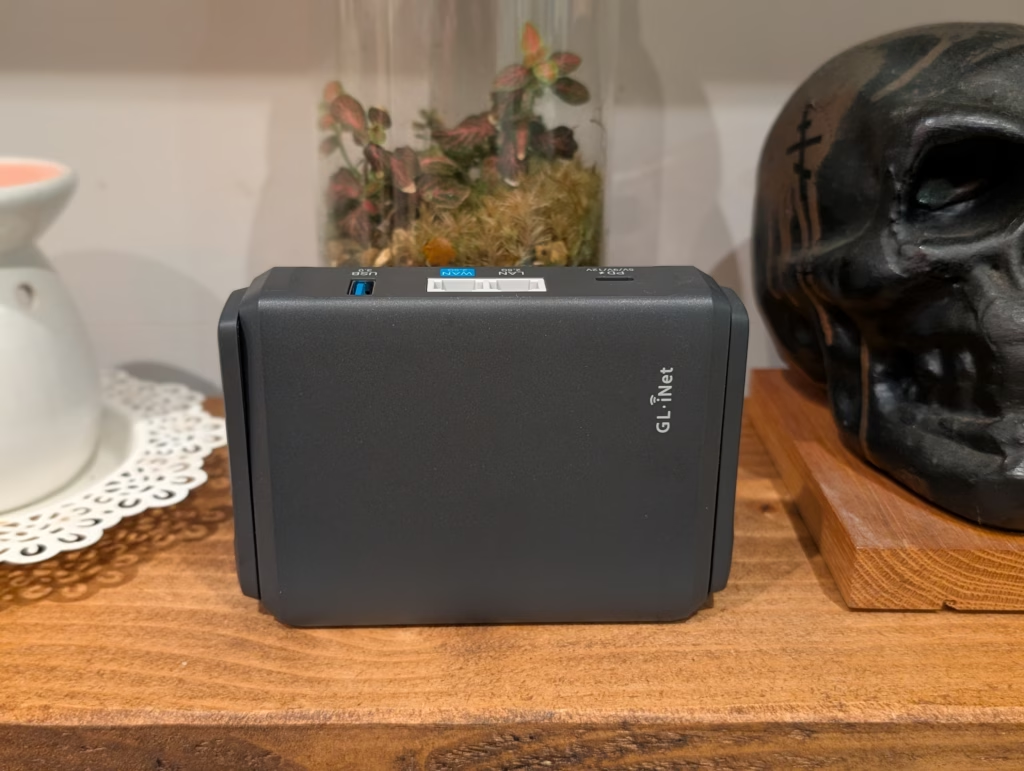
Connectivity options include two 2.5GbE Ethernet ports, one designated as WAN and one as LAN, both supporting speeds of 10/100/1000/2500Mbps. Having dual 2.5GbE ports is a notable advantage over competitors like the ASUS RT-BE58 Go and TP-Link TL-WR3602BE, which only offer a single 2.5GbE port. There is also a USB 3.0 Type-A port for storage sharing, cellular modem tethering, or connecting USB devices.
Power is supplied via USB-C with support for 5V/3A, 9V/3A, and 12V/2.5A inputs, making it compatible with most USB-C power banks and chargers. Power consumption sits under 18W without USB devices connected, and in practice I measured around 7-8W during typical operation. The included power adapter comes with interchangeable plugs for different regions, which is a thoughtful touch for a travel router.
Physically, the Slate 7 measures 130 x 91 x 34mm and weighs 295g. While not pocketable, it is compact enough to slip into a laptop bag without taking up much space. The two external Wi-Fi antennas fold flat against the body for transport and can be positioned for optimal signal coverage when in use.
| Specification | Details |
| CPU | Qualcomm Quad-core @ 1.1GHz |
| Memory / Storage | 1GB DDR4 / 512MB NAND Flash |
| Protocol | IEEE 802.11a/b/g/n/ac/ax/be |
| Wi-Fi Speed | 688Mbps (2.4GHz), 2882Mbps (5GHz) |
| Antennas | 2 x foldable external Wi-Fi antennas |
| USB Port | USB 3.0 Type-A |
| Ethernet Ports | 1 x 2.5G WAN, 1 x 2.5G LAN |
| Power Input | USB-C (5V/3A, 9V/3A, 12V/2.5A) |
| Power Consumption | <18W (without USB devices) |
| Dimensions / Weight | 130 x 91 x 34mm / 295g |
Features
The Slate 7 packs an impressive array of features into its compact chassis. At its core, it functions as a standard wireless router, but it also supports multiple operating modes that make it genuinely useful for travel scenarios.
The Slate 7 from GL.iNet offers a variety of connectivity options, including standard router mode, access point mode, wireless repeater mode (also known as WISP mode), and USB tethering mode for sharing a mobile phone’s data connection.
What sets the Slate 7 apart is its multi-WAN capability, allowing it to accept internet connections from multiple sources simultaneously and provide failover between them. This is especially useful when traveling through areas with inconsistent connectivity. The router can connect via the WAN Ethernet port, piggyback an existing Wi-Fi network in repeater mode, or tether a smartphone or USB cellular modem through the USB port.
Additionally, the USB port enables network-attached storage functionality, allowing you to share files across your local network using various protocols. While not a replacement for a dedicated NAS, this feature is handy for backing up photos or sharing files between devices while on the go.
In terms of security, the Slate 7 offers WPA3 encryption, built-in firewall capabilities, support for multiple virtual SSIDs, MAC address filtering, and DHCP reservation for more control over connected devices.
The router comes in understated packaging and has a solid build quality with a matte black plastic chassis. The foldable antennas are well-hinged and stay in position whether deployed or folded flat.
Setting up the Slate 7 is straightforward, with an easy-to-follow setup wizard accessible through the default IP address. The web UI is intuitive, providing quick access to common settings, and advanced users can access the LuCI interface for more granular controls.
Overall, the Slate 7’s flexibility in internet connectivity options, multi-WAN capability, network-attached storage functionality, and security features make it a versatile and reliable choice for users looking for a portable and powerful router. The Slate 7 offers invaluable resilience for remote workers who cannot afford to lose connectivity. This feature is crucial for ensuring uninterrupted work, especially for those working remotely. For individuals with home labs or media servers like myself, the inclusion of Tailscale is a significant advantage. It allows all devices connected to the travel router to access my home network as if they were locally connected.
Tailscale creates a mesh VPN network using the WireGuard protocol, connecting devices across different locations through encrypted tunnels. Unlike traditional VPNs that require port forwarding and complex configuration, Tailscale handles NAT traversal automatically, making it work reliably even behind restrictive hotel networks.
Setting up Tailscale on the Slate 7 involves logging into your Tailscale account through the router’s web interface and authorizing the device. Once connected, the router joins your Tailscale network, and any devices connected to the Slate 7 can access resources on your home network through the router’s tunnel.
This feature is especially valuable for remote workers who need to access files on a home NAS, connect to self-hosted services, or use their home Plex server while traveling. Instead of configuring Tailscale on each individual device, the router handles the connection for all clients automatically.
In my testing, Tailscale connections were stable and performed well, with throughput limited primarily by the upstream internet connection rather than the tunnel itself. The ease of use compared to traditional VPN solutions cannot be overstated – there is no certificate management, no port forwarding configuration, and no worrying about dynamic IP addresses.
Beyond Tailscale, the Slate 7 offers extensive VPN support for various use cases. The router can function as both a VPN client (connecting to external VPN services) and a VPN server (allowing you to connect back to the router when traveling).
On the client side, the Slate 7 supports OpenVPN and WireGuard protocols, covering the two most common options for commercial VPN services. Pre-configured profiles for over 30 VPN providers are included, making setup as simple as entering your credentials. For services not in the pre-configured list, you can import custom configuration files.
WireGuard performance is excellent, with the router capable of handling around 540Mbps of VPN throughput in my testing. OpenVPN, being more computationally intensive, tops out around 100Mbps, which is still adequate for most use cases but noticeably slower. If your VPN provider supports WireGuard, I would recommend using it for better performance.
VPN policies allow you to route traffic selectively through the VPN tunnel. This flexibility is useful when you need to balance security with performance or access geo-restricted content on some devices while maintaining local network access on others.
The physical toggle switch on the side of the router can be configured to enable or disable VPN with a single press, providing a quick way to switch between encrypted and direct connections without accessing the web interface. Additionally, the router supports AstroWARP, GL.iNet’s proprietary VPN service that connects multiple GL.iNet routers together, though this ties you into the vendor’s ecosystem.
Wireless performance is solid for a device of this size, though expectations should be calibrated appropriately. On the 5GHz band using 160MHz channel width, peak throughput was around 1200Mbps in close proximity to the router with a Wi-Fi 7 capable client. Real-world performance settled around 800-1000Mbps at typical working distances, which is more than adequate for streaming, video calls, and general productivity work. The 2.4GHz band delivered peak speeds around 300Mbps dropping to 150-200Mbps at moderate distances.
Range is acceptable but not exceptional, with noticeable performance drops beyond about 15-20 meters or through substantial walls. The Multi-Link Operation (MLO) feature helped maintain more consistent connections in environments with heavy Wi-Fi congestion. However, MLO has not been very effective due to poor implementation on devices.
Wired performance through the 2.5GbE ports was excellent, with the router handling the full 2.5Gbps line rate without issue.
The GL.iNet Slate 7 is priced around GBP138 with regular discounts to GBP110. The US retail price is around USD149, with sales bringing it down to USD110-130. Alternative options include the GL.iNet GL-AXT1800 (Slate AX) and the GL.iNet GL-SFT1200 (Opal) at different price points and features. Competing products like the TP-Link TL-WR3602BE Wi-Fi 7 Travel Router are more expensive than the Slate 7 and offer fewer features. The TP-Link TL-WR1502X Wi-Fi 6 travel router is a budget-friendly option at around GBP37, while the ASUS RT-BE58 Go offers similar features to the Slate 7 but with fewer ports. GL.iNet’s upcoming Mudi 7 with 5G support will be pricier but may be worth it for those needing cellular connectivity.
Overall, the GL.iNet Slate 7 is a top choice for travelers who prioritize privacy and flexibility. With dual 2.5GbE ports, comprehensive VPN support, and Tailscale integration, it offers more than just basic connectivity. The price of GBP110 is reasonable for the features it provides, but the older Slate AX may suffice for more budget-conscious users.
While the Slate 7 may not have all the latest Wi-Fi 7 features, it delivers on its promises and is well-suited for those who work from various locations with questionable network security. The upcoming Mudi 7 may be a better option for those needing integrated cellular connectivity.
Despite some potential concerns, such as data privacy and security considerations with the touchscreen, the Slate 7 remains a solid choice for frequent travelers and privacy-conscious individuals. It offers excellent value for its features and performance, making it a recommended option for those in need of a reliable travel router.
The GL.iNet Slate 7 review highlights its strong hardware and software features that set it apart from other travel routers. With excellent VPN support, dual 2.5GbE ports, and AdGuard Home, it caters to the needs of travelers and remote workers who value privacy and security on the go.
While the lack of some Wi-Fi 7 features may be a drawback for some users, the Slate 7’s real-world performance and functionality make it a worthwhile investment, especially at discounted prices. Overall, it offers a compelling package for users seeking a reliable and feature-rich travel router.
Bringing a Unique Perspective to Tech Blogging
With a wide range of interests, I offer a distinctive viewpoint in the world of tech blogging by combining lifestyle, fitness, and the latest technology trends. This diversity allows me to create engaging and informative content that resonates with readers.
Recognized Excellence
I am thrilled to announce that Mighty Gadget has been consistently recognized as one of the top technology blogs in the UK by Vuelio. This recognition is a testament to my passion for technology and my commitment to providing valuable insights to my audience.
Continued Dedication
Driven by my love for technology, I strive to deliver high-quality content that keeps readers informed and entertained. I am dedicated to sharing my knowledge and staying up-to-date with the latest tech trends to ensure that my audience receives the best possible content.
“Can you please help me with this task?”
to
“Could you assist me with this task?” Transform the following sentence into the passive voice:
“The teacher gave the students a pop quiz.”
Answer:
“A pop quiz was given to the students by the teacher.”









Revolutionary Safety Feature: Tesla Roadster with Retractable Movable Wing

Microsoft Announces Discontinuation of Copilot Plus PC Brand

Goblin Invasion: Hytale’s Chapter 1 Update Introduces Epic Boss Battles and Intricate Dungeons

Samsung Galaxy S27 Pro and Ultra: Enhanced with Larger Batteries

Innovative Health Benefits for Emerging Businesses

Comparing Apple Home’s AI Camera to Amazon and Google: A Test of Smart Home Technology

AirPods Enhancements: The Long-Awaited Update

The Evolution of the ALPINA X5: From Secret Prototype to BMW X5 4.6iS

Microsoft’s Revolutionary Copilot: A Game-Changer in the Battle Against Anthropic and OpenAI – GeekWire

EU Takes Action Against Instagram and Facebook for Violating Illegal Content Rules

Warning: Facebook Creators Face Monetization Loss for Stealing and Reposting Videos

Facebook’s New Look: A Blend of Instagram’s Style

Facebook Compliance: ICE-tracking Page Removed After US Government Intervention

Facebook and Instagram to Reduce Personalized Ads for European Users

InstaDub: Meta’s AI Translation Tool for Instagram Videos

Reclaim Your Account: Facebook and Instagram Launch New Hub for Account Recovery

Meta discontinues Messenger apps for Windows and macOS

Breaking Updates: Meta Connect 2025 Unveils Latest Developments

Samsung Galaxy S9 Plus vs iPhone X

The BEST $300 Phone (2018) ft. MKBHD, Technical Guruji, iJustine + More

Samsung Galaxy S9 Plus Gaming Review! (vs OnePlus 5T)

THE BEST PHONE HTC EVER MADE?

The Truth about Google?

Samsung S9/ S9+ vs iPhone X vs Galaxy Note 8 Battery Life DRAIN TEST

Samsung S9 / S9+ vs Mate 10 Pro vs iPhone X Charging SPEED Test

The BEST APPS in 2018 – ft. MKBHD, UrAvgConsumer, iJustine + More

The ULTIMATE Smartphone Unboxing!!
-
 Facebook11 months ago
EU Takes Action Against Instagram and Facebook for Violating Illegal Content Rules
-
 Facebook12 months ago
Warning: Facebook Creators Face Monetization Loss for Stealing and Reposting Videos
-
 Facebook10 months ago
Facebook’s New Look: A Blend of Instagram’s Style
-
 Facebook12 months ago
Facebook Compliance: ICE-tracking Page Removed After US Government Intervention
-
 Facebook10 months ago
Facebook and Instagram to Reduce Personalized Ads for European Users
-
 Facebook12 months ago
InstaDub: Meta’s AI Translation Tool for Instagram Videos
-
 Facebook10 months ago
Reclaim Your Account: Facebook and Instagram Launch New Hub for Account Recovery
-
 Apple11 months ago
Meta discontinues Messenger apps for Windows and macOS
