
Mobile Tech
Revolutionizing Mobile Technology: 5 Cutting-Edge Features for the Latest iPhone

iOS 27 is packed with a plethora of new features, making it a challenge to distinguish between minor enhancements and groundbreaking additions like Siri AI and Visual Intelligence. From improved card selection in Apple Pay to Find My enhancements, new AirPods features, Liquid Glass improvements, and smarter built-in apps, there’s a lot to explore. Even subtle changes to the lock screen are gaining popularity among users.
Among the updates are AI photo editing tools like Reframe, enhanced Shared Albums for cross-platform collaboration, a revamped Weather UI, and subtle tweaks to FaceTime, Maps, and Messages.
Apple Music is not left out of the iOS 27 update, with the iPhone Music app receiving some much-needed attention. One long-awaited feature is finally making its debut in this version.
Landscape Mode
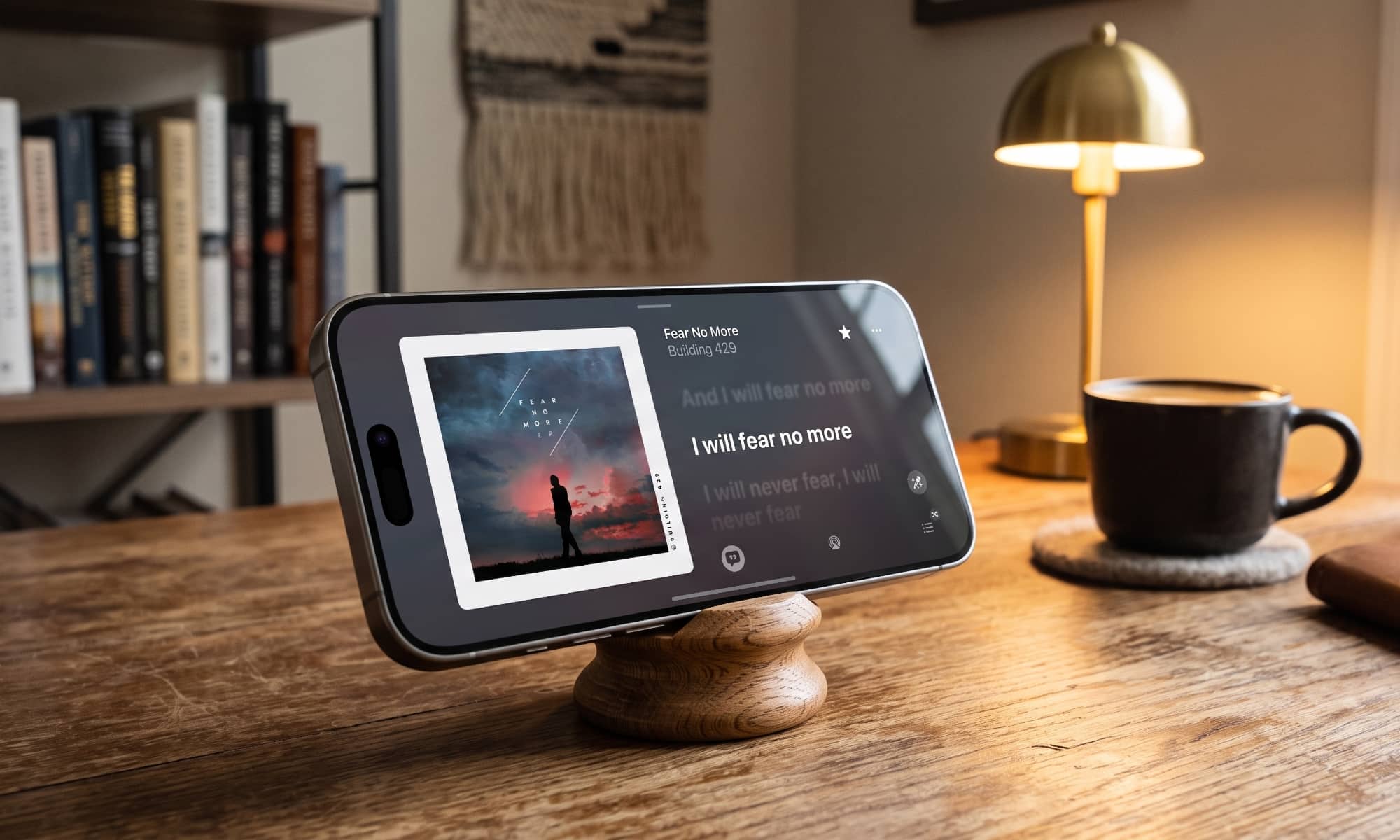
While Apple Weather and Find My now support landscape mode on the iPhone, the most useful addition is the landscape view for the Apple Music Now Playing screen.
Although this feature is currently limited to the Now Playing screen, it offers a significant advantage. When holding the iPhone sideways, most models create a small stereo soundstage using the bottom speaker and earpiece speaker. This feature works exceptionally well on larger models like the iPhone Pro Max but is lacking on the iPhone Air due to the absence of a bottom speaker.
Although you can listen to music in landscape mode without the app flipping, the optimized experience is a welcome addition. In iOS 27, the Now Playing screen automatically switches to landscape orientation upon opening, providing a seamless experience whether the iPhone is upright or flat.
Apple utilizes the additional screen space effectively, allowing users to view lyrics or upcoming tracks alongside full-sized album artwork. While the amount of information visible on a single screen may be reduced, it is sufficient for most users.
Widgets Go Big
iOS 27 introduces a fourth widget size, enabling users to create larger widgets that span an entire Home Screen page. Apple Music offers three widgets in this new size—Recently Played, Recommendations, and Top Charts—providing more information at a glance.
For instance, Top Charts now displays nine entries instead of five, while Recently Played showcases six albums or playlists instead of three.
AutoMix Improves and Expands
AutoMix receives notable enhancements in iOS 27, delivering better transitions for a more immersive listening experience. This feature, available on the iPhone and CarPlay, will also be extended to tvOS 27 and HomePod Software 27, expanding its reach to Apple TV and HomePod users. Additionally, Apple TV will support Hi-Res Lossless Audio.
Refreshed Artist and Album Pages
iOS 27 introduces redesigned pages for albums and artists, building upon the changes initiated in iOS 26.4 earlier this year. Artist pages now feature full-screen background images, prominent action buttons, and a card for recent releases or upcoming concerts, enhancing the overall user experience.
Discover Music with a Little Help from Your Friends
Apple introduces a new Friends playlist in iOS 27, automatically updated every Thursday to showcase what your friends are listening to. By following friends in your Apple Music profile, you can explore a curated playlist that includes their favorite tracks. The playlist even displays avatars over the album artwork for each track, allowing you to identify the friend associated with each song.
global $wp;
. ‘/’;
?>
Transform the following:
Original: “I am going to the store.”
Transformed: “I will be heading to the store.”












Making the iPhone 8 INVINCIBLE (and Modular)

Google Pixel 2 XL vs Galaxy Note 8 vs iPhone 8 Plus- Battery Life Drain Test

Insane Holographic AND Transparent Wallpapers for Android!

Best Tech – October 2017!

TOP 5 MOST UNUSUAL SMARTPHONES

Umidigi S2 – Flagship Smartphone for $199??

Mystery Unboxing from Logitech!

7 Smartphone Life Hacks YOU SHOULD KNOW!

The Oneplus 5T has been LEAKED!

EU Takes Action Against Instagram and Facebook for Violating Illegal Content Rules

Warning: Facebook Creators Face Monetization Loss for Stealing and Reposting Videos

Facebook’s New Look: A Blend of Instagram’s Style

Facebook Compliance: ICE-tracking Page Removed After US Government Intervention

Facebook and Instagram to Reduce Personalized Ads for European Users

InstaDub: Meta’s AI Translation Tool for Instagram Videos

Reclaim Your Account: Facebook and Instagram Launch New Hub for Account Recovery

Meta discontinues Messenger apps for Windows and macOS

Breaking Updates: Meta Connect 2025 Unveils Latest Developments
Making the iPhone 8 INVINCIBLE (and Modular)
Google Pixel 2 XL vs Galaxy Note 8 vs iPhone 8 Plus- Battery Life Drain Test
Insane Holographic AND Transparent Wallpapers for Android!
Best Tech – October 2017!
TOP 5 MOST UNUSUAL SMARTPHONES
Umidigi S2 – Flagship Smartphone for $199??
Mystery Unboxing from Logitech!
7 Smartphone Life Hacks YOU SHOULD KNOW!
The Oneplus 5T has been LEAKED!
-
 Facebook1 year ago
EU Takes Action Against Instagram and Facebook for Violating Illegal Content Rules
-
 Facebook1 year ago
Warning: Facebook Creators Face Monetization Loss for Stealing and Reposting Videos
-
 Facebook11 months ago
Facebook’s New Look: A Blend of Instagram’s Style
-
 Facebook1 year ago
Facebook Compliance: ICE-tracking Page Removed After US Government Intervention
-
 Facebook11 months ago
Facebook and Instagram to Reduce Personalized Ads for European Users
-
 Facebook1 year ago
InstaDub: Meta’s AI Translation Tool for Instagram Videos
-
 Facebook11 months ago
Reclaim Your Account: Facebook and Instagram Launch New Hub for Account Recovery
-
 Apple1 year ago
Meta discontinues Messenger apps for Windows and macOS
