
Tech News
Revolutionizing User Experience: Apple’s iOS 27 Introduces Liquid Glass Slider

Summary generated by Smart Answers AI
In summary:
- According to Tech Advisor, Apple’s upcoming iOS 27 update will provide users with the ability to adjust or disable the divisive ‘Liquid Glass’ interface effects due to varied user feedback.
- While some find the semi-transparent design feature visually appealing, many iPhone users have experienced readability issues with notifications and interface elements.
- iOS 27 is set to launch in September for iPhone 11 and newer models, offering customization options through Display & Brightness settings and accessibility features.
Apple’s WWDC 2026 began with a keynote last night, unveiling significant updates. These include enhanced online safety measures for children, the potential for Siri AI to match Gemini’s capabilities (restricted to select models and not available in the EU), and the surprising exclusion of several Apple Watch models from the WatchOS update list. Unexpected, right?
The keynote primarily focused on design news, signaling Apple’s acknowledgment of the mixed reception to Liquid Glass, the brand’s major software interface redesign since iOS 7 in 2013. iOS 27 will introduce features allowing users to personalize the design according to their preferences.
Shubham Kedia, Apple’s Director of Human Interface, stated: “With major design updates, we take a bold leap forward and continue to refine. We are now making additional refinements, starting with updating the foundations of Liquid Glass.”
However, the distinction between “additional refinements” and “updating the foundations” raises questions. While one implies minor adjustments, the other suggests a more substantial overhaul, which aligns with Apple’s current approach.
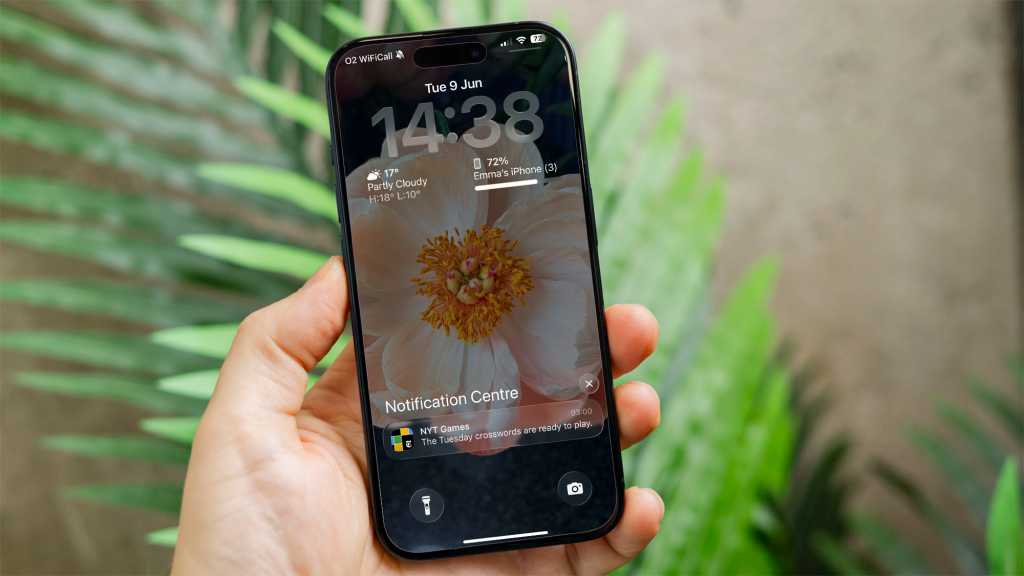
Liquid Glass introduces a glassy aesthetic to screen design and icons, along with a semi-transparent, floating effect on interactive elements. Despite its appeal, some users find it blurry or struggle with reading notifications.
As a solution, iOS 27 will offer a slider and settings to control Liquid Glass effects, allowing users to reduce or disable them entirely.
This move seems less about refining design and more about providing users with the option to revert to a pre-Liquid Glass appearance.
iOS 27 is scheduled for release in September for supported iPhones, including iPhone 11 and newer models, as well as the second and third generations of iPhone SE. The current phase involves iOS 27 being in the developer beta stage.
How to disable Liquid Glass temporarily
While complete removal of Liquid Glass effects isn’t feasible currently, there are steps you can take to minimize the glassy effect.
Here’s what you can do:
Adjust your accessibility settings
Navigate to Settings > Accessibility > Display & Text Size and enable Reduce Transparency.
Dominik Tomaszewski / Foundry
Note that this adjustment may impact other display features, so it may not suit everyone.
Modify your display settings
Another option is to go to Settings > Display & Brightness > Liquid Glass and switch from Clear to Tinted.
This adjustment should enhance the readability of notifications.

Dominik Tomaszewski / Foundry
iO2 27 will coincide with the launch of the iPhone 18 series this September. Stay updated on the latest information about the upcoming iPhone 18 models.













Ford Australia: Recalls and Brand Resilience

Microsoft Sets New Patch Tuesday Record with Latest Updates

Breakthrough Superconducting Technology: Imec’s NbTiN Circuits and 30nm Interconnects

Unleash the Hunt in Monster Hunter Wilds: Ascendance – Watch the First Trailer Now!

The Top 5 Most Stunning iPhone Colors of All Time – Tech Advisor

The Future of Foldable Technology: A Breakthrough Beyond the iPhone – Tech Advisor’s Top Pick for 2026

The Exploration Company’s Reusable High-Thrust Rocket Engine: A €387 Million Investment for Accelerated Development

Pusheen’s Playtime Adventure: Coming Soon to Apple Arcade

Unlocking the Power of Vitamins and Supplements: YouTube’s Key Role in AI-Driven Research

EU Takes Action Against Instagram and Facebook for Violating Illegal Content Rules

Warning: Facebook Creators Face Monetization Loss for Stealing and Reposting Videos

Facebook’s New Look: A Blend of Instagram’s Style

Facebook Compliance: ICE-tracking Page Removed After US Government Intervention

Facebook and Instagram to Reduce Personalized Ads for European Users

InstaDub: Meta’s AI Translation Tool for Instagram Videos

Reclaim Your Account: Facebook and Instagram Launch New Hub for Account Recovery

Meta discontinues Messenger apps for Windows and macOS

Breaking Updates: Meta Connect 2025 Unveils Latest Developments

12 Incredible Android SECRETS, TIPS and TRICKS

The Ultimate Smartphone Camera Comparison.

Top 10 Android Launchers you’ve NEVER tried.

Our Bezel-less future! Q&A 5.0

The $200 OnePlus phone? Lenovo S5 is HERE!

OnePlus 6 vs Samsung Galaxy S9 Plus

Honor 10 UNBOXING!

OnePlus 6 vs iPhone X Camera Test Comparison

MYSTERY Package from Xiaomi – MASSIVE UNBOXING!
-
 Facebook11 months ago
EU Takes Action Against Instagram and Facebook for Violating Illegal Content Rules
-
 Facebook11 months ago
Warning: Facebook Creators Face Monetization Loss for Stealing and Reposting Videos
-
 Facebook9 months ago
Facebook’s New Look: A Blend of Instagram’s Style
-
 Facebook11 months ago
Facebook Compliance: ICE-tracking Page Removed After US Government Intervention
-
 Facebook9 months ago
Facebook and Instagram to Reduce Personalized Ads for European Users
-
 Facebook11 months ago
InstaDub: Meta’s AI Translation Tool for Instagram Videos
-
 Facebook9 months ago
Reclaim Your Account: Facebook and Instagram Launch New Hub for Account Recovery
-
 Apple11 months ago
Meta discontinues Messenger apps for Windows and macOS
