
Google Unveils Refreshed Workspace App Icons for a Modern Look

New Look for Google Workspace Apps
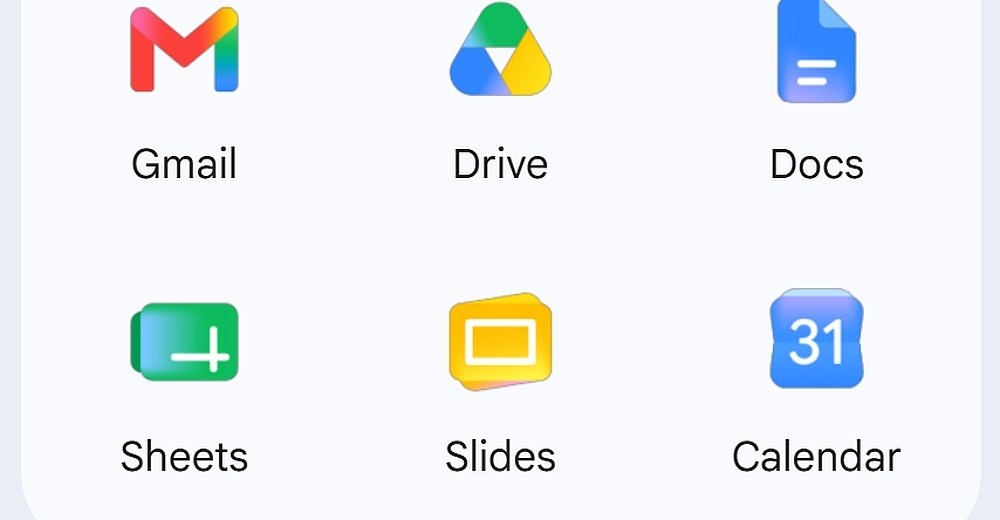
Google Workspace apps are undergoing a transformation with a fresh new look. The redesigned app icons, which were leaked last month, are now being widely rolled out. Users may have already noticed the updated icons, featuring a gradient look that transitions from lighter to darker shades. This new design approach differs from the previous flat tone design and is reminiscent of the redesigned Google logo introduced a year ago.
Icon Changes
Some of the icons have undergone significant changes, such as transitioning from a rainbow design to a single color. Icons like Google Chat, Meet, and Calendar now sport a single-color design, which may help in distinguishing them from one another. However, these changes could also make them slightly harder to recognize. On the other hand, icons like Google Docs, Sheets, and Slides have retained their original colors and design approach. Interestingly, the Sheets and Slides icons have been rotated to landscape mode, aligning with how most users interact with these apps.
The Google Drive icon has also received a significant makeover with rounded corners and the removal of the red spot that was previously present in the bottom right corner. Some icons have also had their borders removed, like Google Keep, which now features a simple yellow light bulb design. While these changes offer a cleaner and more modern look, users familiar with the old designs may need some time to adjust to the new icons. Personally, I find the new design of the Google Keep icon appealing, despite the initial adjustment period. The Gmail icon has also been updated for a cleaner look, although the changes are relatively subtle compared to the previous version.












The Cybersecurity Chronicles: Uncovering AI-Powered Threats, Live Secrets, and Model Inspection Risks

Control Resonant: Unleashing New Game ++

Creating Employee-Centric Health Benefits That Drive Engagement

Enhanced Vision: Unlocking the Secrets of Fine Print with Google’s Guided Vision

Texas School District Embraces the MacBook Neo: A New Era of Technology Education

Nissan X-Trail Hybrid: Affordable Alternative to RAV4 with No Lower-Priced Option in Sight

Departure of Microsoft’s Office and Teams Chief: What’s Next for the Tech Giant?

Reigns and Card Shark creators Nerial pivot back to their origins as they close doors and lay off staff

Building Trust Through Visual Storytelling: A Key Strategy for Startup Success

EU Takes Action Against Instagram and Facebook for Violating Illegal Content Rules

Warning: Facebook Creators Face Monetization Loss for Stealing and Reposting Videos

Facebook’s New Look: A Blend of Instagram’s Style

Facebook Compliance: ICE-tracking Page Removed After US Government Intervention

Facebook and Instagram to Reduce Personalized Ads for European Users

InstaDub: Meta’s AI Translation Tool for Instagram Videos

Reclaim Your Account: Facebook and Instagram Launch New Hub for Account Recovery

Meta discontinues Messenger apps for Windows and macOS

Breaking Updates: Meta Connect 2025 Unveils Latest Developments

Using the Cheapest Smartphone in the World.

Samsung Galaxy S9+ Unboxing! (Clone)

Unboxing the First Ever Samsung Galaxy S!!

Huawei P Smart – Huawei’s new Killer Budget Smartphone!

MYSTERY Package from Xiaomi – HUGE UNBOXING!

5 ways you’re using your Smartphone wrong.

THE INSANE DUAL BATTERY SMARTPHONE!

ELEPHONE U PRO UNBOXING AND REVIEW!

Mrwhosetheboss – 1 Million Subscribers
-
 Facebook11 months ago
EU Takes Action Against Instagram and Facebook for Violating Illegal Content Rules
-
 Facebook12 months ago
Warning: Facebook Creators Face Monetization Loss for Stealing and Reposting Videos
-
 Facebook10 months ago
Facebook’s New Look: A Blend of Instagram’s Style
-
 Facebook12 months ago
Facebook Compliance: ICE-tracking Page Removed After US Government Intervention
-
 Facebook10 months ago
Facebook and Instagram to Reduce Personalized Ads for European Users
-
 Facebook12 months ago
InstaDub: Meta’s AI Translation Tool for Instagram Videos
-
 Facebook10 months ago
Reclaim Your Account: Facebook and Instagram Launch New Hub for Account Recovery
-
 Apple12 months ago
Meta discontinues Messenger apps for Windows and macOS
