
Apple
Unlocking the Power of Live Activities: Sonos’ Latest iPhone Lockscreen Feature

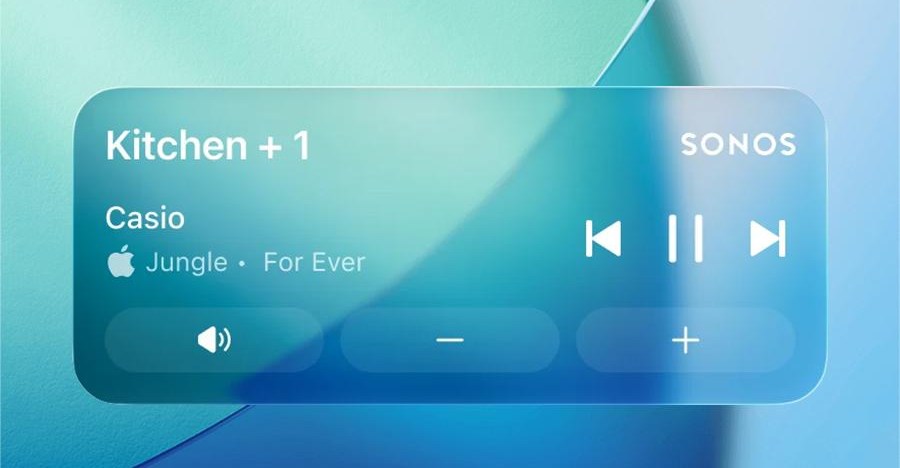
Sonos Enhances Mobile App with iOS Live Activities Support
Sonos has recently rolled out a new update for its mobile app, bringing long-awaited support for iOS Live Activities. This feature allows iPhone users to conveniently access playback controls directly from their lockscreen, providing a seamless listening experience.
According to a recent post on Reddit, this addition has been highly requested by users and is considered a valuable and necessary feature by the Sonos community. While features like displaying album art are currently not available, the Live Activity feature offers essential details and controls for managing music or podcasts played through a Sonos system without the need to unlock the iPhone or open the app.
The concept of Live Activities and lockscreen controls similar to those found in the Android version of the Sonos app was initially mentioned by Sonos CEO Tom Conrad in an interview with Bloomberg last year. Following user feedback on a previous app update, the Live Activities support is disabled by default but can be easily enabled through the Sonos app preferences and iOS settings.
Once activated, the Live Activity feature will display relevant information, such as the group or room where the audio was last played and the title of the current content. The display will automatically disappear from the lockscreen after 15 minutes once playback has stopped.
While support for Apple Watch and CarPlay is included, the Live Activity controls are not available on these platforms. Sonos is continuously working to enhance this new feature, with potential future updates to include album art display on the lock screen for an improved user experience.











FRITZ!OS 8.50 Launches with Enhanced Features: DNS Filtering, Automatic Prioritization, and Matter Bridge Support

The Future of AI Adoption: Exploring the 2% of Consumers Embracing Super Intelligence

Apple’s Testimony: The Case for Removing ICEBlocks

Tesla’s Groundbreaking Feature: Use at Your Own Risk

NO GAME NO LIFE: Grasshopper Manufacture’s Indie Leap

Strengthening Ties: GEC Enhances Ireland-UK Startup Network in the Midst of EU Discussions

Unbeatable Deal: The AirPods Pro 3 for Only $179

Breaking News: Exclusive Details on the Latest Fitbit Edge Features

Apple Store Security Alert: HK Police Demand Fix for $3.8M Fraud Loophole

EU Takes Action Against Instagram and Facebook for Violating Illegal Content Rules

Warning: Facebook Creators Face Monetization Loss for Stealing and Reposting Videos

Facebook’s New Look: A Blend of Instagram’s Style

Facebook Compliance: ICE-tracking Page Removed After US Government Intervention

Facebook and Instagram to Reduce Personalized Ads for European Users

InstaDub: Meta’s AI Translation Tool for Instagram Videos

Reclaim Your Account: Facebook and Instagram Launch New Hub for Account Recovery

Meta discontinues Messenger apps for Windows and macOS

Breaking Updates: Meta Connect 2025 Unveils Latest Developments

Faraday Future FF 91 – 1050 Horsepower Madness!

The Truth about the OnePlus 5T – REAL Review.

Concept Smartphones that are better than Real Smartphones

Samsung Galaxy SII Unboxing!

The SECRET to Maximise Smartphone Battery Life?

We Designed the Ultimate Gaming Smartphone of 2018!

Using the Cheapest Smartphone in the World.

Samsung Galaxy S9+ Unboxing! (Clone)

Unboxing the First Ever Samsung Galaxy S!!
-
 Facebook12 months ago
EU Takes Action Against Instagram and Facebook for Violating Illegal Content Rules
-
 Facebook12 months ago
Warning: Facebook Creators Face Monetization Loss for Stealing and Reposting Videos
-
 Facebook10 months ago
Facebook’s New Look: A Blend of Instagram’s Style
-
 Facebook12 months ago
Facebook Compliance: ICE-tracking Page Removed After US Government Intervention
-
 Facebook10 months ago
Facebook and Instagram to Reduce Personalized Ads for European Users
-
 Facebook12 months ago
InstaDub: Meta’s AI Translation Tool for Instagram Videos
-
 Facebook10 months ago
Reclaim Your Account: Facebook and Instagram Launch New Hub for Account Recovery
-
 Apple12 months ago
Meta discontinues Messenger apps for Windows and macOS
