
Mobile Tech
AirPods Update: The Feature Fans Have Been Waiting For Finally Arrives in Public Beta

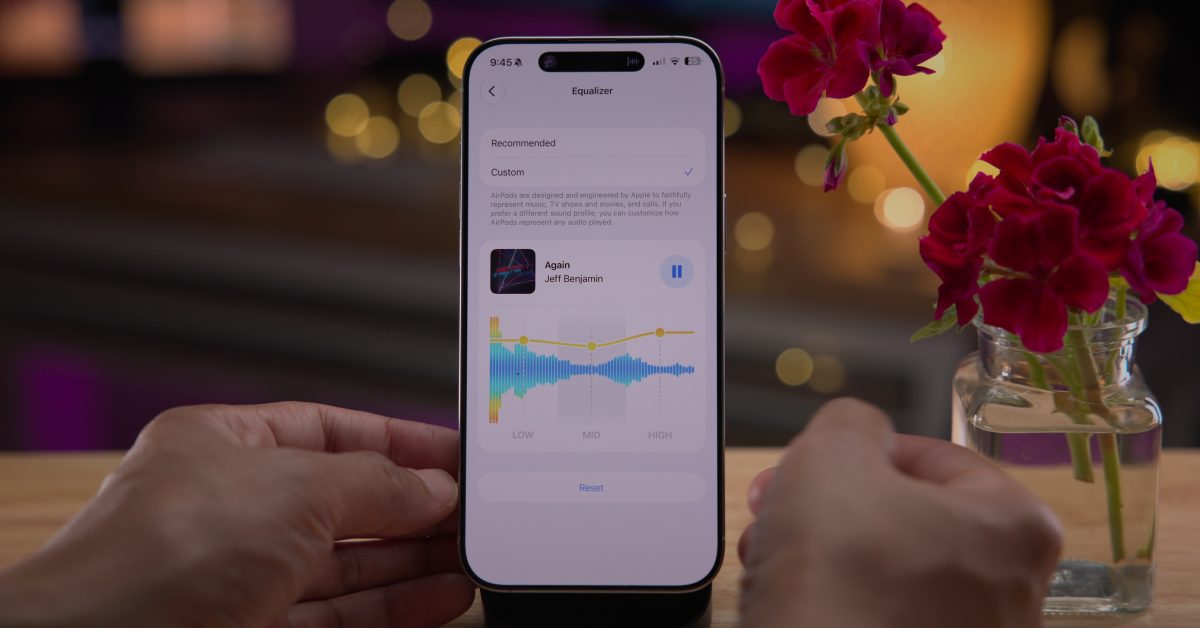
Apple recently released a new public beta firmware for AirPods, alongside the iOS 27 public beta. This update finally brings a much-requested feature to supported AirPods models: custom EQ.
Details of AirPods Public Beta
The AirPods public beta comes with firmware version 9.0.314 and build number 9A314b. This update is compatible with the following AirPods models:
To opt into the AirPods public beta, simply navigate to the Settings app on your iPhone. Once your AirPods are connected, you’ll find a toggle in the Settings app to enable the beta firmware. Subsequently, the betas will download and install when your AirPods are in their charging case and within range of your paired iPhone.
- Open the Settings app
- Tap Bluetooth
- Tap the (i) next to your AirPods
- Scroll down and toggle on “AirPods Beta Updates”
Custom EQ Feature for AirPods
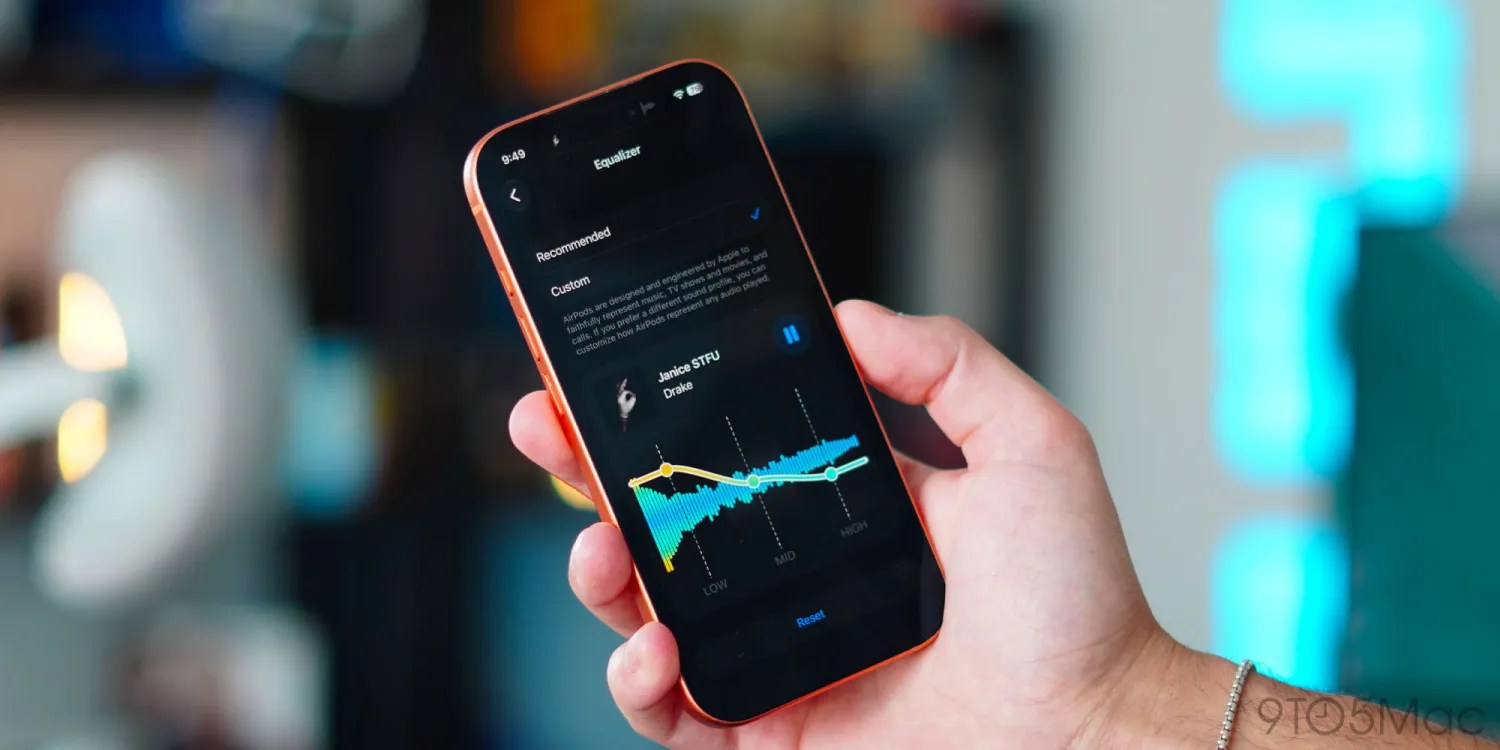
The installation of the AirPods public beta introduces a highly anticipated feature in the Settings app: custom EQ settings.
Users now have the ability to customize the sound profile of their AirPods by adjusting the lows, mids, and highs. Apple explains that while AirPods are designed to faithfully represent audio, users now have the option to personalize the sound output to their preference.
During the adjustment of custom EQ settings, users can play a song from Apple Music directly in the Settings app to experience real-time changes.
Although the custom EQ feature is a basic three-band system, it fulfills a long-awaited demand from users. The feature is accessible in the AirPods section of the Settings app under the “Audio and Routing” menu, and is compatible with all AirPods equipped with an H2 chip.
Other iOS 27 Features for AirPods
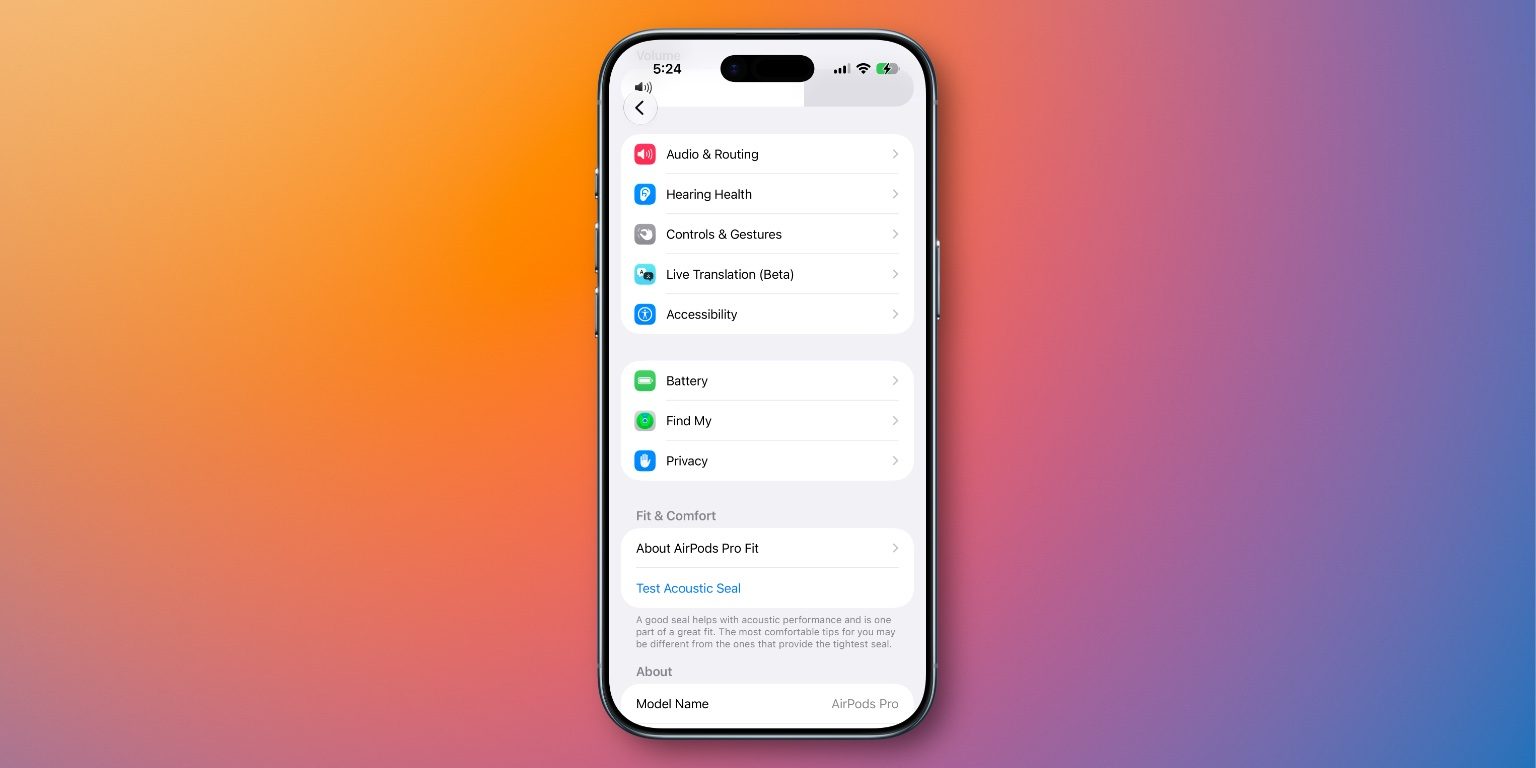
iOS 27 also introduces several other features for AirPods:
- Settings App Redesign: The AirPods interface in the Settings app has been redesigned in iOS 27, with reorganized controls and separate menus for various functions such as Hearing Health, Find My, and Live Translation.
- Adaptive Audio Slider: A new slider in the Settings app allows for more precise adjustment of Adaptive Audio mode.
- GymKit: iOS 27 extends the GymKit experience to iPhone and AirPods Pro 3, eliminating the need for an Apple Watch.
- Precision Finding: The Find My app on Apple Watch now supports Precision Finding to locate AirPods Pro 3.
- Siri AI: AirPods can now interact with Siri AI when connected to a compatible iPhone.
Conclusion
Which of the new AirPods features are you most eager to try out? Will you be experimenting with the custom EQ feature? Share your thoughts in the comments below.
Explore More:
Connect with Chance: Threads, Bluesky, Instagram, and Mastodon.


FTC: We use income earning auto affiliate links. More.






![Apple releases fourth iOS 27.2 developer beta for iPhone [U: Public]](https://bennetttechinnovation.com/wp-content/uploads/2026/10/Apple-unveils-latest-iOS-272-developer-beta-for-iPhone-Now-400x240.jpg)
![Apple releases fourth iOS 27.2 developer beta for iPhone [U: Public]](https://bennetttechinnovation.com/wp-content/uploads/2026/10/Apple-unveils-latest-iOS-272-developer-beta-for-iPhone-Now-80x80.jpg)



Upgrade Alert: HomePod Mini 2 and HomePod 2 Set to Become Default Mac Speakers

Finally Fixing my Wi-Fi – Zyxel Multy X!

Lost in the Living Maze: Unraveling Hidden Terrain Magic Through Copy-Paste

Samsung Unveils Exclusive Galaxy Z Fold 8 BTS Edition

Navigating the Digital World: Expert Tech Advice for Everyman

OMass Therapeutics Secures €275 Million Funding to Advance Innovative Small-Molecule Therapies

The Evolution of Apple’s Smart Home Strategy: A Closer Look at Their Own Devices

Unveiling the Imposter: The Truth Behind the Fake WhatsApp Clone on the Play Store

Digital Protection: How a 1988 Law Could Safeguard Your Online Viewing Experience

EU Takes Action Against Instagram and Facebook for Violating Illegal Content Rules

Warning: Facebook Creators Face Monetization Loss for Stealing and Reposting Videos

Facebook’s New Look: A Blend of Instagram’s Style

Facebook Compliance: ICE-tracking Page Removed After US Government Intervention

Facebook and Instagram to Reduce Personalized Ads for European Users

InstaDub: Meta’s AI Translation Tool for Instagram Videos

Reclaim Your Account: Facebook and Instagram Launch New Hub for Account Recovery

Meta discontinues Messenger apps for Windows and macOS

Breaking Updates: Meta Connect 2025 Unveils Latest Developments
Finally Fixing my Wi-Fi – Zyxel Multy X!

$25,000 Gaming Setup – EVOLUTION!

The Maze Alpha X is HERE!

Cool Tech under $100 – December!

MYSTERY UNBOXING FROM GOOGLE!

TOP 6 Smartphones from Companies you NEVER Expected!

A Surprise Smartphone from EE!

DOOGEE MIX 2 VS DOOGEE MIX 1!

INCREDIBLE Smartphone Gadgets on Amazon!
-
 Facebook12 months ago
EU Takes Action Against Instagram and Facebook for Violating Illegal Content Rules
-
 Facebook1 year ago
Warning: Facebook Creators Face Monetization Loss for Stealing and Reposting Videos
-
 Facebook10 months ago
Facebook’s New Look: A Blend of Instagram’s Style
-
 Facebook1 year ago
Facebook Compliance: ICE-tracking Page Removed After US Government Intervention
-
 Facebook10 months ago
Facebook and Instagram to Reduce Personalized Ads for European Users
-
 Facebook1 year ago
InstaDub: Meta’s AI Translation Tool for Instagram Videos
-
 Facebook11 months ago
Reclaim Your Account: Facebook and Instagram Launch New Hub for Account Recovery
-
 Apple12 months ago
Meta discontinues Messenger apps for Windows and macOS
