
Mobile Tech
Midnight Melodies: Reviving Classic Screen Savers on Mac

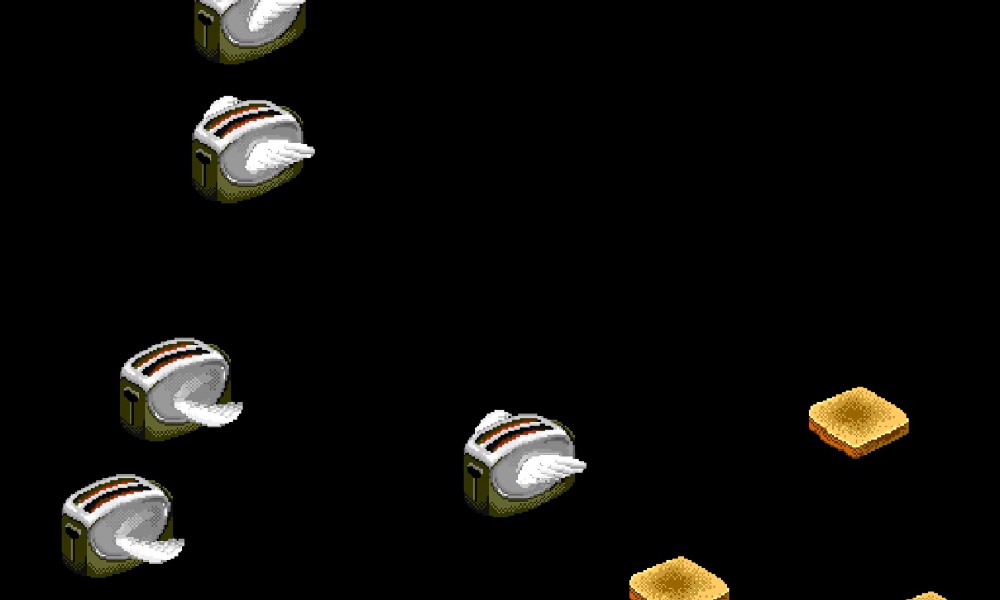
If you belong to a certain generation (like myself), you probably have fond memories of After Dark, the iconic collection of screen savers that were popular in the 1990s, initially designed for the 68k Macintosh and later for Windows PCs. Even if you can’t recall all the screen savers in the collection, I’m sure the image of the flying toasters rings a bell!
Developer Jeff Halter has now introduced Afterglow, a new application that allows you to relive those classic Mac screen savers on your modern Mac (as reported by Daring Fireball).
Exploring After Dark
After Dark was a series of computer screen savers released by Berkeley Systems in 1989 for the Apple Macintosh and in 1991 for Microsoft Windows. The original version spawned multiple sequels, with additional editions named More After Dark and Before Dark, as well as variations themed around popular franchises like Disney, Star Trek, Looney Tunes, Marvel, and The Simpsons.
Arguably, the most famous screen saver module from the original collection was Flying Toasters, featuring 1940s-style chrome toasters with bird-like wings, flying across the screen alongside pieces of toast.
The creator of the Flying Toasters, engineer Jack Eastman, claims that the idea for the screen saver came to him when he saw a toaster in a kitchen during a late-night programming session and imagined adding wings to it. While some users have pointed out the resemblance between the winged toasters and those on the cover of Jefferson Airplane’s 1973 album Thirty Seconds Over Winterland, the origins of the design remain a subject of debate.
Introducing Afterglow
In recent years, experiencing the nostalgia of After Dark required finding vintage hardware or a compatible emulator to run the classic Mac OS architecture. Both options could be cumbersome, as old hardware is prone to unexpected failures and not all emulators could properly handle After Dark.
Fortunately, Afterglow offers a simpler solution. Developed by Jeff Halter, who previously created Lunacy, a Swift app allowing users to play the classic More After Dark game called Lunatic Fringe on modern Macs.
After installing Afterglow by downloading the disk image, mounting it, and moving the app file to the Applications folder, users can launch the app and import and enjoy After Dark modules as their screen saver. While the app doesn’t include any After Dark modules in the download, users can import their existing modules from a hard drive or obtain them from Archive.org.
Halter shared his motivation behind the project:
In the ’90s, Berkeley Systems’ After Dark screen savers brought Flying Toasters, Fish, and Starry Skylines to Macintosh screens everywhere. They served a practical purpose in preventing burn-in on CRT monitors, but also entertained, with animations that could be funny, surreal, beautiful — sometimes gross.
They are works of art worth preserving.
Halter emphasized that Afterglow solely runs the original 68k After Dark module code without any dependencies on ROMs or classic Mac OS. His goal was to preserve software and allow current and future Mac users to enjoy a piece of computing history.
Afterglow offers several features, including full-screen mode, module controls, multimodule support, a CRT shader, a randomizer, 3D box art, a resource inspector, and a DrawMorph editor.
For more information about Afterglow, visit the Afterglow website.
global $wp;
. ‘/’;
?>









International Collaboration: Surrey, Sheffield, and Melbourne Join Forces on £3.2m Project to Create Provably Secure Sandbox for AI Agents

Tech Advisor Announces Samsung Galaxy Phones Now Available on Google Play Store

Exploring the Boundaries of Physical AI: Insights from an Nvidia Veteran Turned Investor

The Latest Updates on Apple’s iPhone Duo

Google Unveils Revolutionary ‘Universal’ Online Shopping Cart for Seamless Shopping Experience

Upgrade Alert: HomePod Mini 2 and HomePod 2 Set to Become Default Mac Speakers

Finally Fixing my Wi-Fi – Zyxel Multy X!

Lost in the Living Maze: Unraveling Hidden Terrain Magic Through Copy-Paste

Samsung Unveils Exclusive Galaxy Z Fold 8 BTS Edition

EU Takes Action Against Instagram and Facebook for Violating Illegal Content Rules

Warning: Facebook Creators Face Monetization Loss for Stealing and Reposting Videos

Facebook’s New Look: A Blend of Instagram’s Style

Facebook Compliance: ICE-tracking Page Removed After US Government Intervention

Facebook and Instagram to Reduce Personalized Ads for European Users

InstaDub: Meta’s AI Translation Tool for Instagram Videos

Reclaim Your Account: Facebook and Instagram Launch New Hub for Account Recovery

Meta discontinues Messenger apps for Windows and macOS

Breaking Updates: Meta Connect 2025 Unveils Latest Developments
Finally Fixing my Wi-Fi – Zyxel Multy X!

$25,000 Gaming Setup – EVOLUTION!

The Maze Alpha X is HERE!

Cool Tech under $100 – December!

MYSTERY UNBOXING FROM GOOGLE!

TOP 6 Smartphones from Companies you NEVER Expected!

A Surprise Smartphone from EE!

DOOGEE MIX 2 VS DOOGEE MIX 1!

INCREDIBLE Smartphone Gadgets on Amazon!
-
 Facebook12 months ago
EU Takes Action Against Instagram and Facebook for Violating Illegal Content Rules
-
 Facebook1 year ago
Warning: Facebook Creators Face Monetization Loss for Stealing and Reposting Videos
-
 Facebook10 months ago
Facebook’s New Look: A Blend of Instagram’s Style
-
 Facebook1 year ago
Facebook Compliance: ICE-tracking Page Removed After US Government Intervention
-
 Facebook10 months ago
Facebook and Instagram to Reduce Personalized Ads for European Users
-
 Facebook1 year ago
InstaDub: Meta’s AI Translation Tool for Instagram Videos
-
 Facebook11 months ago
Reclaim Your Account: Facebook and Instagram Launch New Hub for Account Recovery
-
 Apple12 months ago
Meta discontinues Messenger apps for Windows and macOS
