
Microsoft
Enhanced Precision: The New Surface Mouse with Haptic Feedback and Customizable Action Button

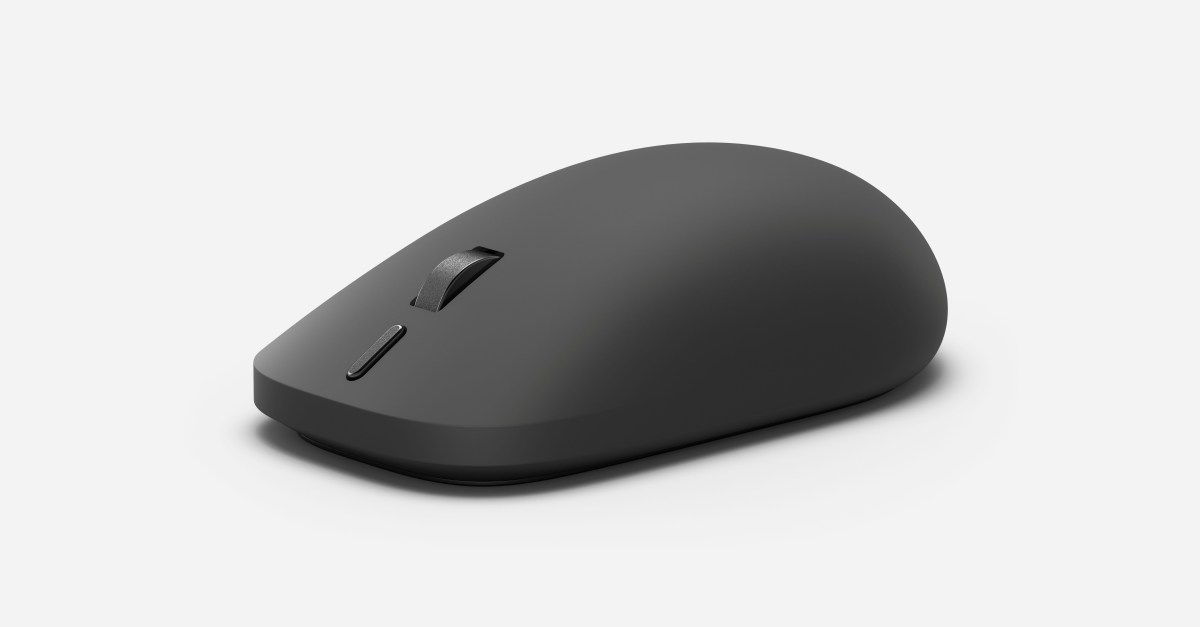
Introducing the Second Generation Surface Mouse with Haptic Feedback Support
Microsoft is set to launch an upgraded version of its popular Surface Mouse next month, featuring haptic feedback support. This innovative feature provides users with a tactile response to various actions, enhancing the overall user experience.
In addition to haptic feedback, the new Surface Mouse will also include a customizable action button for the first time. This button is designed for quick access to Copilot, a feature within the Surface app, but can be configured to work with other shortcuts as well.
The Impact of Haptic Feedback on User Experience
Brett Ostrum, corporate vice president of Surface Devices at Microsoft, highlighted the significance of haptic feedback in the new Surface Mouse. He explained that this feature adds a subtle yet purposeful physical response to actions typically seen on a screen, such as clicks, window snapping, and object alignment.
The haptic feedback functionality extends beyond basic interactions within Windows 11, also enhancing experiences in applications like PowerPoint, Affinity, Concepts, and Filmora. Microsoft’s introduction of haptic feedback support earlier this year has paved the way for enhanced user interactions across various software platforms.
Expanding Support for Haptic Feedback
Microsoft is not alone in its commitment to haptic feedback technology. Logitech, a key player in the industry, has also incorporated haptic feedback in its MX Master 4 mouse. However, Microsoft’s Surface Mouse stands out with its unique design and customizable features.
Furthermore, the upcoming Surface Laptop Ultra will feature a haptic trackpad, further solidifying Microsoft’s dedication to integrating innovative technologies into their devices.
Enhanced Comfort and Connectivity
Recognizing the importance of comfort during extended use, Microsoft has redesigned the Surface Mouse to be more ergonomically friendly. The addition of a soft-touch material on the top surface enhances grip and comfort for all-day productivity.
Moreover, with Bluetooth 6.0 support, users can now effortlessly pair the Surface Mouse with up to three devices, providing seamless connectivity and versatility.












Unveiling the New Adventure Model

Enhanced Precision: The New Surface Mouse with Haptic Feedback and Customizable Action Button

Purdue and University of Illinois Join Forces to Enhance Semiconductor Industry Talent Pool

Unveiling the Secrets of ARC Raiders: Exploring Frozen Trails, Pendola Pass, Weapon Amplification, and Beyond

Samsung Galaxy S25: Unveiling Android 17 in September – Tech Advisor

Top Phones to Run Qualcomm Snapdragon 8 Elite Gen 6 – Tech Advisor’s Picks

Navigating Expansion: Essential Tips for European Founders Entering the US Market (Sponsored)

Unveiling iOS 27.2: Enhanced features, official release date, and much more

THE BEST PHONE HTC EVER MADE?

EU Takes Action Against Instagram and Facebook for Violating Illegal Content Rules

Warning: Facebook Creators Face Monetization Loss for Stealing and Reposting Videos

Facebook’s New Look: A Blend of Instagram’s Style

Facebook Compliance: ICE-tracking Page Removed After US Government Intervention

Facebook and Instagram to Reduce Personalized Ads for European Users

InstaDub: Meta’s AI Translation Tool for Instagram Videos

Reclaim Your Account: Facebook and Instagram Launch New Hub for Account Recovery

Meta discontinues Messenger apps for Windows and macOS

Breaking Updates: Meta Connect 2025 Unveils Latest Developments
THE BEST PHONE HTC EVER MADE?

The Truth about Google?

Samsung S9/ S9+ vs iPhone X vs Galaxy Note 8 Battery Life DRAIN TEST

Samsung S9 / S9+ vs Mate 10 Pro vs iPhone X Charging SPEED Test

The BEST APPS in 2018 – ft. MKBHD, UrAvgConsumer, iJustine + More

The ULTIMATE Smartphone Unboxing!!

HOW GOOD can a $250 Smartphone Camera be!?

10 Android Apps you NEED to try in 2018

They could not believe how cheap this Phone is
-
 Facebook11 months ago
EU Takes Action Against Instagram and Facebook for Violating Illegal Content Rules
-
 Facebook11 months ago
Warning: Facebook Creators Face Monetization Loss for Stealing and Reposting Videos
-
 Facebook10 months ago
Facebook’s New Look: A Blend of Instagram’s Style
-
 Facebook11 months ago
Facebook Compliance: ICE-tracking Page Removed After US Government Intervention
-
 Facebook10 months ago
Facebook and Instagram to Reduce Personalized Ads for European Users
-
 Facebook11 months ago
InstaDub: Meta’s AI Translation Tool for Instagram Videos
-
 Facebook10 months ago
Reclaim Your Account: Facebook and Instagram Launch New Hub for Account Recovery
-
 Apple11 months ago
Meta discontinues Messenger apps for Windows and macOS
