
Security
Unlocking the Future: Windows 11 Build 26220.7051 Introduces ‘Ask Copilot’ Feature

Windows 11 Insider Program Update: New Features Unveiled
The latest Windows 11 build, numbered 26220.7051, is currently being released to testers within the Insider Program. This update brings several enhancements, including the introduction of Ask Copilot on the taskbar.
Previously, accessing Copilot on Windows 11 required using the app or browser. However, the new taskbar feature ‘Ask Copilot’ now allows users to interact with the AI directly from the taskbar.
It is anticipated that this new Copilot taskbar search experience will eventually replace the existing Windows Search UI.
Ask Copilot will initially remain an optional feature that users can opt into. This feature allows users to search the internet, local files, and AI using text and voice.
“You’re always in control. As you type, results appear and update instantly, making it easier than ever to find what you need,” Microsoft explained in a blog post.
Microsoft envisions Copilot becoming a natural way to interact with PCs in the future.
To enable the feature, navigate to Settings > Personalization > Taskbar > Ask Copilot.
New Xbox Experience Available to All
Users with handheld devices can now access the new full-screen experience (FSE), previously exclusive to ASUS ROG Xbox Ally and ROG Xbox Ally X devices. This enhancement aims to enhance gaming performance by allowing users to focus solely on gaming.
To enable FSE, go to Settings > Gaming > Full screen experience and select Xbox as your home app.
Once activated, users can access FSE from Task View and Game Bar or configure their handheld devices to enter full-screen experience mode upon startup.
Shared Audio Support for Bluetooth
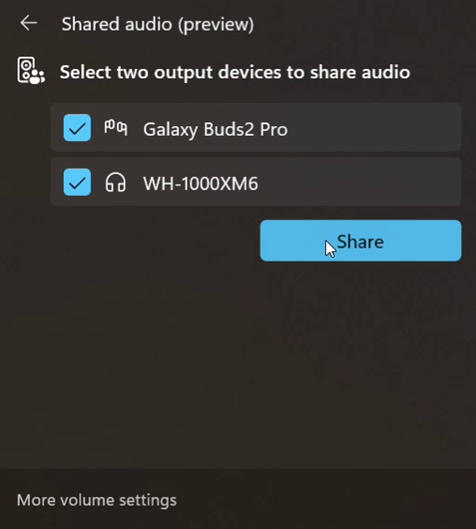
Microsoft is introducing “shared audio,” utilizing Bluetooth LE Audio broadcast technology. This feature allows Windows to transmit audio to two Bluetooth devices simultaneously.
Users can activate the new “Shared audio (preview)” shortcut in quick settings to begin sharing audio.
Additionally, this update improves performance on ARM PCs by enabling support for more 64-bit x86 (x64) applications to run under emulation, resulting in better overall performance.
These features will be available to all users in the upcoming weeks. To try them out immediately, consider joining the Beta or Dev Channel of the Windows Insider Program.









BMW M2 CS Production Concludes with Record-Breaking 2,882 Cars Sold, a 21% Increase from Previous Model

Fortnite Hearts: Keyblade Chaos under the Heart Moon

The Imperfect Brilliance of the Google Pixel 11 Pro

Cycloid Secures Spot in European Commission’s €180 Million Sovereign Cloud Framework after Successful Series A Funding Round

Exploring the Exciting Updates of iOS 27: A Look Beyond Artificial Intelligence

A $50,000 Smartphone for $400?

Ram Trucks Australia Braces for Price Increases Due to Emissions Regulations

Revving Up: Tractor Battle Adventure RPG Expands with Mod Support on Steam Workshop

Troubleshooting Guide: Unable to Access 192.168.0.1

EU Takes Action Against Instagram and Facebook for Violating Illegal Content Rules

Warning: Facebook Creators Face Monetization Loss for Stealing and Reposting Videos

Facebook’s New Look: A Blend of Instagram’s Style

Facebook Compliance: ICE-tracking Page Removed After US Government Intervention

Facebook and Instagram to Reduce Personalized Ads for European Users

InstaDub: Meta’s AI Translation Tool for Instagram Videos

Reclaim Your Account: Facebook and Instagram Launch New Hub for Account Recovery

Meta discontinues Messenger apps for Windows and macOS

Breaking Updates: Meta Connect 2025 Unveils Latest Developments
A $50,000 Smartphone for $400?

Huawei P20 Pro Unboxing!

Huawei P20 Pro vs Samsung S9 Plus!

Huawei P20 vs P20 Pro vs iPhone 8 Plus vs S9 Battery Drain Test!

10 Android Mods that Change Everything

I used the first Android Phone in the World.

DOOGEE MIX 4 UNBOXING (PROTOTYPE)!

MYSTERY UNBOXING FROM SAMSUNG!

The Truth about Huawei P20 Pro – REAL Review
-
 Facebook11 months ago
EU Takes Action Against Instagram and Facebook for Violating Illegal Content Rules
-
 Facebook11 months ago
Warning: Facebook Creators Face Monetization Loss for Stealing and Reposting Videos
-
 Facebook9 months ago
Facebook’s New Look: A Blend of Instagram’s Style
-
 Facebook11 months ago
Facebook Compliance: ICE-tracking Page Removed After US Government Intervention
-
 Facebook9 months ago
Facebook and Instagram to Reduce Personalized Ads for European Users
-
 Facebook11 months ago
InstaDub: Meta’s AI Translation Tool for Instagram Videos
-
 Facebook10 months ago
Reclaim Your Account: Facebook and Instagram Launch New Hub for Account Recovery
-
 Apple11 months ago
Meta discontinues Messenger apps for Windows and macOS
