
Mobile Tech
Withings Introduces Enhanced Cycle Tracking Feature on ScanWatch Light

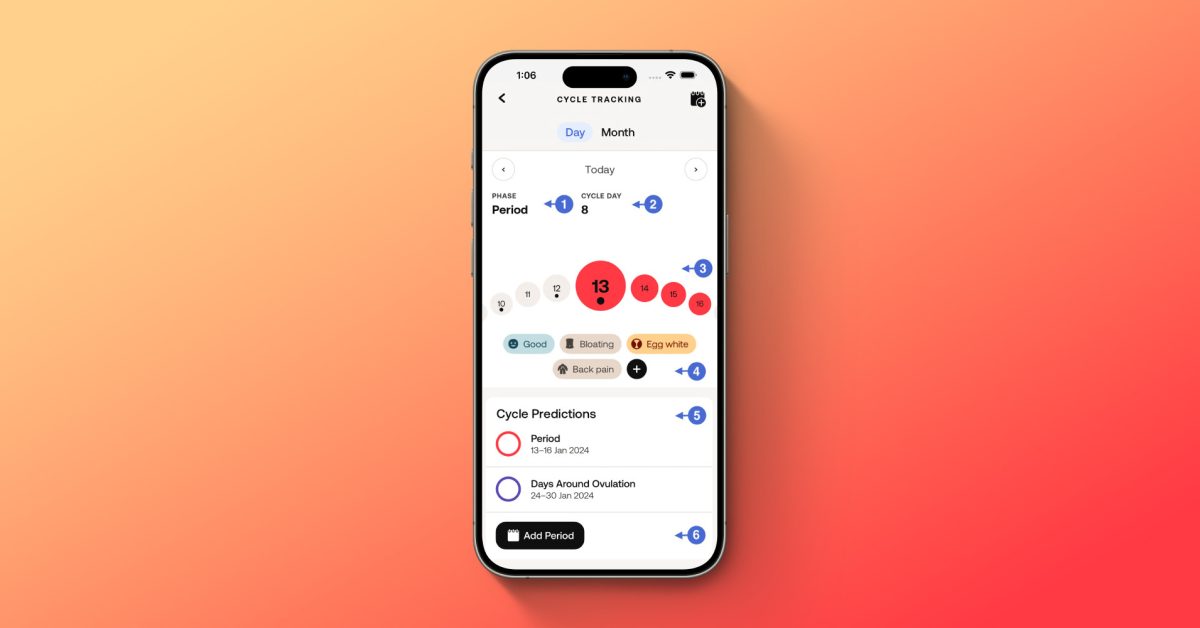
Withings has introduced cycle tracking capabilities for its users through the ScanWatch Light, a hybrid smartwatch. This feature not only allows users to track their menstrual cycles on the wearable device but also within the Withings app itself. Let’s delve into the details below.
The ScanWatch Light by Withings enables users to input cycle data directly from their wrist. Additionally, users can now monitor their periods within the Withings app. While other companies like Fitbit, Apple, and Garmin have had cycle tracking functionalities for years, Withings has finally caught up with this essential health feature.
Understanding your menstrual cycle can offer valuable insights into your overall health. Withings emphasizes the importance of tracking cycle patterns, symptoms, and phases, as they can be indicators of any irregularities or changes.
Period irregularities and changes are very common. Tracking your symptoms, phases, and the length of your menstrual cycle month after month can help you understand your unique cycle patterns.
Furthermore, Withings suggests that comparing cycle tracking data with other health metrics like heart rate, respiratory rate, or sleep quality can reveal connections between reproductive health and overall well-being.
It’s important to monitor your period because significant changes may be linked to other health issues. Comparing your menstrual cycle data with your other metrics like heart rate, respiratory rate, or sleep quality can help you recognize connections between your reproductive health and the rest of your body’s systems.
By analyzing various metrics together, users can gain a comprehensive understanding of their bodies and health status.
How to Enable Cycle Tracking in the Withings App
Accessing cycle tracking within the Withings app can be done through two methods. You can either navigate through the Tutorials section or customize your screen settings:
- Open the Withings app
- Go to Devices > ScanWatch Light
- Tap on Tutorials
- Scroll down until you find “Welcome to Cycle Tracking”
Alternatively, you can activate cycle tracking through the Customize Screens section:
- Open the Withings app
- Go to Devices > ScanWatch Light
- Navigate to All Settings > Display Options > Customize Screens
- Tap on Activate next to “Cycle Tracking”
Upon accessing cycle tracking, you will be prompted to provide relevant information to enhance the accuracy of the collected data.
For detailed instructions on utilizing Withings’ cycle tracking feature, refer to their support page.
Exploring More Withings Features:


FTC: We use income earning auto affiliate links. More.










Microsoft Executive’s Warning: The Decline of App Pricing Power

Football Manager 27: Get Ready for Kickoff with the Ultimate Match Day Experience Trailer!

Google Pixel 11a: A Closer Look at the Familiar Design

Cerebras Systems’ Andrew Feldman: A Disruptive Force in 2026

The Halide Camera App Revolutionizes iPhone 18 Pro Photography with Full Aperture Control

Google Explores Paid Partnerships with Publishers for AI-Driven Search Results

Siri Home Hub: Apple’s Latest Smart Assistant Set to Debut on October 13

Revolutionizing the Road: BMW i3 Series Unleashes Impressive Performance and Extended Driving Range in 2027

Sneak Peek: Vibrant New Shades Unveiled for Amazon’s Latest Budget-Friendly Kindle

EU Takes Action Against Instagram and Facebook for Violating Illegal Content Rules

Warning: Facebook Creators Face Monetization Loss for Stealing and Reposting Videos

Facebook’s New Look: A Blend of Instagram’s Style

Facebook Compliance: ICE-tracking Page Removed After US Government Intervention

Facebook and Instagram to Reduce Personalized Ads for European Users

InstaDub: Meta’s AI Translation Tool for Instagram Videos

Reclaim Your Account: Facebook and Instagram Launch New Hub for Account Recovery

Meta discontinues Messenger apps for Windows and macOS

Breaking Updates: Meta Connect 2025 Unveils Latest Developments

Huawei P Smart – Huawei’s new Killer Budget Smartphone!

MYSTERY Package from Xiaomi – HUGE UNBOXING!

5 ways you’re using your Smartphone wrong.

THE INSANE DUAL BATTERY SMARTPHONE!

ELEPHONE U PRO UNBOXING AND REVIEW!

Mrwhosetheboss – 1 Million Subscribers

The Surprising TRUTH about Samsung – 15 things you did not know.

10 Incredible Android DIY Hacks!

Does a Cheap 2018 Smartphone beat a 2013 Flagship?
-
 Facebook11 months ago
EU Takes Action Against Instagram and Facebook for Violating Illegal Content Rules
-
 Facebook12 months ago
Warning: Facebook Creators Face Monetization Loss for Stealing and Reposting Videos
-
 Facebook10 months ago
Facebook’s New Look: A Blend of Instagram’s Style
-
 Facebook12 months ago
Facebook Compliance: ICE-tracking Page Removed After US Government Intervention
-
 Facebook10 months ago
Facebook and Instagram to Reduce Personalized Ads for European Users
-
 Facebook12 months ago
InstaDub: Meta’s AI Translation Tool for Instagram Videos
-
 Facebook10 months ago
Reclaim Your Account: Facebook and Instagram Launch New Hub for Account Recovery
-
 Apple11 months ago
Meta discontinues Messenger apps for Windows and macOS
