
Effortless Form Completion: Chrome’s New Auto-Fill Feature Streamlines Online Tasks

Google Chrome Enhances Autofill Feature for Mobile and Desktop Users
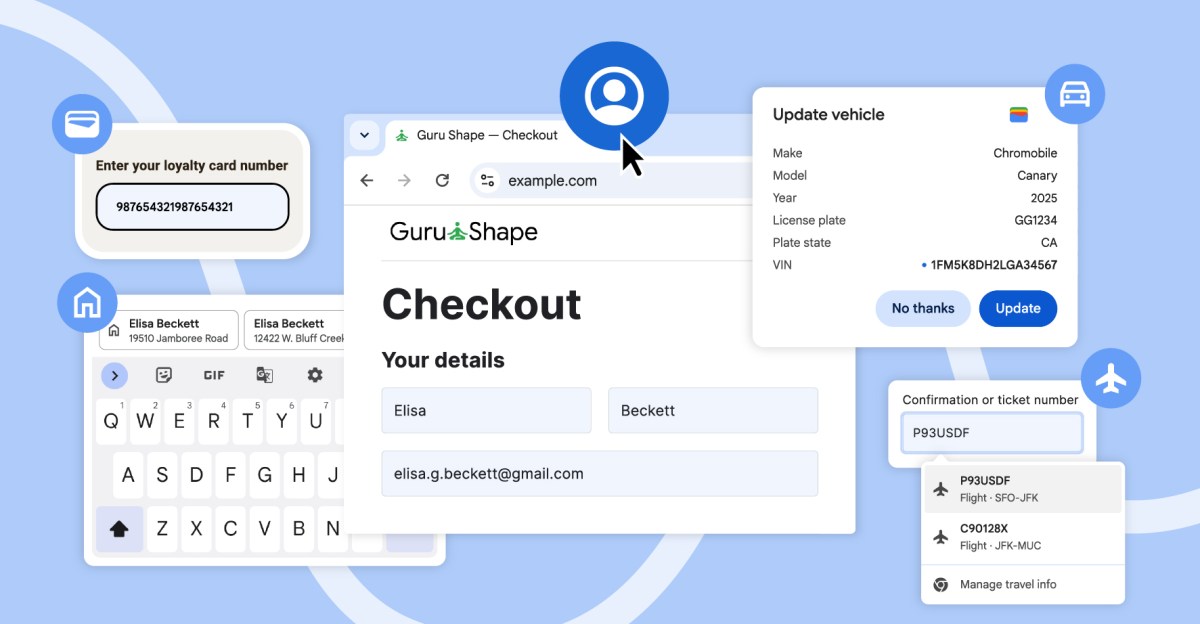
Google has recently announced significant improvements to the autofill feature on both the mobile and desktop versions of Chrome. These updates aim to provide users with easier access to their data stored in Google Wallet and streamline the process of selecting the correct information when filling out online forms.
Users can now enjoy autofill capabilities for their name, email address, as well as saved work and home addresses directly from their Google Account while using Chrome on desktop, iOS, and Android devices.
In the Android version of Chrome, Google is expanding autofill suggestions to provide more context and differentiation. The suggestions will now display two lines of information, such as addresses of contacts with the same name, making it easier for users to select the correct one.
Furthermore, Google is enhancing Chrome’s autofill capabilities for international addresses, including Mexican descriptions that often include references to two cross-streets. Support for “phonetic names in Japan” is also on the horizon.
Last month, Chrome introduced the ability to autofill details like passport numbers, driver’s licenses, loyalty cards, and vehicle information for desktop users who enabled “enhanced autofill.” Now, both desktop and Android users can access data from their travel bookings saved in Google Wallet, making online bookings, such as airport car rentals, a seamless process.












Revolutionizing Home Entertainment: The Fire TV Stick 4K’s Power-Saving Feature

Arkansas Semiconductor Institute: Pioneering Innovation in Technology

The Isle of Beautiful Monsters: A First-person RPG Adventure

The Genius Unhackable Samsung Phone: Unveiling Two Major Weaknesses

Google Pixel Watch 5: Pour Another Round

Navigating the Real Estate Market: Essential Guidelines for Buyers and Sellers

Google Unveils Powerful Gemini 4, Reserved for Trusted Cyber Defenders

Beware: DarkSword Malware Hidden in Fake $500 iPhone Duo Page

Unboxing the First Ever Samsung Galaxy S!!

EU Takes Action Against Instagram and Facebook for Violating Illegal Content Rules

Warning: Facebook Creators Face Monetization Loss for Stealing and Reposting Videos

Facebook’s New Look: A Blend of Instagram’s Style

Facebook Compliance: ICE-tracking Page Removed After US Government Intervention

Facebook and Instagram to Reduce Personalized Ads for European Users

InstaDub: Meta’s AI Translation Tool for Instagram Videos

Reclaim Your Account: Facebook and Instagram Launch New Hub for Account Recovery

Meta discontinues Messenger apps for Windows and macOS

Breaking Updates: Meta Connect 2025 Unveils Latest Developments
Unboxing the First Ever Samsung Galaxy S!!

Huawei P Smart – Huawei’s new Killer Budget Smartphone!

MYSTERY Package from Xiaomi – HUGE UNBOXING!

5 ways you’re using your Smartphone wrong.

THE INSANE DUAL BATTERY SMARTPHONE!

ELEPHONE U PRO UNBOXING AND REVIEW!

Mrwhosetheboss – 1 Million Subscribers

The Surprising TRUTH about Samsung – 15 things you did not know.

10 Incredible Android DIY Hacks!
-
 Facebook11 months ago
EU Takes Action Against Instagram and Facebook for Violating Illegal Content Rules
-
 Facebook12 months ago
Warning: Facebook Creators Face Monetization Loss for Stealing and Reposting Videos
-
 Facebook10 months ago
Facebook’s New Look: A Blend of Instagram’s Style
-
 Facebook12 months ago
Facebook Compliance: ICE-tracking Page Removed After US Government Intervention
-
 Facebook10 months ago
Facebook and Instagram to Reduce Personalized Ads for European Users
-
 Facebook12 months ago
InstaDub: Meta’s AI Translation Tool for Instagram Videos
-
 Facebook10 months ago
Reclaim Your Account: Facebook and Instagram Launch New Hub for Account Recovery
-
 Apple12 months ago
Meta discontinues Messenger apps for Windows and macOS
