
Mobile Tech
Ending Support: macOS 27 Kills Apple Time Capsule

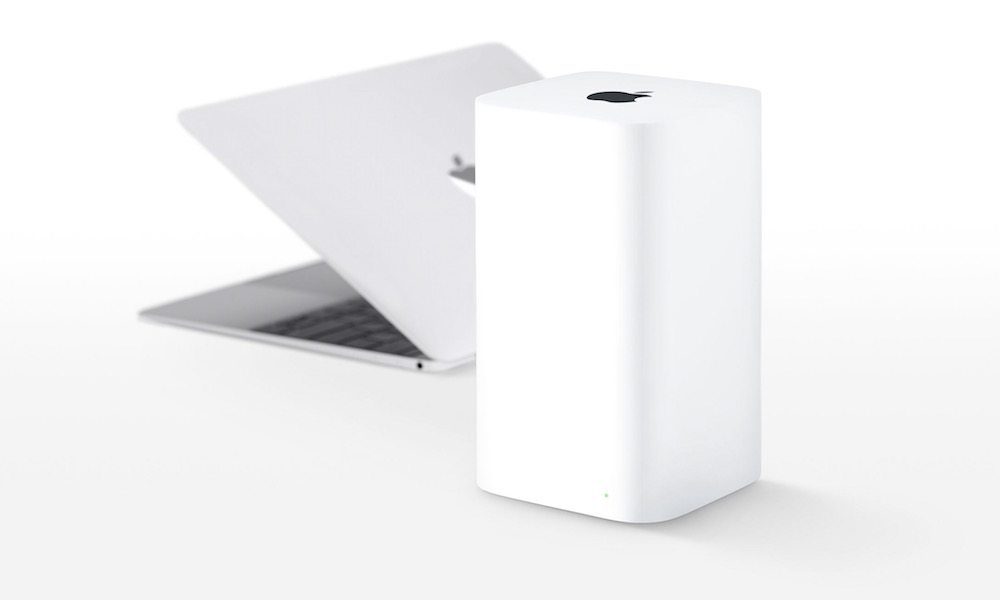
With macOS 27 Golden Gate, Apple is drawing some hard lines in the sand for its legacy. Not only does this year’s big release close the book on the Intel Generation, but it’s also marking the official end of a device that was once the pinnacle of a now-forgotten Apple product family: the AirPort Time Capsule.
If you’ve only come to the world of Apple devices in recent years, you may find it surprising that Apple was once in the router business. Yes, that’s right: for years, the company that makes your iPhone and Mac also made a surprisingly solid lineup of Wi-Fi routers, from the pocketable $99 AirPort Express to the $299 AirPort Time Capsule with a built-in hard drive to store your Mac’s Time Machine backups.
Many people don’t realize that Apple was actually a pioneer that broke new ground in consumer Wi-Fi. The company debuted its first AirPort router in 1999 at Macworld New York to complement its brand-new iBook, the first mass consumer product to offer wireless networking — a pretty big deal in an era when the vast majority of people were still using wired Ethernet connections and had never even heard the term “Wi-Fi.”
When Apple Ruled the Airwaves
In fact, the terminology was so unknown at the time that “AirPort” wasn’t just the brand name of Apple’s new routers; it was what Apple called its wireless connectivity. The iBook had “AirPort” capabilities that allowed it to connect to an “AirPort” router, and Apple released “AirPort” cards that could be used to upgrade other Macs. This was so revolutionary that it was presented as one of the first of Steve Jobs’ famous “one more thing” keynote epilogues. Watching Jobs walking around the stage and surfing the web on an iBook with no wires was in the same class as watching him pull the iPod nano out of his jeans pocket and slide the MacBook Air out of a manila envelope.
Apple followed that original AirPort up in 2003 with the AirPort Extreme, offering a bump from the 11 Mbps speeds of the original AirPort (which used the 802.11b protocol) to a whopping 54 Mbps (thanks to the newer 802.11g specification). Then came the AirPort Express, a little base station that became legendary due to its support for streaming music from a Mac using a new “AirTunes” protocol — the direct precursor to what we know today as AirPlay. This was the state of the art for digital whole-home audio in 2004, and I still have a half-dozen original AirPort Express units in my basement from the days when I deployed them around my house solely to be able to stream music in every room.
The AirPort family continued to grow from there as new protocols and technologies arrived. From 2008 until 2013, the advent of even more powerful 802.11n and 802.11ac standards — now retconned as Wi-Fi 4 and Wi-Fi 5 today — led to two new generations of AirPort Express and ultimately the redesigned tower-like AirPort Extreme.
In 2008, a few months after Apple debuted Time Machine in Mac OS X Leopard, it released the first Time Capsule — a version of the AirPort Extreme with a built-in hard drive designed to serve as an appliance-style destination for Mac backups. The original flat version mirrored the 2007 AirPort Extreme, and looked a lot like the Mac mini and Apple TV of the day (before Apple shrunk its set-top box into a smaller black puck-sized device), and came in 500 GB and 1 TB capacities.
When Apple released the redesigned 802.11ac (“Wi-Fi 5”) AirPort Extreme and AirPort Time Capsule in 2013, they adopted a sleeker tower form factor, presumably to help with antenna placement and range. The Time Capsule remained visually identical except for the hard drive inside, which had grown to 2 TB and 3 TB options in the years since the original launched. This was also the point at which it gained the “AirPort” prefix.
Sadly, the AirPort Time Capsule was the last of the AirPort base stations. There would never be another. While Apple continued to support all its current AirPort routers with firmware updates, sources told Bloomberg’s Mark Gurman in late 2016 that Apple had shut down its wireless router division to focus on more popular products. Apple made it official less than two years later, announcing that it was discontinuing all AirPort base station products, and would only be selling off existing inventory. The AirPort Express got one last 2018 firmware update to add AirPlay 2 support after that, but inventory officially dried up by late 2018, and the AirPort products became the stuff of legends.
Like most discontinued products, the fact that Apple wasn’t selling these devices didn’t mean they became doorstops for anyone who already had one. Although the relatively dated Wi-Fi protocols meant the AirPort Express and Time Capsule were quickly superseded by better routers, especially as Wi-Fi 6 became mainstream, the AirPort Express still made for a great AirPlay audio adapter, and many folks hung onto their Time Capsules to use for Mac backups and other network-attached storage tasks.
Enter macOS 27: The Final Blow to AFP
That era will now be coming to an end for anyone upgrading to macOS 27 Golden Gate this year, which is removing the Apple Filing Protocol (AFP) — a key legacy protocol the AirPort Time Capsule relied on to do its thing.
As the name suggests, AFP was a proprietary network protocol that Apple invented in the late eighties, when Unix and NetWare servers roamed the earth. As with its foray into wireless technologies, AFP was Apple’s attempt to have a foothold in the networking space at a time when it was building dedicated Mac server hardware in the form of the Xserve lineup.
Those ambitions slowly died on the vine as Microsoft became more dominant in the networking space.
Apple discontinued its Xserve in 2010 and the “server” configurations of the Mac mini in 2014. The Mac OS X Server, later known as macOS Server, was gradually phased out until Apple officially ended its support in 2022.
Similarly, AFP (Apple Filing Protocol) also faded into obscurity over the years. In 2013, OS X 10.9 Mavericks shifted to Microsoft’s SMB (Server Message Block) protocol as the default file-sharing method, leading to a decrease in AFP usage. By 2020, macOS 11 Big Sur removed AFP server capabilities, leaving modern Macs to rely solely on SMB for file sharing. macOS 15 Sequoia marked the beginning of the end for AFP by officially deprecating it.
With the release of macOS 27 Golden Gate, Apple has completely removed AFP. This means that network Time Machine backups on macOS 27 will now require a server that supports the latest SMB protocols.
For those looking to revive their Time Capsules, a GitHub project called TimeCapsuleSMB aims to add modern SMB support to the device. While the Time Capsule originally supported the outdated SMBv1 protocol, which has since been disabled due to security issues, the GitHub project seeks to upgrade the existing SMB stack. However, this is a challenging task as Apple has not released the source code for the Time Capsule.
If you are still using an AirPort Time Capsule, which was last sold in 2018, it may be time to consider upgrading to a newer solution. The Time Capsule has served its purpose well since its release in 2013, but newer options may offer better support and features.










Exploring the Exciting Updates of iOS 27: A Look Beyond Artificial Intelligence

A $50,000 Smartphone for $400?

Ram Trucks Australia Braces for Price Increases Due to Emissions Regulations

Revving Up: Tractor Battle Adventure RPG Expands with Mod Support on Steam Workshop

Troubleshooting Guide: Unable to Access 192.168.0.1

Choosing the Right AI: Ensuring Trust in Multi-Model Translation Systems

Friday Night Baseball Madness: iPhone 18 Pro Edition

Partnership Potential: JAC & Huawei in Talks to Produce Electric Maserati Vehicles

Grand Theft Auto VI: The Soundtrack – Limited Edition Physical Release

EU Takes Action Against Instagram and Facebook for Violating Illegal Content Rules

Warning: Facebook Creators Face Monetization Loss for Stealing and Reposting Videos

Facebook’s New Look: A Blend of Instagram’s Style

Facebook Compliance: ICE-tracking Page Removed After US Government Intervention

Facebook and Instagram to Reduce Personalized Ads for European Users

InstaDub: Meta’s AI Translation Tool for Instagram Videos

Reclaim Your Account: Facebook and Instagram Launch New Hub for Account Recovery

Meta discontinues Messenger apps for Windows and macOS

Breaking Updates: Meta Connect 2025 Unveils Latest Developments
A $50,000 Smartphone for $400?

Huawei P20 Pro Unboxing!

Huawei P20 Pro vs Samsung S9 Plus!

Huawei P20 vs P20 Pro vs iPhone 8 Plus vs S9 Battery Drain Test!

10 Android Mods that Change Everything

I used the first Android Phone in the World.

DOOGEE MIX 4 UNBOXING (PROTOTYPE)!

MYSTERY UNBOXING FROM SAMSUNG!

The Truth about Huawei P20 Pro – REAL Review
-
 Facebook11 months ago
EU Takes Action Against Instagram and Facebook for Violating Illegal Content Rules
-
 Facebook11 months ago
Warning: Facebook Creators Face Monetization Loss for Stealing and Reposting Videos
-
 Facebook9 months ago
Facebook’s New Look: A Blend of Instagram’s Style
-
 Facebook11 months ago
Facebook Compliance: ICE-tracking Page Removed After US Government Intervention
-
 Facebook9 months ago
Facebook and Instagram to Reduce Personalized Ads for European Users
-
 Facebook11 months ago
InstaDub: Meta’s AI Translation Tool for Instagram Videos
-
 Facebook10 months ago
Reclaim Your Account: Facebook and Instagram Launch New Hub for Account Recovery
-
 Apple11 months ago
Meta discontinues Messenger apps for Windows and macOS
