
Mobile Tech
Enhanced AirPods: Unveiling the Exciting Upgrades of iOS 27

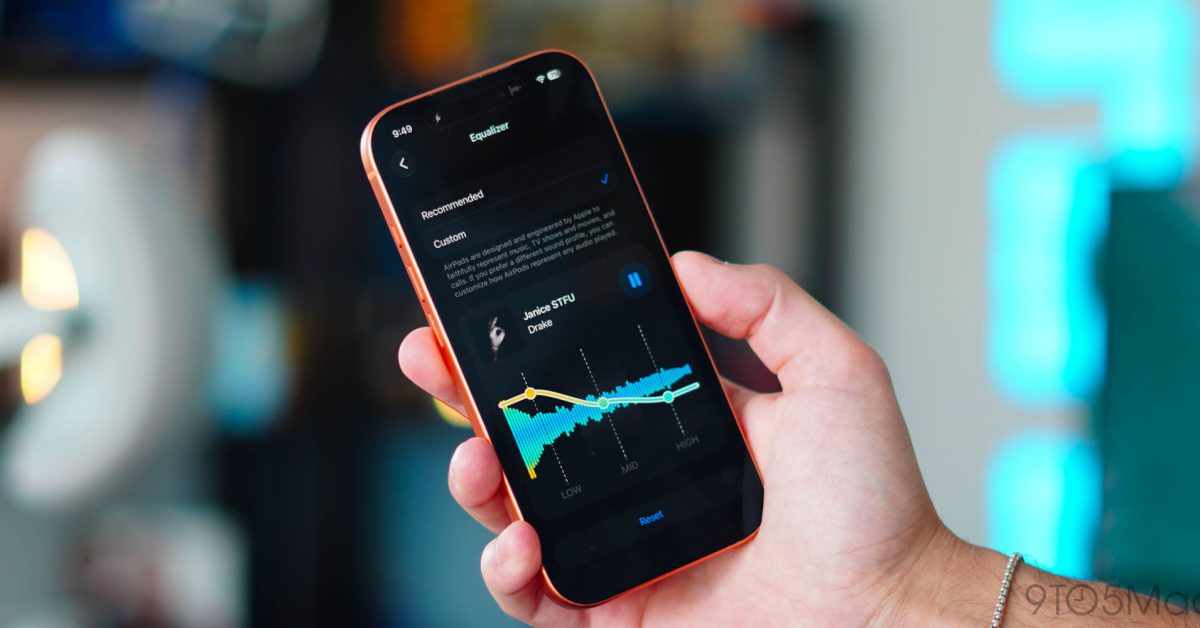
Since its release in 2016, AirPods have exploded in popularity. I feel like you cannot go anywhere without seeing them in people’s ears. AirPods have become one of Apple’s most impactful products, and they might even be my most-used Apple devices. I use them in every scenario, from just listening to media to phone calls, workouts, live translation, and transparency. There is always something I am using them for. But one feature was missing that Apple finally added with iOS 27. So let’s talk about the new features of the AirPods and how to install the beta update.
Be sure to check out our hands-on video below, which walks through how to install the beta update and all the new features!
How to install the beta on AirPods
Unlike iOS 27 developer beta, installing the beta firmware on AirPods is actually a bit tricky. There is no dedicated update button. But if you follow the instructions below, you can have the update within a few hours.
- Make sure your device is running the latest iOS 27 beta software
- Connect AirPods to your phone
- Open settings
- Tap on AirPods settings near the top of the screen
- Scroll to the bottom and select AirPods Beta Updates
- Enable the beta updates
- Place your AirPods and your iPhone on a charger, and it will automatically install the new beta firmware
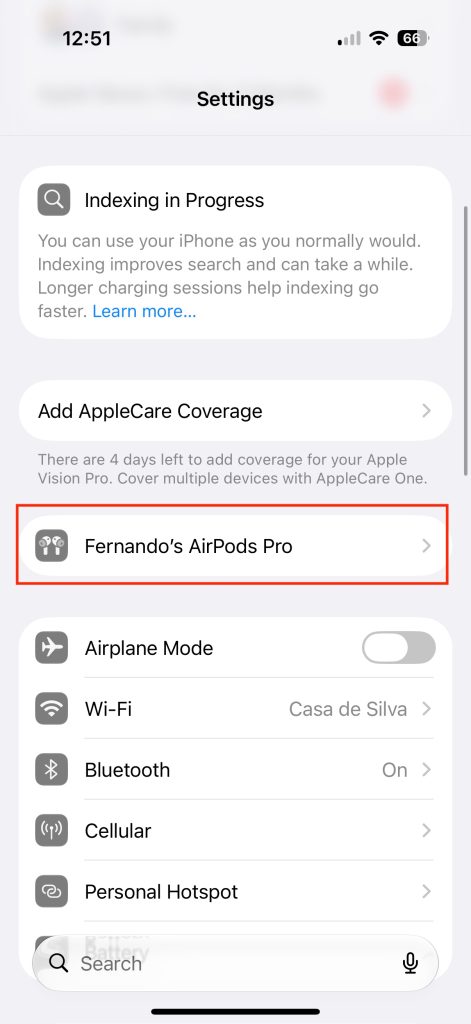
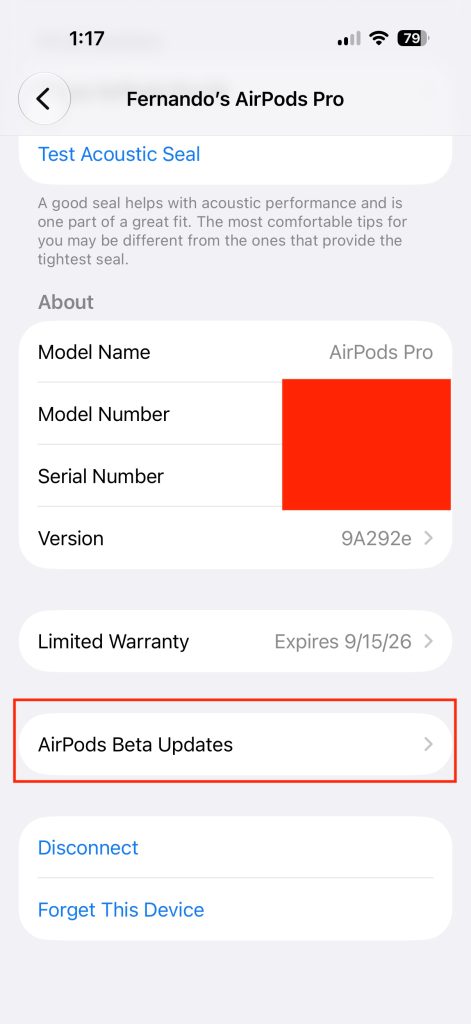
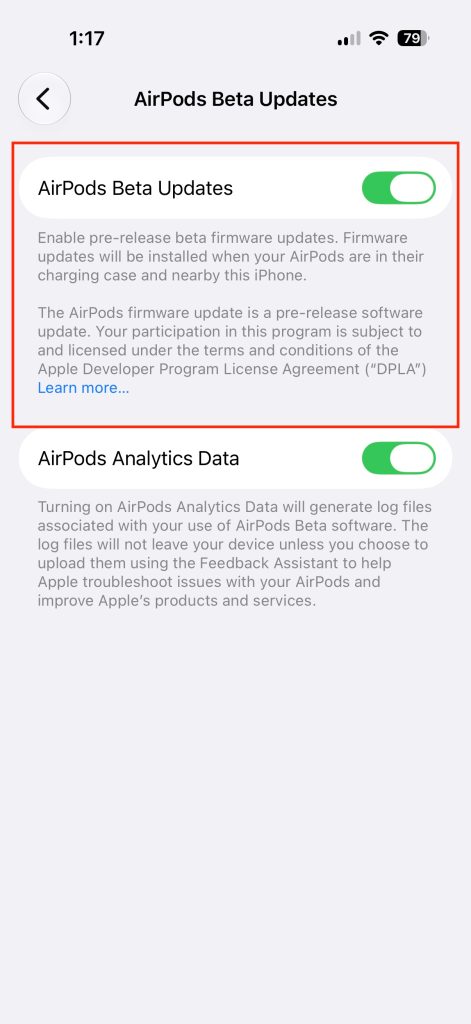
The best bet is to just let it happen overnight instead of constantly checking it. I put it on my new Nomad Stand One and when i woke up my AirPods Pro 3 were ready to go with the new update.
In terms of supported AirPods, they are listed below:
Other AirPods will technically get the same firmware update, but only the H2-equipped AirPods will get the features we mention below.
Custom EQ is here
By far the biggest addition was the support for a custom EQ. For years, Apple has omitted this feature. They mention that they have always set the best EQ for each media genre with their adaptive EQ, but this is the first time we have control over it.
Here are the steps to use the features mentioned:
**Custom EQ settings for AirPods:**
1. Open Settings
2. Tap on your AirPods settings
3. Select Audio and Routing
4. Tap Equalizer
5. Tap Custom
6. Adjust Low, Mid, and High frequencies
**Heart rate syncing with gym equipment:**
1. Make sure you have the AirPods Pro 3 on
2. Ensure the gym equipment is GymKit enabled
3. Tap your iPhone to the equipment
4. Heart rate info will sync to the machine from the heart rate data your AirPods Pro 3 gather
**Precision Finding on AirPods:**
1. Open the Find My app on iPhone or Apple Watch
2. Select your AirPods
3. Tap Find Nearby
4. Use Precision Finding to guide you to your AirPods
These features are exclusive to specific Apple products and offer convenient functionalities for users.
Key Takeaways from AirPods Pro Updates
The latest improvements to AirPods Pro may not have stolen the show at WWDC, but they are definitely worth noting. One of the standout upgrades is the introduction of custom EQ, which enhances the overall AirPods experience significantly. As of now, you can snag a pair of AirPods Pro 3 on Amazon for just $179, a $70 discount from the original Apple retail price. If you’ve been thinking about upgrading your AirPods or are in the market for a new pair, this deal is too good to pass up. Additionally, the new AirPods Max 2 are also on sale for $499!
Another exciting development is the evolution of SiriAI in conjunction with AirPods. How do you think this integration will unfold? Share your thoughts in the comments below!
Check Out These Amazing Apple Deals


FTC: We use income earning auto affiliate links. More.

Transform the following:
“I want to go to the store to buy some groceries.”
into:
“I need to visit the store to purchase groceries.”




Blizzard’s Battle.net: A Unique Player in the Gaming Storefront Landscape
The Ultimate Durability: Redmi Note 17 Pro Max Review

Mastering the Art of Creating Long-Term AI Defenses: A Guide from Disrupt 2026

Insights from Microsoft AI on the Humanist AI Code of Conduct

Revolutionizing Group Travel: Vox Group’s AI-Powered Translation Technology

Unusual Sight: Quadruple Pipes Spotted in Munich

Wolverine: A Divisive Marvel Adventure

Galaxy Tab S12: Confirmed Release Date Revealed – Tech Advisor

Fitbit Charge 7: The Next Evolution in Fitness Tracking – Tech Advisor

EU Takes Action Against Instagram and Facebook for Violating Illegal Content Rules

Warning: Facebook Creators Face Monetization Loss for Stealing and Reposting Videos

Facebook Compliance: ICE-tracking Page Removed After US Government Intervention

Facebook’s New Look: A Blend of Instagram’s Style

Facebook and Instagram to Reduce Personalized Ads for European Users

InstaDub: Meta’s AI Translation Tool for Instagram Videos

Reclaim Your Account: Facebook and Instagram Launch New Hub for Account Recovery

Meta discontinues Messenger apps for Windows and macOS

Breaking Updates: Meta Connect 2025 Unveils Latest Developments

The LG G7 has a Big Problem.

The most Beautiful Android Games you’ve never played.

Charge your Smartphone in 5 Minutes – How Batteries are about to Change!

10 CHEAP Smartphone Gadgets that Change Everything.

Huawei Mobile Cloud – The Huawei P20 Feature you didn’t know about!

PUBG MOBILE on Android – Disastrous or Revolutionary?

Why you should buy the Galaxy S8 right now.

Customize your Android Smartphone!

Xiaomi Mi Mix 2S Review – Beauty and the BEAST.
-
 Facebook11 months ago
EU Takes Action Against Instagram and Facebook for Violating Illegal Content Rules
-
 Facebook11 months ago
Warning: Facebook Creators Face Monetization Loss for Stealing and Reposting Videos
-
 Facebook11 months ago
Facebook Compliance: ICE-tracking Page Removed After US Government Intervention
-
 Facebook9 months ago
Facebook’s New Look: A Blend of Instagram’s Style
-
 Facebook9 months ago
Facebook and Instagram to Reduce Personalized Ads for European Users
-
 Facebook11 months ago
InstaDub: Meta’s AI Translation Tool for Instagram Videos
-
 Facebook9 months ago
Reclaim Your Account: Facebook and Instagram Launch New Hub for Account Recovery
-
 Apple11 months ago
Meta discontinues Messenger apps for Windows and macOS
