
Tech News
Mastering Android App Development: The Ultimate Guide

Are more Android apps necessary in today’s world?
Whether or not the world needs another Android app depends on the uniqueness and usefulness of your creation. Despite the saturation in the Google Play store with an estimated 2.3 million apps, there are still untapped niche audiences waiting for innovative solutions.
Creating an Android app has become more accessible than ever, thanks to tools like Google Gemini and Base44. The beauty of it all is that you can design and build your app directly on your Android phone without any coding skills required. Here’s how you can do it.
1. Brainstorm an innovative idea
The first step is coming up with a unique concept for your app. To avoid getting lost in the sea of existing apps, focus on addressing a specific need or pain point. For instance, I thought about simplifying the process of taking notes while test-driving cars, leading to the idea of an app that streamlines this task.
Using Google Gemini, I explored various ideas based on this premise. By refining my search to exclude technical suggestions and concentrate solely on app ideas, I was able to generate valuable insights for my project.
With a clear vision of the app’s scope and purpose, I delved into the creative process of vibe coding to bring my concept to life.
2. Utilize an AI app builder for development
The AI landscape offers a plethora of tools for app development, ranging from technical to user-friendly options. After testing out an AI app builder called Replit and finding it too complex for my needs, I switched to Base44 for its simplicity and efficiency.
Creating an Android app has never been easier
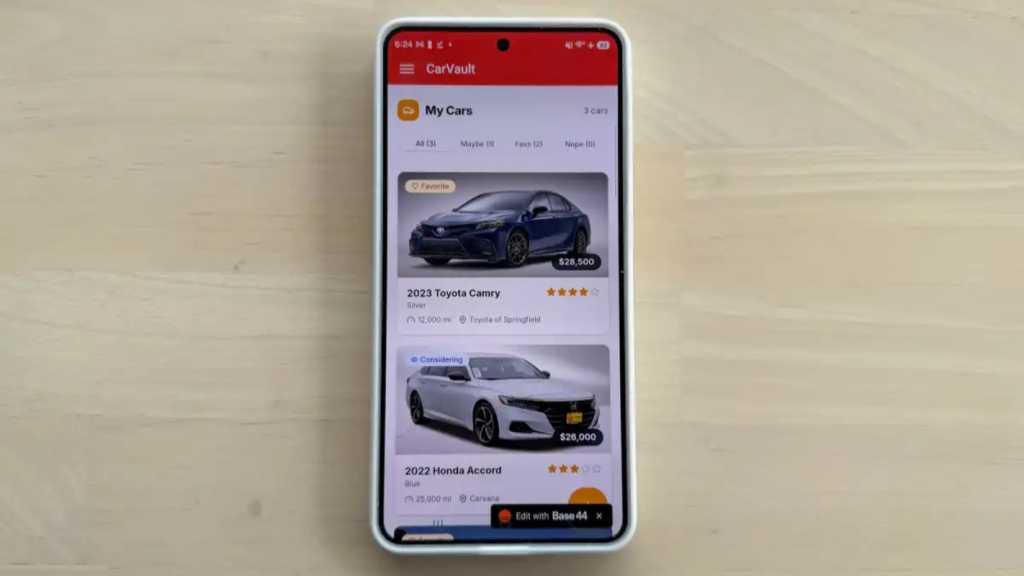
Base44 proved to be a perfect fit, automating the app creation process seamlessly. By inputting a prompt like “Build an app for note-taking during car evaluations,” Base44 swiftly generated the app interface and suggested the app name, CarVault.
The intuitive nature of Base44, coupled with its alignment with Gemini suggestions, expedited the development process. Within minutes, I had a fully functional app ready for testing.
3. Test the web version of your app
Prior to launching the Android app, thorough testing is essential to ensure smooth functionality. I opted to test the web-based version first, mimicking the mobile app experience to identify any potential issues.
Fortunately, the web-based app performed flawlessly, but Base44’s flexibility allowed for quick bug fixes if needed. This streamlined approach to testing highlighted the app’s robustness and usability.
4. Prepare for app deployment
While my primary goal was not a public release, launching an Android app involves setting up a Google Play Store developer account and a one-time activation fee of $25. Instead, I chose to sideload the app on my Samsung Galaxy S26 for personal use.
To convert the web app into a mobile version, I utilized AppMyWeb, a user-friendly platform that simplifies the process. By generating the Android app and obtaining the APK file, I proceeded to install the app on my device, bypassing the formal app store route.
With the app up and running on my phone within minutes, I marveled at the efficiency and ease of the entire process. Now, armed with a customized Android app, I could focus on my car buying research with enhanced organization and efficiency.









Digital Protection: How a 1988 Law Could Safeguard Your Online Viewing Experience

BMW Unlocks Greater Range for i7 Model Through Innovative Technology

Modern Warfare 4: The Final Chapter and the Birth of a New COD Legacy

Enhanced Sleep Tracking for Samsung Health: Galaxy Watch, Fit, and Ring Upgrade

Building a Sustainable Future: Actionable Recommendations from the European Parliament

Exploring the Superior Camera Quality of the Oppo Find X10 Pro Max: First Impressions from Tech Advisor

Strategies for Reducing Customer Acquisition Costs While Maintaining Lead Quality

Preorder the iPhone Duo for $1,999 and Experience the Ultimate Mobile Duo

Enhancing Google’s AI Responses with Prominent Inline Links

EU Takes Action Against Instagram and Facebook for Violating Illegal Content Rules

Warning: Facebook Creators Face Monetization Loss for Stealing and Reposting Videos

Facebook’s New Look: A Blend of Instagram’s Style

Facebook Compliance: ICE-tracking Page Removed After US Government Intervention

Facebook and Instagram to Reduce Personalized Ads for European Users

InstaDub: Meta’s AI Translation Tool for Instagram Videos

Reclaim Your Account: Facebook and Instagram Launch New Hub for Account Recovery

Meta discontinues Messenger apps for Windows and macOS

Breaking Updates: Meta Connect 2025 Unveils Latest Developments

$25,000 Gaming Setup – EVOLUTION!

The Maze Alpha X is HERE!

Cool Tech under $100 – December!

MYSTERY UNBOXING FROM GOOGLE!

TOP 6 Smartphones from Companies you NEVER Expected!

A Surprise Smartphone from EE!

DOOGEE MIX 2 VS DOOGEE MIX 1!

INCREDIBLE Smartphone Gadgets on Amazon!

10 Android Apps you NEED to try in 2017 / 2018
-
 Facebook12 months ago
EU Takes Action Against Instagram and Facebook for Violating Illegal Content Rules
-
 Facebook1 year ago
Warning: Facebook Creators Face Monetization Loss for Stealing and Reposting Videos
-
 Facebook10 months ago
Facebook’s New Look: A Blend of Instagram’s Style
-
 Facebook1 year ago
Facebook Compliance: ICE-tracking Page Removed After US Government Intervention
-
 Facebook10 months ago
Facebook and Instagram to Reduce Personalized Ads for European Users
-
 Facebook1 year ago
InstaDub: Meta’s AI Translation Tool for Instagram Videos
-
 Facebook10 months ago
Reclaim Your Account: Facebook and Instagram Launch New Hub for Account Recovery
-
 Apple12 months ago
Meta discontinues Messenger apps for Windows and macOS
