
Cars
Thief-Proof Software: The Ultimate Security Solution

Always consult with a professional before making any modifications to your vehicle’s security system. It is important to ensure that any changes comply with local laws and regulations.
Relay attacks on keyless-entry systems have turned modern cars into some of the most targeted vehicles on the road. The exploit kits are cheap, widely available, and require almost no skill to operate. And the standard immobiliser in your car? It’s already been defeated the moment that relay device fooled the door lock.
This is the problem xAutomotive, an Austrian automotive-IT firm, set out to solve — and their answer is clever. Their solution, called xProtect, doesn’t live in a visible box bolted under your dashboard. It lives inside the transmission itself.
The Magic Is in the TCU
xProtect is a software modification flashed directly into your BMW’s Transmission Control Unit — the TCU, a processor nestled deep inside the automatic gearbox. Once installed, the adapter used to flash it is removed and put away. From the outside, your car looks completely standard.
And yet, the next time someone tries to drive it away without knowing your personal code, the car will turn over — the engine will start — and then simply refuse to move. This is intentional. xProtect doesn’t prevent the engine from starting. Instead, it prevents the transmission from engaging a gear.
If you’re wondering, features like the remote start and Keyless-Go functionality remain completely unaffected. BMW owners who use remote start on cold mornings can continue to do so without ever entering their code. The code is only required when you actually want to drive.
One Flash. Always There

A common misconception is that the OBD adapter must stay plugged in for xProtect to work. It doesn’t. Installation is a one-time operation — you connect the adapter, flash the software into the TCU via the xProtect app on your phone, configure your personal code, and remove the adapter. That’s it. The protection is now embedded in the firmware of the transmission controller itself. The adapter is simply the tool used for installation, like a USB stick used to install an operating system. Once the software is written, the adapter has no further role.
To connect the app and install xProtect, you need a compatible Wi-Fi OBD adapter. Supported options include the xA Ultra (available in the xAutomotive shop), xHP WiFi (discontinued), Thor, MHD UNI, MHD Orange, and bootmod3 WiFi.
Your Code, Your Controls

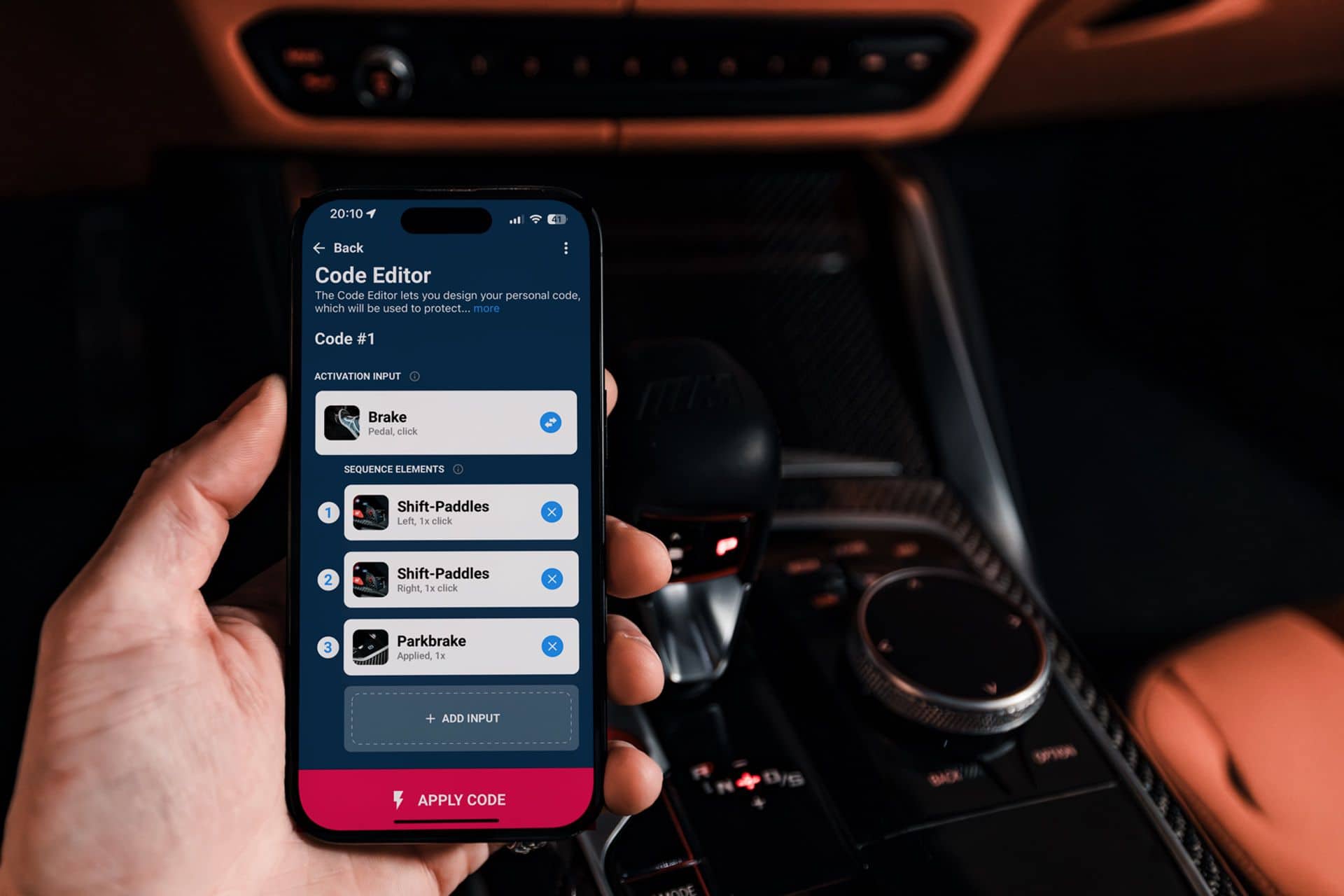
The personal code is built from the physical buttons already in the car — the gear lever, shift paddles on the steering wheel, driving mode selector, brake pedal, and more. Users design their sequence in the xProtect app’s Code Editor, then flash it to the car via the adapter.
The combination space is enormous. With the range of available inputs across a typical BMW G-Series interior, xAutomotive calculates over 35 trillion possible combinations. A three-button sequence combined with a held activation input already achieves excellent code strength. The system enforces a maximum two-second window between each button press, and any unintended input invalidates the current attempt entirely.
Brute-forcing the code isn’t a realistic option. The time constraint alone makes it impractical; the sheer number of combinations makes it mathematically absurd.
Your sequence is always accessible within the xProtect app, protected by Face ID or Touch ID on your phone. It is stored in encrypted format linked to your user account on xAutomotive’s Amazon AWS servers. xAutomotive cannot reconstruct a stored code on your behalf — only you can view it in the app.
The Icing on the Cake
Beyond preventing gear engagement, xProtect adds a further layer of security: when active and locked, the TCU cannot be reprogrammed. Even a thief equipped with professional diagnostic tools cannot overwrite the TCU to remove the protection while the code is active. In practice, xAutomotive considers this secondary to the main use case — a thief who runs into unexpected problems doesn’t troubleshoot, they leave — but it closes off a more sophisticated attack vector entirely.
Built for Everyday Life
Security systems that inconvenience their owners are security systems that get disabled. xAutomotive has thought carefully about this. The reactivation delay — configurable between zero and 180 minutes — means that during a shopping trip or a series of short errands, drivers can choose not to re-enter their code each time.
For workshop visits or any situation where the car needs to be driven by someone else, Friendship Mode fully suspends the protection. To activate it: while xProtect is in unlocked mode, hold the Park button on your gear lever for three seconds. The “P” symbol on your dashboard will flash once to confirm xProtect is now disabled. When you collect the car, hold the Park button for three seconds again to re-enable it. The “P” symbol on your dash and gear lever flashes whenever xProtect is installed and active — the flashing stops in Friendship or Unlocked mode.
xProtect fully supports Remote Software Upgrades and dealer updates. The system can be temporarily disabled before an upgrade and re-enabled immediately after.
Warranty and Performance

xProtect says that their software does not alter any performance- or safety-related behavior of your vehicle. Your warranty remains fully intact. There is no hardware to install, and installation of the software will not — as of January 2026 — affect any warranty claims.
xProtect is available now for most BMW G-Series vehicles at €199 worldwide, with no workshop required for installation or removal. If you’re selling the car, it can be fully uninstalled the same way it was put in, leaving no trace. The full list of supported models is at xautomotive.com/pages/supported-cars.
Disclaimer
This article is intended for informational purposes only. Always consult with a professional before making any modifications to your vehicle’s security system. It is important to ensure that any changes comply with local laws and regulations.
Disclaimer: Understanding Your Responsibilities When Installing xProtect
In no way are we associated with xAutomotive GmbH, and the content of this article should not be considered as professional or legal advice. All information regarding products, specifications, and claims are sourced from xAutomotive’s official materials, for which they hold full responsibility. We do not accept any liability for the consequences that may arise from the installation or use of xProtect.
When deciding to install xProtect or any third-party software onto your vehicle, you are assuming all risks involved. It is highly recommended to verify compatibility with your specific vehicle before proceeding. Altering your vehicle’s software could potentially impact your manufacturer warranty, insurance coverage, and adherence to local road regulations. It is your duty to confirm these factors before proceeding with the installation. Vehicle modification laws and regulations vary across different countries and regions.
This article is based on information available at the time of publication and may not reflect any future changes to the product, its compatibility, or relevant laws. We cannot guarantee the ongoing accuracy or currency of the information provided.
For any inquiries, concerns, or technical assistance related to the product, please reach out to xAutomotive directly through their website at www.xautomotive.com.











Ram Trucks Australia Braces for Price Increases Due to Emissions Regulations

Revving Up: Tractor Battle Adventure RPG Expands with Mod Support on Steam Workshop

Troubleshooting Guide: Unable to Access 192.168.0.1

Choosing the Right AI: Ensuring Trust in Multi-Model Translation Systems

Friday Night Baseball Madness: iPhone 18 Pro Edition

Partnership Potential: JAC & Huawei in Talks to Produce Electric Maserati Vehicles

Grand Theft Auto VI: The Soundtrack – Limited Edition Physical Release

The Never-Ending Battle of the Galaxy S27 Ultra Camera: A Tech Advisor’s Perspective

Motorola Signature 27: Unveiled Specs and Vibrant Colour Options – Tech Advisor

EU Takes Action Against Instagram and Facebook for Violating Illegal Content Rules

Warning: Facebook Creators Face Monetization Loss for Stealing and Reposting Videos

Facebook’s New Look: A Blend of Instagram’s Style

Facebook Compliance: ICE-tracking Page Removed After US Government Intervention

Facebook and Instagram to Reduce Personalized Ads for European Users

InstaDub: Meta’s AI Translation Tool for Instagram Videos

Reclaim Your Account: Facebook and Instagram Launch New Hub for Account Recovery

Meta discontinues Messenger apps for Windows and macOS

Breaking Updates: Meta Connect 2025 Unveils Latest Developments

Huawei P20 Pro Unboxing!

Huawei P20 Pro vs Samsung S9 Plus!

Huawei P20 vs P20 Pro vs iPhone 8 Plus vs S9 Battery Drain Test!

10 Android Mods that Change Everything

I used the first Android Phone in the World.

DOOGEE MIX 4 UNBOXING (PROTOTYPE)!

MYSTERY UNBOXING FROM SAMSUNG!

The Truth about Huawei P20 Pro – REAL Review

How to Love your Android Phone again.
-
 Facebook11 months ago
EU Takes Action Against Instagram and Facebook for Violating Illegal Content Rules
-
 Facebook11 months ago
Warning: Facebook Creators Face Monetization Loss for Stealing and Reposting Videos
-
 Facebook9 months ago
Facebook’s New Look: A Blend of Instagram’s Style
-
 Facebook11 months ago
Facebook Compliance: ICE-tracking Page Removed After US Government Intervention
-
 Facebook9 months ago
Facebook and Instagram to Reduce Personalized Ads for European Users
-
 Facebook11 months ago
InstaDub: Meta’s AI Translation Tool for Instagram Videos
-
 Facebook10 months ago
Reclaim Your Account: Facebook and Instagram Launch New Hub for Account Recovery
-
 Apple11 months ago
Meta discontinues Messenger apps for Windows and macOS
