
Microsoft
Microsoft’s Removal of Copilot Buttons: A Shift in Windows 11 App Design

Microsoft Removes Unnecessary Copilot Buttons from Windows 11 Apps
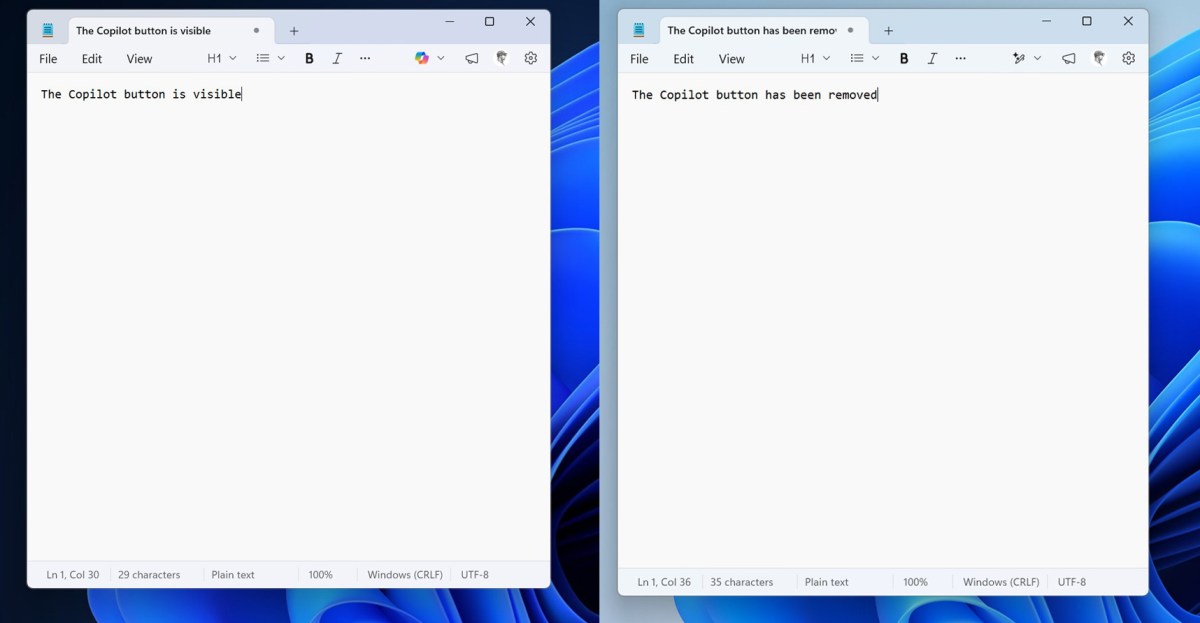
In a recent update for Windows 11 apps, Microsoft has begun the process of eliminating what it deems as “unnecessary” Copilot buttons. Notably, the Notepad app for Windows Insiders no longer features the Copilot button; instead, it has been replaced with a “writing tools” menu. Similarly, the Copilot button in the Snipping Tool app has also been removed from the area selection interface.
This move is part of Microsoft’s initiative to reduce the number of Copilot entry points in various apps, starting with Snipping Tool, Photos, Widgets, and Notepad. The company has pledged to streamline Windows 11 as part of a broader plan to enhance the user experience. Despite the removal of Copilot buttons, it appears that the AI-powered features they represent will remain intact.
Although the Copilot button has been eliminated from Notepad, the replacement “writing tools” menu still incorporates AI-driven functionalities and retains the same set of options as before. While some may argue that these features are unnecessary for a lightweight text app, the removal of extraneous Copilot branding marks a positive initial step towards simplifying the user interface.












Lost in the Living Maze: Unraveling Hidden Terrain Magic Through Copy-Paste

Samsung Unveils Exclusive Galaxy Z Fold 8 BTS Edition

Navigating the Digital World: Expert Tech Advice for Everyman

OMass Therapeutics Secures €275 Million Funding to Advance Innovative Small-Molecule Therapies

The Evolution of Apple’s Smart Home Strategy: A Closer Look at Their Own Devices

Unveiling the Imposter: The Truth Behind the Fake WhatsApp Clone on the Play Store

Digital Protection: How a 1988 Law Could Safeguard Your Online Viewing Experience

BMW Unlocks Greater Range for i7 Model Through Innovative Technology

Modern Warfare 4: The Final Chapter and the Birth of a New COD Legacy

EU Takes Action Against Instagram and Facebook for Violating Illegal Content Rules

Warning: Facebook Creators Face Monetization Loss for Stealing and Reposting Videos

Facebook’s New Look: A Blend of Instagram’s Style

Facebook Compliance: ICE-tracking Page Removed After US Government Intervention

Facebook and Instagram to Reduce Personalized Ads for European Users

InstaDub: Meta’s AI Translation Tool for Instagram Videos

Reclaim Your Account: Facebook and Instagram Launch New Hub for Account Recovery

Meta discontinues Messenger apps for Windows and macOS

Breaking Updates: Meta Connect 2025 Unveils Latest Developments

$25,000 Gaming Setup – EVOLUTION!

The Maze Alpha X is HERE!

Cool Tech under $100 – December!

MYSTERY UNBOXING FROM GOOGLE!

TOP 6 Smartphones from Companies you NEVER Expected!

A Surprise Smartphone from EE!

DOOGEE MIX 2 VS DOOGEE MIX 1!

INCREDIBLE Smartphone Gadgets on Amazon!

10 Android Apps you NEED to try in 2017 / 2018
-
 Facebook12 months ago
EU Takes Action Against Instagram and Facebook for Violating Illegal Content Rules
-
 Facebook1 year ago
Warning: Facebook Creators Face Monetization Loss for Stealing and Reposting Videos
-
 Facebook10 months ago
Facebook’s New Look: A Blend of Instagram’s Style
-
 Facebook1 year ago
Facebook Compliance: ICE-tracking Page Removed After US Government Intervention
-
 Facebook10 months ago
Facebook and Instagram to Reduce Personalized Ads for European Users
-
 Facebook1 year ago
InstaDub: Meta’s AI Translation Tool for Instagram Videos
-
 Facebook11 months ago
Reclaim Your Account: Facebook and Instagram Launch New Hub for Account Recovery
-
 Apple12 months ago
Meta discontinues Messenger apps for Windows and macOS
