
Gadgets
Revolutionizing Your Smart Home Experience: The Philips Hue Bridge Pro Review

Any links to online stores should be assumed to be affiliates. The company or PR agency provides all or most review samples. They have no control over my content, and I provide my honest opinion.
After nearly a decade of waiting, Philips Hue has finally delivered what many smart lighting enthusiasts have been begging for – a bridge that can handle the demands of a modern smart home. The Hue Bridge Pro represents the first major hardware upgrade to the Hue ecosystem’s backbone since 2015, when the version 2 bridge launched. For those of us who have gradually expanded our Hue systems over the years, hitting the frustrating 50-device limit has become an all-too-familiar experience.
The new Bridge Pro addresses this limitation head-on, supporting up to 150 lights and 50 accessories – three times the capacity of its predecessor. But raw capacity isn’t the only improvement here. With a 1.7 GHz quad-core processor replacing the old 600 MHz single-core chip, 8GB of RAM instead of 256MB, and built-in Wi-Fi connectivity, this bridge has been rebuilt from the ground up for the demands of 2025 and beyond.
Philips Hue has been kind enough to provide me with a lot of samples to review over the years, but I bought the Hue Bridge Pro myself, as I was eager to upgrade my home and review this new bridge.
Related Reviews
Specification
– Processor: The previous bridge used a modest 600 MHz single-core processor. The Hue Bridge Pro is equipped with a 1.7 GHz quad-core “Hue Chip Pro”. This is a substantial increase in processing power, allowing the bridge to manage more devices, process complex scenes faster, and run new software like MotionAware.
– Memory (RAM): The old bridge functioned on just 256 MB of RAM. The Hue Bridge Pro includes 8 GB of DDR4 RAM. This massive increase in available memory means the bridge can handle far more concurrent commands, store more complex automations, and manage a much larger device list without lagging.
– Storage: The Pro model includes 8 GB of eMMC flash storage, a significant jump from the minimal storage on the old model. This allows for the storage of up to 500 light scenes, compared to the much lower limit on the previous bridge.
– Light Capacity: The old bridge had an official limit of 50 lights (with a hard technical limit around 63). The Hue Bridge Pro officially supports 150+ lights, with some reports suggesting the hardware could handle even more. This effectively triples the size of a single Hue system.
– Accessory Capacity: The old bridge supported around 10-15 accessories (dimmers, sensors, etc.). The Hue Bridge Pro increases this to 50+ accessories. This is a welcome change for users who rely on Hue’s physical controls.
– Connectivity: The previous bridge was famously Ethernet-only, requiring it to be physically tethered to a router. The Hue Bridge Pro now includes both an Ethernet port and Wi-Fi (2.4 GHz). This gives users new flexibility in placing the bridge centrally in their home for optimal Zigbee mesh coverage, rather than being stuck in a cabinet or basement.
– Power: The Pro model has been modernized to use a standard USB-C port for power. The old bridge used a proprietary barrel connector. This small change is a great convenience, allowing for more flexible power options, including the ability to run the bridge from a USB-C battery pack during a power cut.
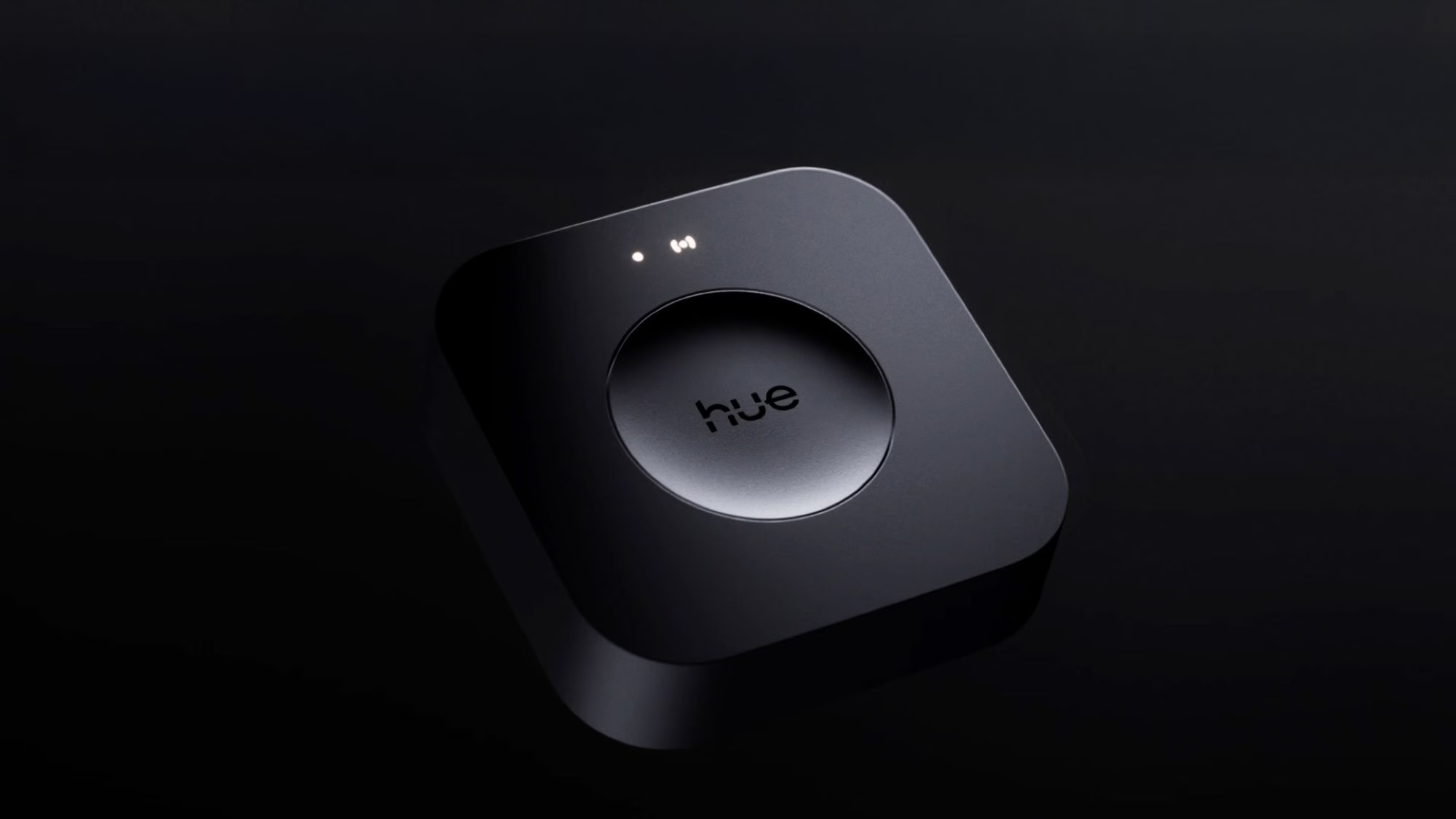
– Design: Physically, the two units are almost identical in size and shape, retaining the familiar white, rounded-square design. The Pro has a slightly different button and a new two-light indicator system on top, compared to the three lights on the older model.
Features
The new hardware in the Hue Bridge Pro enables a suite of new features that were not possible on the older model. While the headline feature is capacity, the supporting additions are also significant.
First is the massively increased device capacity. Supporting 150+ lights and 50+ accessories on a single bridge is the primary reason for this product’s existence. For users who had to run two, three, or even more bridges to manage their home, this is a profound quality-of-life improvement. It re-centralizes the entire home system, allowing for scenes and automations that span all rooms without the clumsy workarounds the old multi-bridge interface required.
Second is the inclusion of Wi-Fi connectivity. While connecting any smart home hub via an Ethernet cable is still the recommended method for maximum reliability, the Wi-Fi option is a practical solution for many. It allows the bridge, which is the heart of the Zigbee mesh network, to be placed in an open, central location in the house. This can dramatically improve the range and reliability of the entire lighting system, especially in large or unconventionally shaped homes where the router is often located in an inconvenient corner.
Third is the new flagship software feature: Hue MotionAware. This is an exclusive feature for the Bridge Pro, as it requires the new processor to perform real-time analysis. MotionAware uses the existing Hue light bulbs as a form of motion sensor. It works by detecting subtle disturbances in the Zigbee radio frequency signals that travel between the bulbs. When a person moves through a room, their body disrupts these signals, and the Bridge Pro can interpret that disruption as motion. This allows users to create motion-based automations without purchasing dedicated motion sensors.
Fourth is the integration of an AI-powered assistant within the Hue app. This feature, which is still in its early stages, allows users to type or speak natural language commands to create scenes or, in theory, automations.
Finally, the Bridge Pro is built with Matter support from the ground up. While the previous bridge received a Matter update, the integration with the Pro feels more native. This allows the bridge to act as a Matter gateway, exposing all of its connected Zigbee lights and accessories to other Matter-compatible platforms like Apple Home, Google Home, and Home Assistant.
Unboxing
The unboxing experience for the Hue Bridge Pro is straightforward and reflects a move towards more modern standards. The device is packaged in a compact box with sustainable paper wrapping for the main unit, a departure from the previous products’ molded plastic. Inside the box, you will find the Hue Bridge Pro unit, a USB-C to USB-C power cable, a USB-C power adapter block for your specific region, a new flat-style Ethernet cable, and the usual paperwork and quick-start guide.
Comparing the old and new components side by side, the most notable difference is the power supply. The move from the old proprietary barrel connector to the universal USB-C standard is welcomed.
The migration process from the Hue Bridge V3 isn’t perfect but could be worse. Updating all devices to the latest firmware can be time-consuming, especially for large systems. The migration wizard is straightforward, and most Philips-branded lights, accessories, rooms, zones, and scenes transfer without issue. However, third-party devices may require manual re-addition after the migration.
The integration of Matter and Home Assistant with the Bridge Pro provides faster response times and local control even if the internet connection drops. Setting up Matter is easy by scanning the QR code on the bridge, and the increased processing power of the Bridge Pro improves performance when using Matter. The Group commands that previously struggled on the old bridge when controlling many lights simultaneously now execute smoothly and synchronously on the new bridge.
Aqara Integration:
I have heavily invested in Aqara and use a lot of their light switches. I prefer to use the automations within the Aqara app for simplicity. The Matter integration process is similar to other platforms, but Aqara imports all devices with a generic model name, making it unclear what device each model name corresponds to. Despite this initial confusion, once properly configured, the integration works flawlessly. Aqara’s automations execute reliably with excellent response times. Using Aqara’s presence sensors to control Hue lights results in minimal latency, creating a robust and responsive smart lighting system that does not rely on cloud services for basic operation.
Scenes and Automations:
The increased scene storage capacity of up to 500 scenes eliminates the need to carefully manage which scenes to keep. Multiple scenes for different times of day in each room, seasonal variations, and special occasion settings can now be created without concerns about hitting limits. Automations benefit from the improved processing power, as complex rules involving multiple conditions and actions execute reliably, even when triggering simultaneously. Time-based fades progress smoothly, unlike the jerky transitions on the old bridge. Sunrise and sunset automations for adjusting colour temperature throughout the day no longer experience stutters or delays in manual control.
The Adaptive Lighting feature, which adjusts colour temperature based on the time of day, works more smoothly on the Bridge Pro. The transitions are imperceptible, maintaining the natural feeling of the lighting while ensuring it is always appropriate for the time. This feature, which was hit-or-miss on the old bridge, now functions reliably without long delays in updating. Transform the following sentence into a question.
Original sentence: The cat is sleeping on the couch.
Transformed question: Is the cat sleeping on the couch? Transform the following:
Original: The dog ran quickly through the park.
Transformed: Quickly, the dog ran through the park. Transform the following sentence into the passive voice:
“The company will launch a new product next month.”
Answer: “A new product will be launched by the company next month.” Transform the following sentence:
Original: The cat chased the mouse.
Transformed: The mouse was chased by the cat. Transform the following:
Original: “I am going to the store to buy groceries.”
Transformed: “I will be heading to the store to purchase some groceries.”









Tesla’s Groundbreaking Feature: Use at Your Own Risk

NO GAME NO LIFE: Grasshopper Manufacture’s Indie Leap

Strengthening Ties: GEC Enhances Ireland-UK Startup Network in the Midst of EU Discussions

Unbeatable Deal: The AirPods Pro 3 for Only $179

Breaking News: Exclusive Details on the Latest Fitbit Edge Features

Apple Store Security Alert: HK Police Demand Fix for $3.8M Fraud Loophole

Faraday Future FF 91 – 1050 Horsepower Madness!

Massive Recall: Thousands of Toyota Land Cruiser SUVs Pulled from UAE Roads

Massive’s Rise to the Top: Leading Splinter Cell, Ghost Recon, and a New Ubisoft Dieselpunk MOBA

EU Takes Action Against Instagram and Facebook for Violating Illegal Content Rules

Warning: Facebook Creators Face Monetization Loss for Stealing and Reposting Videos

Facebook’s New Look: A Blend of Instagram’s Style

Facebook Compliance: ICE-tracking Page Removed After US Government Intervention

Facebook and Instagram to Reduce Personalized Ads for European Users

InstaDub: Meta’s AI Translation Tool for Instagram Videos

Reclaim Your Account: Facebook and Instagram Launch New Hub for Account Recovery

Meta discontinues Messenger apps for Windows and macOS

Breaking Updates: Meta Connect 2025 Unveils Latest Developments
Faraday Future FF 91 – 1050 Horsepower Madness!

The Truth about the OnePlus 5T – REAL Review.

Concept Smartphones that are better than Real Smartphones

Samsung Galaxy SII Unboxing!

The SECRET to Maximise Smartphone Battery Life?

We Designed the Ultimate Gaming Smartphone of 2018!

Using the Cheapest Smartphone in the World.

Samsung Galaxy S9+ Unboxing! (Clone)

Unboxing the First Ever Samsung Galaxy S!!
-
 Facebook12 months ago
EU Takes Action Against Instagram and Facebook for Violating Illegal Content Rules
-
 Facebook12 months ago
Warning: Facebook Creators Face Monetization Loss for Stealing and Reposting Videos
-
 Facebook10 months ago
Facebook’s New Look: A Blend of Instagram’s Style
-
 Facebook12 months ago
Facebook Compliance: ICE-tracking Page Removed After US Government Intervention
-
 Facebook10 months ago
Facebook and Instagram to Reduce Personalized Ads for European Users
-
 Facebook12 months ago
InstaDub: Meta’s AI Translation Tool for Instagram Videos
-
 Facebook10 months ago
Reclaim Your Account: Facebook and Instagram Launch New Hub for Account Recovery
-
 Apple12 months ago
Meta discontinues Messenger apps for Windows and macOS
