
Mobile Tech
Enhanced Security Measures: Apple Cash Introduces ID Checks for Balance Reloads

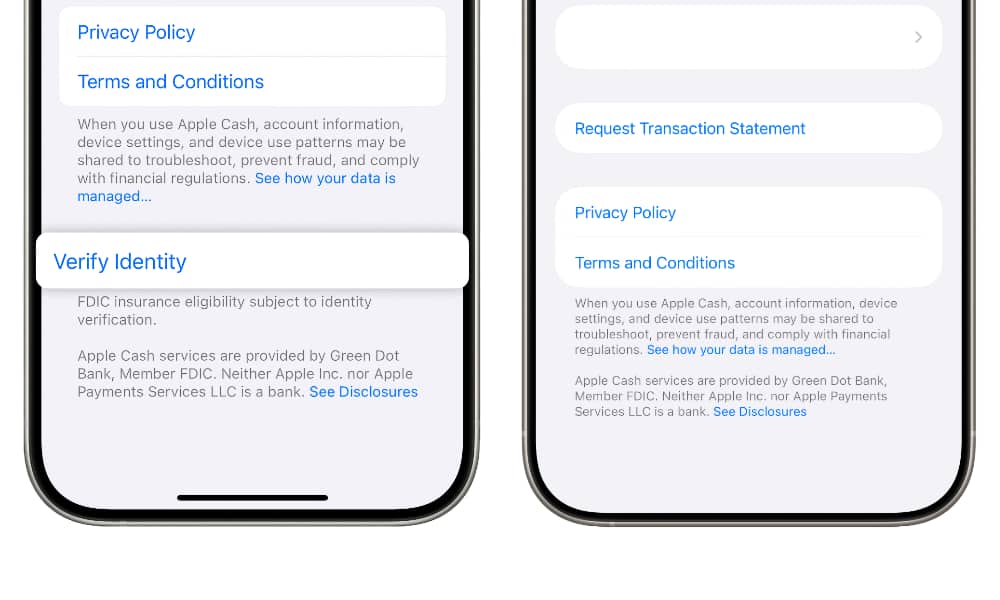
Apple and its financial partner have implemented stricter security measures for Apple Cash accounts, mandating users to verify their identity before transferring money into their accounts. Users of Apple Cash recently received notifications via email regarding changes to the service’s terms and conditions. Effective November 9, Green Dot Bank will require identity verification for loading money into an Apple Cash account. Regardless of whether the funds are from a personal payment card or a peer-to-peer transfer, this verification process will be necessary.
Furthermore, the updated terms mention the potential introduction of “Externally-Initiated Funding Transactions” as a forthcoming feature that Green Dot Bank may enable. This hints at the possibility of users being able to withdraw funds directly from a bank instead of using a debit card.
Previously, Apple Cash required identity verification for transactions exceeding $500 through peer-to-peer transfers. However, the new requirement extends to smaller transactions and topping up the Apple Cash balance from a debit card. It is worth noting that users will not need to verify their identity every time they reload their balance; instead, having a “verified” account is recommended.
Green Dot refers to this process as “Registering your Apple Cash Account with Bank,” a prerequisite for FDIC insurance coverage on the balance and for transferring funds between Savings and Apple Cash Accounts, as well as making international purchases. Identity verification is also essential for using Apple Cash Family features.
To confirm if your Apple Cash account is verified, follow these steps on your iPhone:
1. Open the Wallet app.
2. Select your Apple Cash card.
3. Tap on the three-dot menu in the top-right corner.
4. Choose Card Details.
5. Scroll to the bottom and look for Verify Identity.
If the option to verify identity is not visible, your account is already verified. If it is required, tap Verify Identity and complete the on-screen instructions to provide the necessary details and submit identification documents. Users with a digital driver’s license or Digital ID in Wallet can use those for verification, while others will be prompted to scan their driver’s license and take a selfie for identity confirmation.
By implementing these security measures, Apple aims to enhance the safety and protection of Apple Cash accounts for its users.












Counting Sheep: A Roguelite Adventure Through the Strange Portal

Tech Advisor’s Top Picks: Unbeatable Deals on Phones, Tablets, and More

INIU Cougar P63 Laptop Power Bank: A Comprehensive Review by Mighty Gadget Blog

British Business Bank Invests €11 Million in Fuel Ventures Multi-Fund

Enhanced Security Measures: Apple Cash Introduces ID Checks for Balance Reloads

CSR2 Introduces Lamborghini Revuelto SV: The Newest Addition to Their Supercar Collection

Xbox Scores Exclusive Streaming Rights for GTA 6

Echo Disruption: Alexa’s Aux Input Dilemma

Chaos Tetris: Four-Sided Block Madness

EU Takes Action Against Instagram and Facebook for Violating Illegal Content Rules

Warning: Facebook Creators Face Monetization Loss for Stealing and Reposting Videos

Facebook’s New Look: A Blend of Instagram’s Style

Facebook Compliance: ICE-tracking Page Removed After US Government Intervention

Facebook and Instagram to Reduce Personalized Ads for European Users

InstaDub: Meta’s AI Translation Tool for Instagram Videos

Reclaim Your Account: Facebook and Instagram Launch New Hub for Account Recovery

Meta discontinues Messenger apps for Windows and macOS

Breaking Updates: Meta Connect 2025 Unveils Latest Developments

Samsung sent us THIS! #AD

Ulefone Power 3 – Quad Camera Smartphone that last 2 weeks!

EPIC Smartphone FAILS that people will never forget.

The Best Android Launcher of 2018?

Faraday Future FF 91 – 1050 Horsepower Madness!

The Truth about the OnePlus 5T – REAL Review.

Concept Smartphones that are better than Real Smartphones

Samsung Galaxy SII Unboxing!

The SECRET to Maximise Smartphone Battery Life?
-
 Facebook12 months ago
EU Takes Action Against Instagram and Facebook for Violating Illegal Content Rules
-
 Facebook12 months ago
Warning: Facebook Creators Face Monetization Loss for Stealing and Reposting Videos
-
 Facebook10 months ago
Facebook’s New Look: A Blend of Instagram’s Style
-
 Facebook12 months ago
Facebook Compliance: ICE-tracking Page Removed After US Government Intervention
-
 Facebook10 months ago
Facebook and Instagram to Reduce Personalized Ads for European Users
-
 Facebook12 months ago
InstaDub: Meta’s AI Translation Tool for Instagram Videos
-
 Facebook10 months ago
Reclaim Your Account: Facebook and Instagram Launch New Hub for Account Recovery
-
 Apple12 months ago
Meta discontinues Messenger apps for Windows and macOS
