
Mobile Tech
Exploring the Latest Features in Apple’s iOS 26.2 Beta for Developers

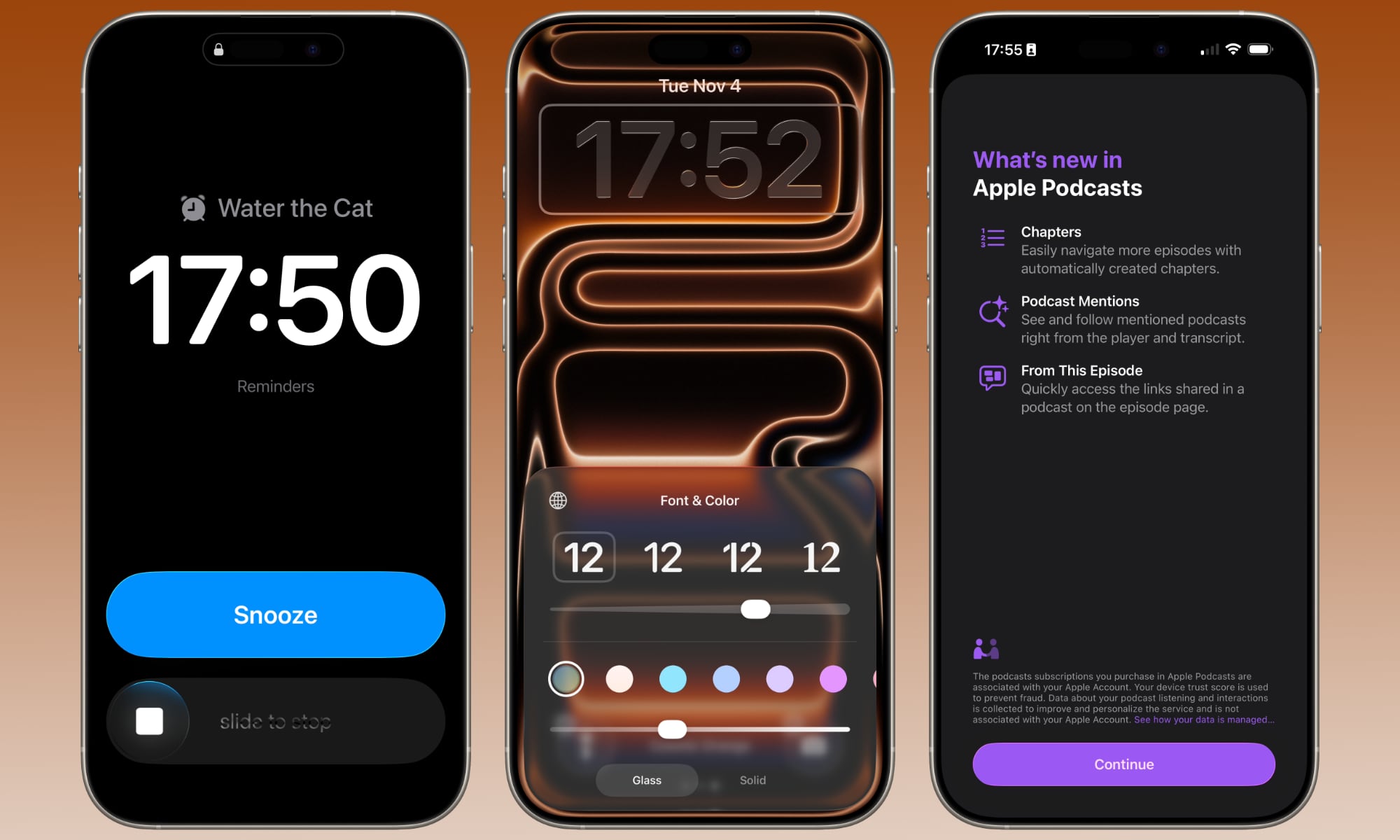
Less than 24 hours after releasing iOS 26.1 to the public, Apple is already kicking off the beta cycle for iOS 26.2, seeding the first beta to developers earlier today. This quick turnaround isn’t unusual for Apple, which often uses its early point releases to smooth out bugs and begin testing smaller feature additions.
We’re not expecting any groundbreaking changes in iOS 26.2. Apple has taken a more measured approach with iOS 26 this year, delivering most of its promised features in the initial release, rather than laying out a months-long roadmap. The one conspicuously outstanding feature — US Passports in Apple Wallet — is waiting on external factors and may not even require an iOS update to enable.
Nevertheless, the first iOS 26.2 beta does offer a few small but interesting surprises.
What’s Coming in iOS 26.2
We’re still digging through the first developer beta of iOS 26.2, and as always, it’s important to remember that this is at the “beta one” level. That means some features may not be present yet — and others could change or disappear before iOS 26.2’s final release.
Alarms in Reminders
Perhaps the most significant change in iOS 26.2 is that Apple Reminders now integrates with the Clock app to support higher-priority alarms.
The Reminders app has always offered alerts, but these use the standard notification system, just like any other app. Higher-priority Time Sensitive alerts can be used to help them stand out and break through Focus modes, but they still behave like standard notifications.
Alarms, on the other hand, keep going until they’re acknowledged. Many iPhone users already use the Clock app to set urgent reminders — things that they absolutely don’t want to miss — and now iOS 26.2 makes this even easier by tying them right into the Reminders app.
A new “Urgent” option now appears when setting a time for a reminder. When set, this will trigger an alarm at the appointed time — the same kind of alarm you’d get from the Clock app, but shown in blue instead of orange. You’ll get a full-screen alert with the same snooze and stop options — the latter of which was changed to use a swipe gesture in iOS 26.1. If you prefer, you can swap the snooze button out for a complete button to mark the reminder as done right away.
What’s more, Apple isn’t giving its own first-party app any special privileges here. Instead, it’s just the poster child for a new AlarmKit framework that Apple introduced in iOS 26.0, which third-party apps can also take advantage of.
Sleep Score Changes
Apple added a new “Sleep Score” metric in iOS 26 and watchOS 26 that provides a glanceable indication of how well you’re sleeping. It takes any sleep data stored in the Health app — whether from the Apple Watch or a third-party sleep tracker — and provides a numerical score out of 100 based on what time you went to bed (30 points), how long you slept (50 points), and how many interruptions you had during your sleep (20 points).
The Sleep Score in iOS 26.0 also provided a scale to give you some idea on what each range of numbers represented, from “Very Low” (0-40) to “Excellent” (90-100).
While Apple doesn’t seem to have changed the algorithm in iOS 26.2, it has revised the scoring scale. “Excellent” is now “Very High,” and several outlets report that Apple has adjusted the numerical thresholds, as follows:
However, Apple hasn’t (at least publicly) published official developer documentation confirming the new scale. While I see the new “Very High” category name in iOS 26.2 beta 1, the scores themselves are still being classified in the original ranges, at least for pre-update scores.
Either way, renaming “Excellent” to “Very High” fits better with the other grades — but if the scale has been readjusted, you’ll have to sleep harder to hit that higher level by getting to bed on time — even a significantly earlier bedtime can pull down your score, as consistency is key here — and getting at least 7–8 hours of uninterrupted sleep.
More Liquid Glass Refinements
This year, Apple introduced one of the most significant software redesigns we’ve seen since iOS 7 — a new Liquid Glass aesthetic that’s turned out to be a bit controversial.
While some of that can be chalked up to resistance to change, there are also aspects of the new design that are inarguably hard on some people’s eyes. Apple has been listening to feedback and making several course corrections. iOS 26.1 introduced an easy way to tone down the overall Liquid Glass transparency, and now iOS 26.2 is introducing a way to dial it down on the Lock Screen clock.
When you’re customizing the time on the Lock Screen, a new slider appears that lets you adjust the glass look from almost entirely clear to a more frosted translucent look. There’s still a “Solid” toggle to disable the Liquid Glass effect entirely, but the new slider is a nice touch for those who like the effect, but want more control over its intensity.
Podcasts Enhancements
The iOS 26.2 Podcasts app adds some new features to enhance the user experience, although we won’t see them all until creators start taking advantage of them.
The biggest win is that Podcasts can now automatically generate chapter markers for those episodes that don’t already have them. Podcast creators can toggle this setting off if they’d rather Apple not do this for them, but it’s on by default, which means most podcasts will benefit from it.
Creators can also now embed “Timed Links” in their podcasts, which will allow them to automatically display links to content from Apple Music, Apple News, Apple TV, and other services at the appropriate times in their show. These will appear in line with the transcript and on the player during those times.
Subject: Exciting Updates for Podcast Creators and Apple News Design Tweaks
Dear Podcast Creators,
I wanted to share some exciting updates from Apple that may interest you. Apple recently announced that it will now automatically create links to other shows on Apple Podcasts that are mentioned in an episode. However, creators have the option to opt out of this feature if they prefer.
Shifting gears to Apple News, the platform has evolved beyond just news in recent years, now including sports, puzzles, and food content. With the latest iOS 26.2 update, Apple has introduced a small yet significant design tweak. They have added a menu bar at the top for quick access to Sports, Puzzles, Food, and key news categories like business or politics. Additionally, the navigation bar at the bottom has been updated, removing the Sports section to make space for a Following button. This change not only enhances the overall design but also streamlines the navigation experience by highlighting key categories and reducing clutter.
For those eagerly anticipating the release of iOS 26.2, we are still in the early stages. Based on Apple’s typical release cycle, we can expect a public beta to roll out in the next few days, followed by the official release before the end of the year. While there may have been a slight delay with iOS 26.1, Apple is keen on getting iOS 26.2 out before the holiday break, possibly even in early 2026.
We hope these updates excite you as much as they do us. Stay tuned for more news and enhancements from Apple!
Best regards,
[Your Name]









The Ultimate BMW N62 V8 Engine Handbook: Troubleshooting, Performance Upgrades, and Durability

Black Salt Games Launches Team Trifold Studio, Unveiling Nothing Lost

Unlocking Your Phone Made Easy: How Android Users Can Use Their Google Account

Bixdo Glossonic Brush Pro: The Ultimate Electric Toothbrush for Whiter Teeth – A Tech Advisor Review

Virtual Me: Engage with My Interactive Avatar

5 Revolutionary Apple Products on the Horizon for 2026

10 Incredible Android DIY Hacks!

Cyberpunk 2077: The Endless Battle with Phantom Liberty’s Chimera Tank

Unlock the Power of Adobe Premiere with a Free App for Android Phones – Tech Advisor

EU Takes Action Against Instagram and Facebook for Violating Illegal Content Rules

Warning: Facebook Creators Face Monetization Loss for Stealing and Reposting Videos

Facebook’s New Look: A Blend of Instagram’s Style

Facebook Compliance: ICE-tracking Page Removed After US Government Intervention

Facebook and Instagram to Reduce Personalized Ads for European Users

InstaDub: Meta’s AI Translation Tool for Instagram Videos

Reclaim Your Account: Facebook and Instagram Launch New Hub for Account Recovery

Meta discontinues Messenger apps for Windows and macOS

Breaking Updates: Meta Connect 2025 Unveils Latest Developments
10 Incredible Android DIY Hacks!

Does a Cheap 2018 Smartphone beat a 2013 Flagship?

Samsung Galaxy S9 & S9+ UNBOXING!

Samsung Galaxy S9 Plus vs iPhone X

The BEST $300 Phone (2018) ft. MKBHD, Technical Guruji, iJustine + More

Samsung Galaxy S9 Plus Gaming Review! (vs OnePlus 5T)

THE BEST PHONE HTC EVER MADE?

The Truth about Google?

Samsung S9/ S9+ vs iPhone X vs Galaxy Note 8 Battery Life DRAIN TEST
-
 Facebook11 months ago
EU Takes Action Against Instagram and Facebook for Violating Illegal Content Rules
-
 Facebook12 months ago
Warning: Facebook Creators Face Monetization Loss for Stealing and Reposting Videos
-
 Facebook10 months ago
Facebook’s New Look: A Blend of Instagram’s Style
-
 Facebook12 months ago
Facebook Compliance: ICE-tracking Page Removed After US Government Intervention
-
 Facebook10 months ago
Facebook and Instagram to Reduce Personalized Ads for European Users
-
 Facebook12 months ago
InstaDub: Meta’s AI Translation Tool for Instagram Videos
-
 Facebook10 months ago
Reclaim Your Account: Facebook and Instagram Launch New Hub for Account Recovery
-
 Apple11 months ago
Meta discontinues Messenger apps for Windows and macOS
