
Security
Apple Boosts Security with First Background Update for WebKit Flaw


Apple Releases Background Security Improvements Update for iPhones, iPads, and Macs
Apple has recently rolled out its initial Background Security Improvements update to address a critical WebKit vulnerability known as CVE-2026-20643 on iPhones, iPads, and Macs. The update aims to rectify the flaw without necessitating a complete operating system upgrade.
The CVE-2026-20643 vulnerability enables malicious web content to circumvent the browser’s Same Origin Policy, posing a significant security risk to users.
According to Apple, the flaw pertains to a cross-origin issue within the Navigation API, which has been mitigated through enhanced input validation measures.
The discovery of this vulnerability was credited to security researcher Thomas Espach. The latest update is now available for iOS 26.3.1, iPadOS 26.3.1, macOS 26.3.1, and macOS 26.3.2.
This release marks the debut of Apple’s Background Security Improvements feature, designed to deliver lightweight security patches outside the traditional security update cycle. This feature allows for the seamless deployment of small out-of-band patches for components like the Safari browser, WebKit framework stack, and system libraries.
Apple explains, “Background Security Improvements provide ongoing security enhancements for specific system components, ensuring continuous protection against evolving threats.”
Formerly, Apple’s security updates necessitated a complete OS upgrade and device reboot. However, with the introduction of Background Security Improvements, Apple can deliver incremental updates for individual components discreetly in the background.
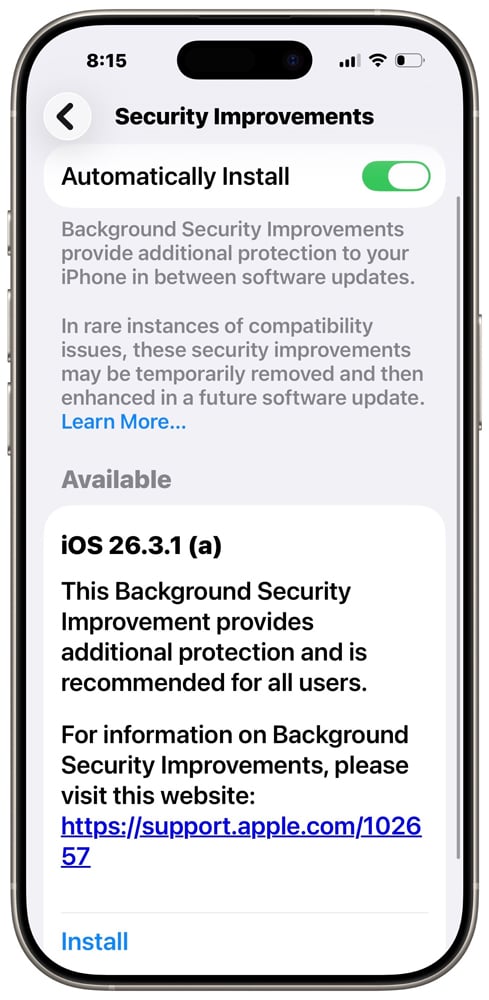
Apple introduced this feature in iOS 26.1, iPadOS 26.1, and macOS 26.1 with the objective of swiftly addressing security vulnerabilities between major releases.
To access the feature, users can navigate to their device settings and locate it under the Privacy & Security menu.
- On iPhone and iPad: Visit Settings, then select Privacy & Security.
- On Mac: Go to the Apple menu, choose System Preferences, and click on Privacy & Security.
Apple cautions that uninstalling a Background Security Improvements update will revert the device to the baseline OS version, removing all previously applied patches. This action eliminates the additional security layers provided by the feature until the updates are reapplied or included in a future comprehensive update.
It is advisable not to uninstall baseline security improvements unless they cause compatibility issues on the device, as doing so would leave the device vulnerable until the updates are reinstated.

Malware tactics are evolving rapidly. The Red Report 2026 sheds light on new threats that leverage mathematical techniques to evade detection and operate stealthily.
Explore our analysis of 1.1 million malicious samples, uncovering the top 10 evasion tactics, and assess the efficacy of your security defenses.












Ram Trucks Australia Braces for Price Increases Due to Emissions Regulations

Revving Up: Tractor Battle Adventure RPG Expands with Mod Support on Steam Workshop

Troubleshooting Guide: Unable to Access 192.168.0.1

Choosing the Right AI: Ensuring Trust in Multi-Model Translation Systems

Friday Night Baseball Madness: iPhone 18 Pro Edition

Partnership Potential: JAC & Huawei in Talks to Produce Electric Maserati Vehicles

Grand Theft Auto VI: The Soundtrack – Limited Edition Physical Release

The Never-Ending Battle of the Galaxy S27 Ultra Camera: A Tech Advisor’s Perspective

Motorola Signature 27: Unveiled Specs and Vibrant Colour Options – Tech Advisor

EU Takes Action Against Instagram and Facebook for Violating Illegal Content Rules

Warning: Facebook Creators Face Monetization Loss for Stealing and Reposting Videos

Facebook’s New Look: A Blend of Instagram’s Style

Facebook Compliance: ICE-tracking Page Removed After US Government Intervention

Facebook and Instagram to Reduce Personalized Ads for European Users

InstaDub: Meta’s AI Translation Tool for Instagram Videos

Reclaim Your Account: Facebook and Instagram Launch New Hub for Account Recovery

Meta discontinues Messenger apps for Windows and macOS

Breaking Updates: Meta Connect 2025 Unveils Latest Developments

Huawei P20 Pro Unboxing!

Huawei P20 Pro vs Samsung S9 Plus!

Huawei P20 vs P20 Pro vs iPhone 8 Plus vs S9 Battery Drain Test!

10 Android Mods that Change Everything

I used the first Android Phone in the World.

DOOGEE MIX 4 UNBOXING (PROTOTYPE)!

MYSTERY UNBOXING FROM SAMSUNG!

The Truth about Huawei P20 Pro – REAL Review

How to Love your Android Phone again.
-
 Facebook11 months ago
EU Takes Action Against Instagram and Facebook for Violating Illegal Content Rules
-
 Facebook11 months ago
Warning: Facebook Creators Face Monetization Loss for Stealing and Reposting Videos
-
 Facebook9 months ago
Facebook’s New Look: A Blend of Instagram’s Style
-
 Facebook11 months ago
Facebook Compliance: ICE-tracking Page Removed After US Government Intervention
-
 Facebook9 months ago
Facebook and Instagram to Reduce Personalized Ads for European Users
-
 Facebook11 months ago
InstaDub: Meta’s AI Translation Tool for Instagram Videos
-
 Facebook10 months ago
Reclaim Your Account: Facebook and Instagram Launch New Hub for Account Recovery
-
 Apple11 months ago
Meta discontinues Messenger apps for Windows and macOS
