
Mobile Tech
Mastering iOS 26.4: A Complete Guide to Monitoring Personal Hotspot Data Usage

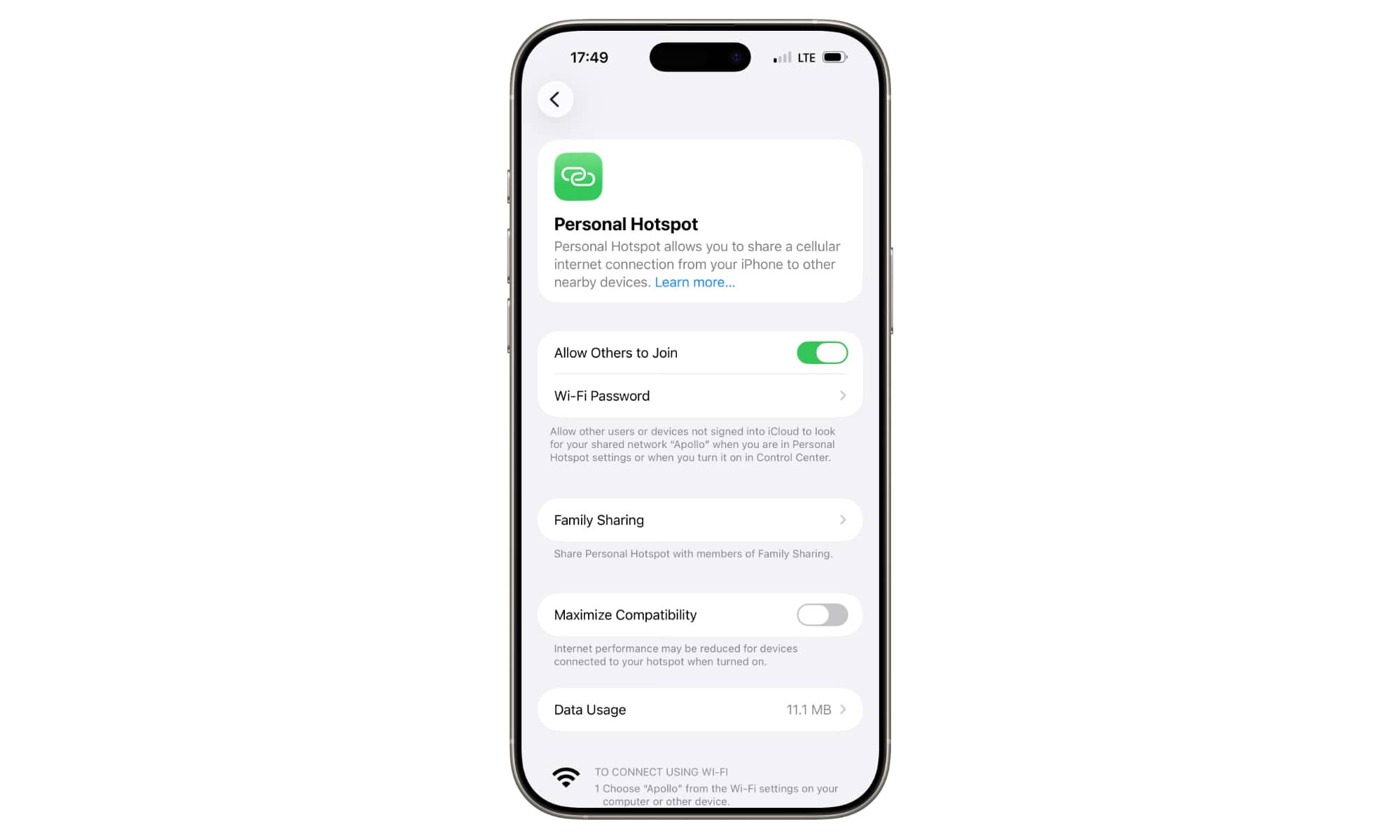
The latest iOS 26.4 release brought about some significant changes, with new emojis stealing the spotlight. However, Apple also made improvements to Apple Music, introducing AI-generated playlists for US users and addressing keyboard issues. Among these updates was a subtle yet practical enhancement that may have gone unnoticed: the ability to monitor your cellular data usage.
This feature would have been beneficial in earlier years when unlimited data plans were less common. With iOS 26.4, Apple has made it easier for users to track the data consumption of their Personal Hotspot, identifying the users and devices consuming the data.
Previously, users could check data usage by accessing Settings > Cellular, but the breakdown by device and user was not as prominent. In the latest update, iOS 26.4 now includes a Data Usage section within the Personal Hotspot settings, providing a more visible overview of data usage.
The Data Usage section can be found at the bottom of Settings > Personal Hotspot, displaying a list of connected Apple devices and their respective data usage. This includes personal devices like iPads and Macs, as well as devices of others authorized to use the hotspot.
Guest devices running at least iOS/iPadOS 18.4 or macOS 15.4 will be individually listed, while non-Apple devices and older systems will be grouped under “Other Devices.” The feature does not track Wi-Fi data usage from paired Apple Watches, as it is considered an extension of the iPhone’s data.
Resetting data statistics under Settings > Cellular will clear Personal Hotspot data as well, temporarily removing the Data Usage section until new data is consumed. The feature aims to provide transparency on data usage and device connections, enhancing user control and awareness.
While detailed usage by device names or MAC addresses may not be available for all devices, the feature offers valuable insights for managing data consumption. As technology evolves, Apple continues to refine its features to meet user needs and improve the overall experience.

![Apple releases fourth iOS 27.2 developer beta for iPhone [U: Public]](https://bennetttechinnovation.com/wp-content/uploads/2026/10/Apple-unveils-latest-iOS-272-developer-beta-for-iPhone-Now-400x240.jpg)
![Apple releases fourth iOS 27.2 developer beta for iPhone [U: Public]](https://bennetttechinnovation.com/wp-content/uploads/2026/10/Apple-unveils-latest-iOS-272-developer-beta-for-iPhone-Now-80x80.jpg)







Upgrade Alert: HomePod Mini 2 and HomePod 2 Set to Become Default Mac Speakers

Finally Fixing my Wi-Fi – Zyxel Multy X!

Lost in the Living Maze: Unraveling Hidden Terrain Magic Through Copy-Paste

Samsung Unveils Exclusive Galaxy Z Fold 8 BTS Edition

Navigating the Digital World: Expert Tech Advice for Everyman

OMass Therapeutics Secures €275 Million Funding to Advance Innovative Small-Molecule Therapies

The Evolution of Apple’s Smart Home Strategy: A Closer Look at Their Own Devices

Unveiling the Imposter: The Truth Behind the Fake WhatsApp Clone on the Play Store

Digital Protection: How a 1988 Law Could Safeguard Your Online Viewing Experience

EU Takes Action Against Instagram and Facebook for Violating Illegal Content Rules

Warning: Facebook Creators Face Monetization Loss for Stealing and Reposting Videos

Facebook’s New Look: A Blend of Instagram’s Style

Facebook Compliance: ICE-tracking Page Removed After US Government Intervention

Facebook and Instagram to Reduce Personalized Ads for European Users

InstaDub: Meta’s AI Translation Tool for Instagram Videos

Reclaim Your Account: Facebook and Instagram Launch New Hub for Account Recovery

Meta discontinues Messenger apps for Windows and macOS

Breaking Updates: Meta Connect 2025 Unveils Latest Developments
Finally Fixing my Wi-Fi – Zyxel Multy X!

$25,000 Gaming Setup – EVOLUTION!

The Maze Alpha X is HERE!

Cool Tech under $100 – December!

MYSTERY UNBOXING FROM GOOGLE!

TOP 6 Smartphones from Companies you NEVER Expected!

A Surprise Smartphone from EE!

DOOGEE MIX 2 VS DOOGEE MIX 1!

INCREDIBLE Smartphone Gadgets on Amazon!
-
 Facebook12 months ago
EU Takes Action Against Instagram and Facebook for Violating Illegal Content Rules
-
 Facebook1 year ago
Warning: Facebook Creators Face Monetization Loss for Stealing and Reposting Videos
-
 Facebook10 months ago
Facebook’s New Look: A Blend of Instagram’s Style
-
 Facebook1 year ago
Facebook Compliance: ICE-tracking Page Removed After US Government Intervention
-
 Facebook10 months ago
Facebook and Instagram to Reduce Personalized Ads for European Users
-
 Facebook1 year ago
InstaDub: Meta’s AI Translation Tool for Instagram Videos
-
 Facebook11 months ago
Reclaim Your Account: Facebook and Instagram Launch New Hub for Account Recovery
-
 Apple12 months ago
Meta discontinues Messenger apps for Windows and macOS
