
Microsoft
Introducing Xbox Ally X: The Ultimate DLSS Competitor for Gaming on the Go

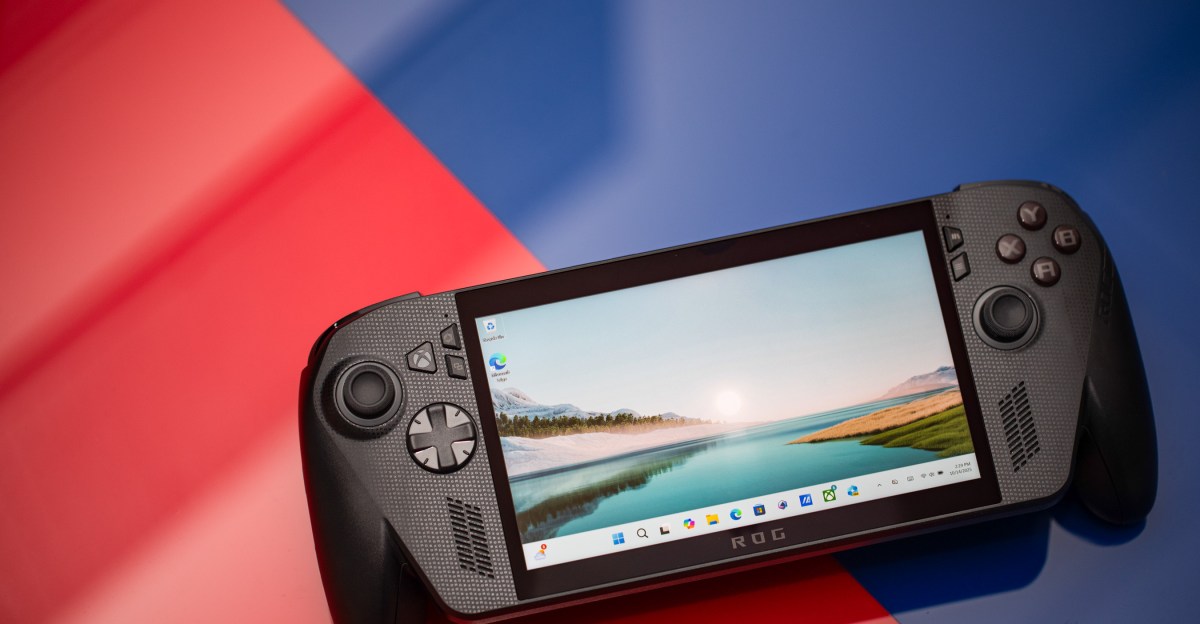
Microsoft Tests Auto Super Resolution Feature on Xbox Ally X
Microsoft is currently testing its Automatic Super Resolution (Auto SR) feature on the Xbox Ally X, aimed at enhancing visual quality and frame rates for gamers. This feature was initially introduced on select Copilot Plus PCs two years ago and is now being extended to the Xbox Ally X for docked play, specifically catering to larger TV screens.
According to Microsoft, Auto SR functions similarly to Nvidia’s DLSS, where a game is rendered at a lower resolution to boost frame rates and then upscaled to improve image quality. This technology has gained popularity in recent years, with Microsoft noting that it has become an essential component in modern game rendering.
Unlike DLSS, AMD’s FSR, or Intel’s XeSS, Auto SR is integrated into Windows and can apply super resolution to existing games without the need for game-specific options. Microsoft acknowledges that the effectiveness of this feature across various games remains to be seen, as it was initially limited to twelve whitelisted games on Qualcomm’s Snapdragon laptops.
The demonstration of Auto SR on the Xbox Ally X showcases its ability to boost frame rates and texture details in games like Forza Horizon 5. Leveraging the NPU chip on the device allows for improved performance without affecting GPU resources.
Auto SR will be accessible through the Game Bar on the Xbox Ally X, enabling players to toggle it on or off as needed for games running below 60fps. Microsoft encourages users to join the Xbox Insider program to begin testing this feature.
Enhancements to Xbox Ally and Xbox Ally X Docking Experience
In addition to Auto SR, Microsoft and Asus are improving the docking experience for Xbox Ally and Xbox Ally X devices. Gameplay will seamlessly transition to the TV when connected, with the handheld display turning off automatically. The ROG Bulwark feature will unlock Variable Refresh Rate (VRR) for smoother gameplay on compatible TVs, with plans to extend this functionality to other “Designed for Xbox” docks in the future.
A new display widget in the Game Bar allows users to control resolution, refresh rates, and project modes without exiting a game. Microsoft has disabled built-in controls on docked Xbox Ally devices when paired with an Xbox controller, introducing a Gamepad Cursor option for easier navigation in non-controller-friendly apps. Enhanced vibration haptic feedback has also been added to Xbox Ally devices for a more immersive gaming experience.
Unified Library Experience and Other Improvements
Microsoft is streamlining the gaming experience on Xbox Ally devices by allowing users to manage and launch games from various PC storefronts directly from the Xbox interface. This update, set to roll out soon, aims to provide a seamless gaming experience across different platforms. Roanne Sones, CVP of gaming devices and ecosystem at Xbox, highlights the convenience of accessing games from multiple PC gaming storefronts and launchers within the Xbox ecosystem.













Exploring the Exciting Updates of iOS 27: A Look Beyond Artificial Intelligence

A $50,000 Smartphone for $400?

Ram Trucks Australia Braces for Price Increases Due to Emissions Regulations

Revving Up: Tractor Battle Adventure RPG Expands with Mod Support on Steam Workshop

Troubleshooting Guide: Unable to Access 192.168.0.1

Choosing the Right AI: Ensuring Trust in Multi-Model Translation Systems

Friday Night Baseball Madness: iPhone 18 Pro Edition

Partnership Potential: JAC & Huawei in Talks to Produce Electric Maserati Vehicles

Grand Theft Auto VI: The Soundtrack – Limited Edition Physical Release

EU Takes Action Against Instagram and Facebook for Violating Illegal Content Rules

Warning: Facebook Creators Face Monetization Loss for Stealing and Reposting Videos

Facebook’s New Look: A Blend of Instagram’s Style

Facebook Compliance: ICE-tracking Page Removed After US Government Intervention

Facebook and Instagram to Reduce Personalized Ads for European Users

InstaDub: Meta’s AI Translation Tool for Instagram Videos

Reclaim Your Account: Facebook and Instagram Launch New Hub for Account Recovery

Meta discontinues Messenger apps for Windows and macOS

Breaking Updates: Meta Connect 2025 Unveils Latest Developments
A $50,000 Smartphone for $400?

Huawei P20 Pro Unboxing!

Huawei P20 Pro vs Samsung S9 Plus!

Huawei P20 vs P20 Pro vs iPhone 8 Plus vs S9 Battery Drain Test!

10 Android Mods that Change Everything

I used the first Android Phone in the World.

DOOGEE MIX 4 UNBOXING (PROTOTYPE)!

MYSTERY UNBOXING FROM SAMSUNG!

The Truth about Huawei P20 Pro – REAL Review
-
 Facebook11 months ago
EU Takes Action Against Instagram and Facebook for Violating Illegal Content Rules
-
 Facebook11 months ago
Warning: Facebook Creators Face Monetization Loss for Stealing and Reposting Videos
-
 Facebook9 months ago
Facebook’s New Look: A Blend of Instagram’s Style
-
 Facebook11 months ago
Facebook Compliance: ICE-tracking Page Removed After US Government Intervention
-
 Facebook9 months ago
Facebook and Instagram to Reduce Personalized Ads for European Users
-
 Facebook11 months ago
InstaDub: Meta’s AI Translation Tool for Instagram Videos
-
 Facebook10 months ago
Reclaim Your Account: Facebook and Instagram Launch New Hub for Account Recovery
-
 Apple11 months ago
Meta discontinues Messenger apps for Windows and macOS
