
Mobile Tech
Mastering iOS 27: Minimizing the Lock Screen Clock

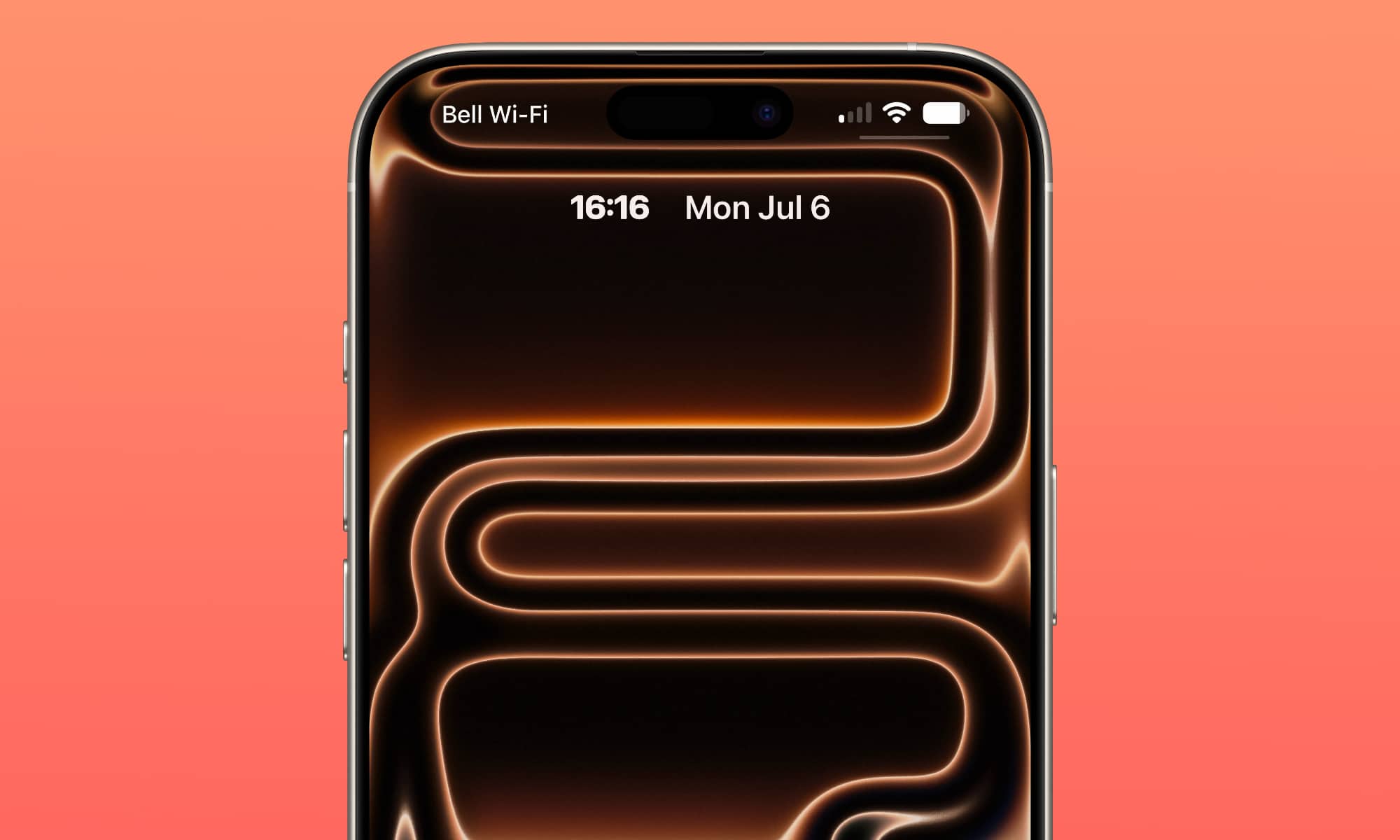
Since the release of the first iOS 27 developer beta by Apple, iPhone users worldwide have been exploring the new features. Among the many exciting updates, one small cosmetic change has caught the attention of many users.
That change is the ability to adjust the size of the Lock Screen’s clock. Now, users can make the clock incredibly small and place it in the widget section at the top of the screen. While seemingly minor, this change has made a significant impact. Here’s how you can try it out yourself.
Changing the Clock Size in iOS 27
To start, you need to be running iOS 27. The third developer beta is currently available, with a public beta expected to follow soon.
Once you have iOS 27 installed, adjusting the size of the Lock Screen’s clock is simple. Here’s what you need to do:
- Open the Settings app.
- Scroll down to Wallpaper.
- Select Customize under your current Lock Screen preview or set up a new layout.
- Tap the clock to access the Font & Color panel.
- Tap the new minimize icon (the small square frame button) in the top-right corner of the panel.
That’s all you need to do! The clock will shrink to a tiny size and move to the widget area next to the date at the top of your screen.
The Appeal of This Change
Despite the clock becoming barely visible, many users have praised this change. It offers a great opportunity to showcase your wallpapers without the time obstructing the view. Additionally, iPhone users have been yearning for more customization options, and this update is a step in the right direction.
More Features in iOS 27
This small clock adjustment is just the beginning of what iOS 27 has to offer. The update is packed with new features and enhancements that iPhone users will appreciate. While the developer beta is currently available for testing, it’s advisable to create a backup before installing it.
global $wp;
. ‘/’;
?>
![Apple releases fourth iOS 27.2 developer beta for iPhone [U: Public]](https://bennetttechinnovation.com/wp-content/uploads/2026/10/Apple-unveils-latest-iOS-272-developer-beta-for-iPhone-Now-400x240.jpg)
![Apple releases fourth iOS 27.2 developer beta for iPhone [U: Public]](https://bennetttechinnovation.com/wp-content/uploads/2026/10/Apple-unveils-latest-iOS-272-developer-beta-for-iPhone-Now-80x80.jpg)










BMW iX5: Unleashing Unprecedented Electric Range

Revolutionizing Weather Forecasting with Microsoft’s Latest Machine Learning Tool

Enhanced Shopping Experience: How Amazon’s AI Devices Can Help You Discover New Products

The Potential Impact of a Rumoured Steam Frame OLED Upgrade on Device Performance

Biometric Security Solutions: CardLab’s Cutting-Edge Technology at Cyber Security Festival 2026

Financial Success vs. Empty Bank Account: Uncovering the Real Issue

Mesmerizing Aurora Captured by NASA Astronaut on iPhone from ISS

Cool Tech under $100 – December!

Zeekr 7X: Unveiling the Global Makeover, Chinese Upgrades Left Behind

EU Takes Action Against Instagram and Facebook for Violating Illegal Content Rules

Warning: Facebook Creators Face Monetization Loss for Stealing and Reposting Videos

Facebook’s New Look: A Blend of Instagram’s Style

Facebook Compliance: ICE-tracking Page Removed After US Government Intervention

Facebook and Instagram to Reduce Personalized Ads for European Users

InstaDub: Meta’s AI Translation Tool for Instagram Videos

Reclaim Your Account: Facebook and Instagram Launch New Hub for Account Recovery

Meta discontinues Messenger apps for Windows and macOS

Breaking Updates: Meta Connect 2025 Unveils Latest Developments
Cool Tech under $100 – December!

MYSTERY UNBOXING FROM GOOGLE!

TOP 6 Smartphones from Companies you NEVER Expected!

A Surprise Smartphone from EE!

DOOGEE MIX 2 VS DOOGEE MIX 1!

INCREDIBLE Smartphone Gadgets on Amazon!

10 Android Apps you NEED to try in 2017 / 2018

The Most Bizarre Smartphone we’ve seen all year.

Best Tech under $2000 – December 2017 / January 2018!
-
 Facebook12 months ago
EU Takes Action Against Instagram and Facebook for Violating Illegal Content Rules
-
 Facebook1 year ago
Warning: Facebook Creators Face Monetization Loss for Stealing and Reposting Videos
-
 Facebook10 months ago
Facebook’s New Look: A Blend of Instagram’s Style
-
 Facebook1 year ago
Facebook Compliance: ICE-tracking Page Removed After US Government Intervention
-
 Facebook10 months ago
Facebook and Instagram to Reduce Personalized Ads for European Users
-
 Facebook1 year ago
InstaDub: Meta’s AI Translation Tool for Instagram Videos
-
 Facebook10 months ago
Reclaim Your Account: Facebook and Instagram Launch New Hub for Account Recovery
-
 Apple12 months ago
Meta discontinues Messenger apps for Windows and macOS
