
Mobile Tech
Voice Cloning: The Innovative iOS Accessibility Feature

Apple consistently introduces new features in its iOS updates, with a particular focus on accessibility options. One such feature, Personal Voice, was unveiled with the release of iOS 17. The concept behind Personal Voice is intriguing – it allows users to train their iPhone to mimic their own voice. However, nearly two years since its debut, how effective is this feature?
If you’re curious to see Personal Voice in action, check out our video demonstration, where you can hear a sample of the personalized voice within the first 20 seconds.
Setting up Personal Voice is a straightforward process, albeit time-consuming. You’ll need approximately 15 minutes to record your voice and then leave your device charging and locked overnight for the rendering process. Here’s a step-by-step guide:
1. Navigate to settings > accessibility > personal voice (under Speech section).
2. Select “Create Personal Voice” to begin the recording process.
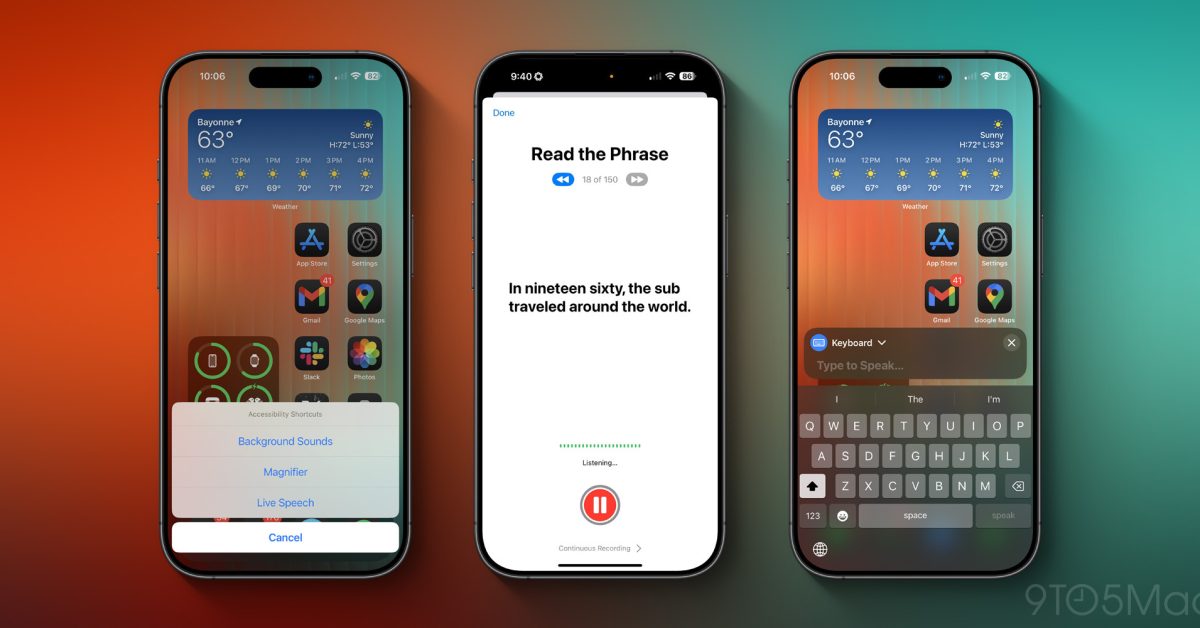
During the recording session, you’ll be prompted to recite 150 short phrases encompassing statements, questions, and exclamations. This variety helps the phone capture different intonations and inflections in your voice. It’s crucial to complete the entire process without interruptions to ensure accuracy. Once the recording is done, leave your phone locked and charging for the voice to process, typically ready by the next morning.
Now that your Personal Voice is set up, ensure it’s activated by checking the live speech section within the Speech settings. Turn on the feature to access it when needed. To activate Personal Voice, triple-press the lock button, bringing up a menu where you can type in text for your phone to speak in your voice. This feature overlays on your screen, allowing interaction while it’s active.
Does Personal Voice truly sound like you? The answer is a mix of yes and no. While it captures the essence of your voice, there’s a robotic undertone to it. Some phrases may sound natural, but others come across as mechanical, with offbeat inflections and odd speech speed. Adjusting the speech speed and voice pitch could enhance the feature’s authenticity.
Despite its imperfections, Personal Voice is a valuable accessibility option, ensuring clear communication. Apple has hinted at significant improvements to the feature in iOS 26, scheduled for release on June 9th. Have you tried Personal Voice? Share your thoughts in the comments – would you use it, or do you find it unsettling? Let’s explore other third-party solutions and discuss further!
—
Include relevant SEO keywords creatively throughout the article to improve search engine visibility. Can you transform the following sentence?













iPhone 18 Pro Face ID Freezing Bug: Update on Fix Release Date

Affordable Electric Vehicle Now Available in Australia: Leapmotor B03 Approved for Sale

Reborn in Ashes: The Shattered Faith Saga – Coming to Consoles Soon

Save Big on Xiaomi 17T: £200 Discount on Amazon – Tech Advisor

NUSX and UnternehmerTUM Join Forces to Expand Presence in Munich

Streaming Wars: Disney+ and Hulu Increase Subscription Fees in 2026

The Surprising TRUTH about Samsung – 15 things you did not know.

McLaren’s Legacy: The Remuera and Muriwai Trademarks

Cloudscape Chronicles: A Fumito Ueda-inspired Parkour Adventure

EU Takes Action Against Instagram and Facebook for Violating Illegal Content Rules

Warning: Facebook Creators Face Monetization Loss for Stealing and Reposting Videos

Facebook’s New Look: A Blend of Instagram’s Style

Facebook Compliance: ICE-tracking Page Removed After US Government Intervention

Facebook and Instagram to Reduce Personalized Ads for European Users

InstaDub: Meta’s AI Translation Tool for Instagram Videos

Reclaim Your Account: Facebook and Instagram Launch New Hub for Account Recovery

Meta discontinues Messenger apps for Windows and macOS

Breaking Updates: Meta Connect 2025 Unveils Latest Developments
The Surprising TRUTH about Samsung – 15 things you did not know.

10 Incredible Android DIY Hacks!

Does a Cheap 2018 Smartphone beat a 2013 Flagship?

Samsung Galaxy S9 & S9+ UNBOXING!

Samsung Galaxy S9 Plus vs iPhone X

The BEST $300 Phone (2018) ft. MKBHD, Technical Guruji, iJustine + More

Samsung Galaxy S9 Plus Gaming Review! (vs OnePlus 5T)

THE BEST PHONE HTC EVER MADE?

The Truth about Google?
-
 Facebook11 months ago
EU Takes Action Against Instagram and Facebook for Violating Illegal Content Rules
-
 Facebook12 months ago
Warning: Facebook Creators Face Monetization Loss for Stealing and Reposting Videos
-
 Facebook10 months ago
Facebook’s New Look: A Blend of Instagram’s Style
-
 Facebook12 months ago
Facebook Compliance: ICE-tracking Page Removed After US Government Intervention
-
 Facebook10 months ago
Facebook and Instagram to Reduce Personalized Ads for European Users
-
 Facebook12 months ago
InstaDub: Meta’s AI Translation Tool for Instagram Videos
-
 Facebook10 months ago
Reclaim Your Account: Facebook and Instagram Launch New Hub for Account Recovery
-
 Apple11 months ago
Meta discontinues Messenger apps for Windows and macOS
