
Security
Balancing Security and User Experience: Implementing Effective Active Directory Password Policies


Enhancing Active Directory Security with Strong Password Policies
Effective cybersecurity measures are crucial in today’s digital landscape, especially when it comes to protecting Active Directory (AD) accounts. The foundation of a robust security posture lies in implementing strong password policies and ensuring consistent enforcement throughout the organization.
However, finding the right balance between security and usability can be challenging. Setting overly strict rules may lead to users resorting to risky practices like writing down passwords or reusing them across multiple systems. On the other hand, weak rules can increase the organization’s vulnerability to cyber attacks.
Embracing Passphrases for Enhanced Security
Traditional password complexity requirements often result in users creating predictable and easily guessable passwords. To address this issue, organizations are encouraged to prioritize passphrase-based authentication. Passphrases, which consist of multiple words and are longer in length, are easier to remember and significantly harder to crack. The National Institute of Standards and Technology (NIST) recommends allowing passwords up to 64 characters in length.
By encouraging the use of passphrases and increasing the minimum password length requirement (e.g., 15 characters or more), organizations can strengthen their security posture while reducing the likelihood of users creating weak passwords.
Combatting Weak Passwords and Compromised Credentials
Despite longer passwords, users may still opt for weak or common choices. This leaves organizations vulnerable to password spraying attacks. Implementing solutions like Specops Password Policy can help mitigate this risk by:
- Customizing banned word lists: Security teams can create tailored dictionaries of prohibited terms to prevent the use of common weak passwords.
- Breach password protection: By continuously checking passwords against a database of over 5.4 billion compromised credentials, Specops Password Policy helps prevent the use of compromised passwords in AD.
Preventing the creation of weak passwords is more effective than addressing the issue after an account has been compromised.
Specops Password Policy
Rethinking Password Expirations for Improved Security
Requiring frequent password resets often leads to users making minor changes to their existing passwords, which can compromise security. Organizations are advised to move away from mandatory password expiration policies unless there is evidence of a breach.
Length-based aging, where expiration periods are tied to password length, can incentivize users to create longer and stronger passwords. Extended or eliminated expiration periods can be granted as a reward for using robust credentials.
Verizon’s Data Breach Investigation Report highlights that stolen credentials are involved in 44.7% of breaches. Secure your Active Directory with compliant password policies and block compromised passwords by leveraging solutions like Specops Password Policy.
Utilizing Password Managers for Enhanced Security
One of the key challenges with stringent password policies is password reuse. Encouraging the use of password managers can alleviate this issue by allowing users to generate and securely store unique passwords for each of their accounts.
Enterprise password managers also enable better control over shared and privileged accounts, further enhancing security across the organization.
Implementing Self-Service Password Resets for Efficiency
Password resets are a common cause of helpdesk tickets in AD environments. Implementing secure self-service password reset options can empower users to reset their passwords independently, reducing support queues and downtime.
By verifying identities through multi-factor authentication (MFA) or other methods, organizations can streamline the password reset process and enhance user experience.
Enhancing User Experience with Customizable Notifications
Clear and timely notifications play a crucial role in keeping users informed about password requirements and impending changes. Effective communication can help users stay compliant with password policies and minimize disruptions.
Providing Real-Time Feedback for Stronger Passwords
Instead of generic error messages, organizations should offer specific and real-time feedback during password creation or modification. Features like password strength meters and banned password checks can guide users in creating more secure credentials.
How Specops Can Assist in Strengthening Password Policies
Reviewing and updating AD password policies requires a careful balance between security and usability. Tools like Specops Password Auditor can help organizations identify and address password-related vulnerabilities within their AD environment.
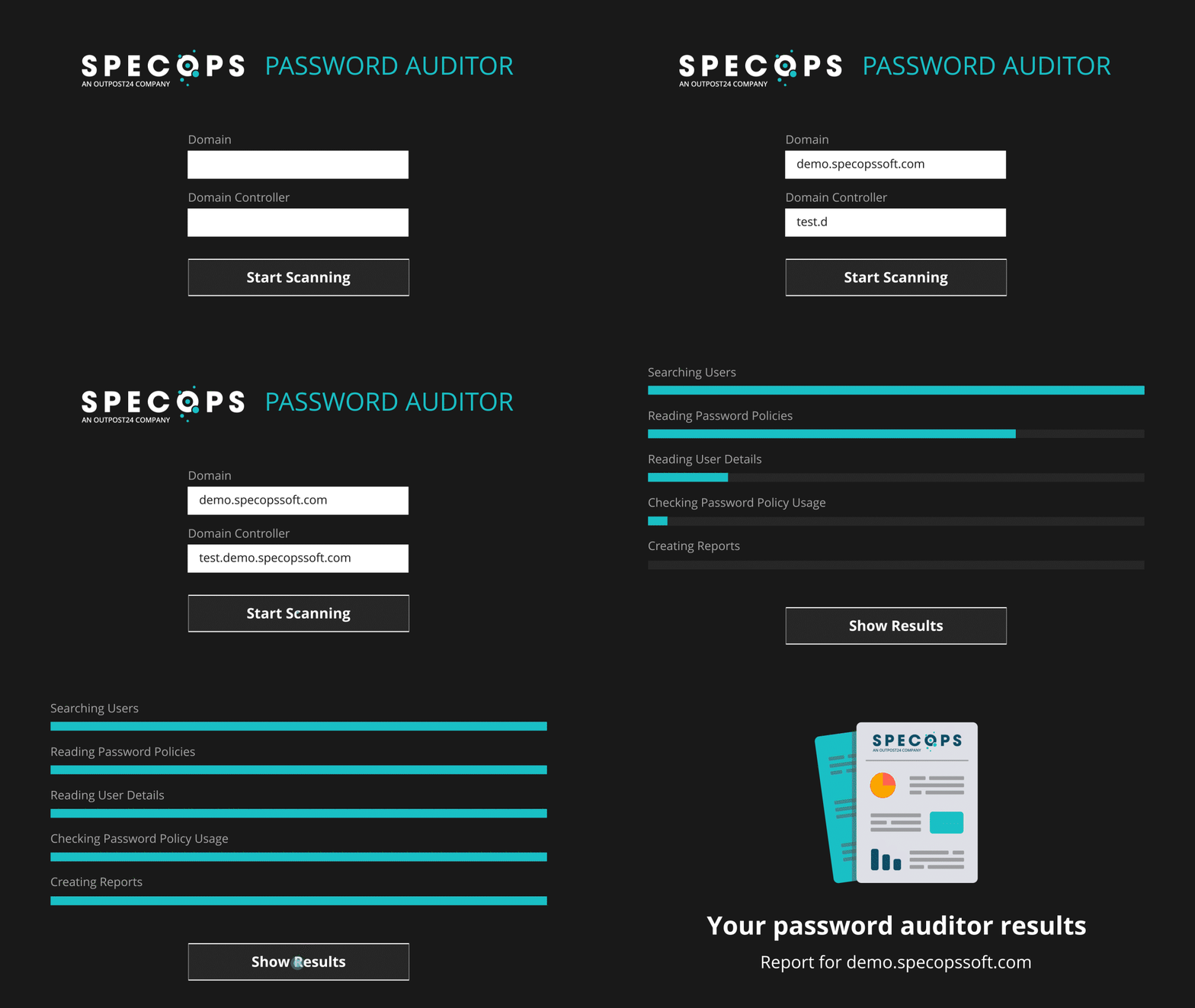
Specops Password Auditor
By leveraging solutions like Specops Password Policy, organizations can remediate password-related issues and ensure consistent policy enforcement. These tools support passphrase implementation and continuous scanning for compromised passwords, strengthening overall resilience.
If you’re reevaluating your password strategy, consider partnering with Specops to develop an approach that enhances security while prioritizing user experience.
Contact Specops today or schedule a demo to explore their solutions further.
Article sponsored and written by Specops Software.











Budget Boss: Mastering Your Finances with These 5 iPhone Apps

How to Apply a Screen Protector

The Ultimate Powerhouse: Unveiling the Superiority of the 60 xDrive i7

Putting People First: Konami’s Stance on the Future of Gaming

Visualizing Reason: Elorian’s AI Model Explores the Power of Images

Navigating HomeView: Addressing Apple’s App Issues

iPhone Duo: The Long Wait Until January 2027

Scaling New Heights: Peak Conquers Consoles and Prepares for PS5 Release

Google’s Pixel 10: Now Available at an Unbeatable Price on Amazon

EU Takes Action Against Instagram and Facebook for Violating Illegal Content Rules

Warning: Facebook Creators Face Monetization Loss for Stealing and Reposting Videos

Facebook’s New Look: A Blend of Instagram’s Style

Facebook Compliance: ICE-tracking Page Removed After US Government Intervention

Facebook and Instagram to Reduce Personalized Ads for European Users

InstaDub: Meta’s AI Translation Tool for Instagram Videos

Reclaim Your Account: Facebook and Instagram Launch New Hub for Account Recovery

Meta discontinues Messenger apps for Windows and macOS

Breaking Updates: Meta Connect 2025 Unveils Latest Developments
How to Apply a Screen Protector

The Flagship Samsung Smartphone you Never Considered.

Finally Fixing my Wi-Fi – Zyxel Multy X!

$25,000 Gaming Setup – EVOLUTION!

The Maze Alpha X is HERE!

Cool Tech under $100 – December!

MYSTERY UNBOXING FROM GOOGLE!

TOP 6 Smartphones from Companies you NEVER Expected!

A Surprise Smartphone from EE!
-
 Facebook12 months ago
EU Takes Action Against Instagram and Facebook for Violating Illegal Content Rules
-
 Facebook1 year ago
Warning: Facebook Creators Face Monetization Loss for Stealing and Reposting Videos
-
 Facebook10 months ago
Facebook’s New Look: A Blend of Instagram’s Style
-
 Facebook1 year ago
Facebook Compliance: ICE-tracking Page Removed After US Government Intervention
-
 Facebook10 months ago
Facebook and Instagram to Reduce Personalized Ads for European Users
-
 Facebook1 year ago
InstaDub: Meta’s AI Translation Tool for Instagram Videos
-
 Facebook11 months ago
Reclaim Your Account: Facebook and Instagram Launch New Hub for Account Recovery
-
 Apple12 months ago
Meta discontinues Messenger apps for Windows and macOS
