
Mobile Tech
Enhanced Siri Voices: A Look at the Latest Updates

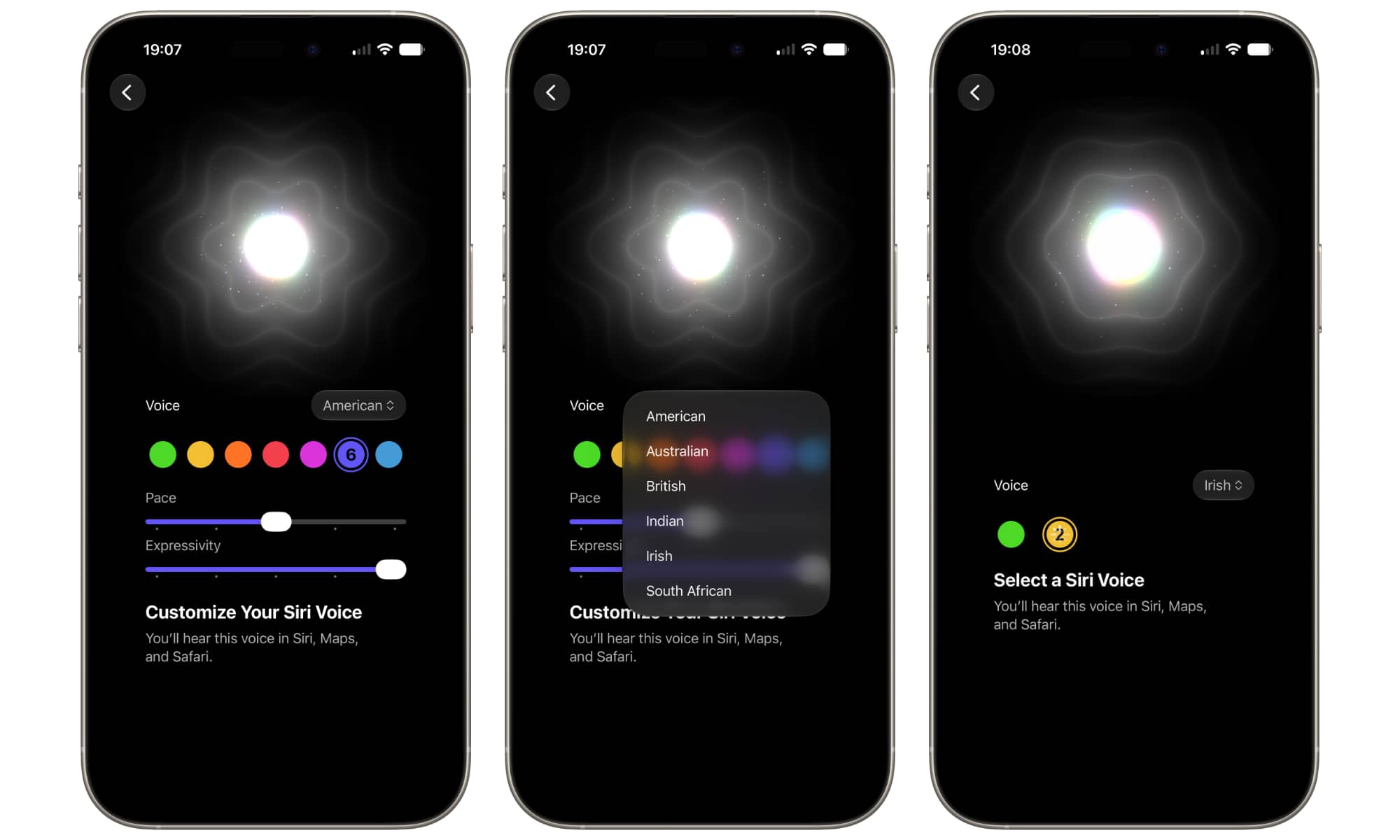
Apple has released the fourth developer beta of iOS 27, following last week’s public beta release. This update comes exactly two weeks after the third developer beta was released on July 6. The public beta of iOS 27 is essentially the same as the earlier developer beta, with no new additions or changes over the past two weeks, just a wider distribution to a broader audience. It is expected that the public beta will be available later this week.
Most of the significant features of iOS 27 were rolled out in the first developer beta, with subsequent releases focusing on polishing and tweaks. However, there are still some features that Apple has yet to fully implement, such as the expressive Siri voices.
In the latest developer beta, there are now six dialects available for Siri voices. Users can select from seven American voices, each distinguished by color. The earlier green and yellow voices have been repositioned as numbers 6 and 7, with purple and blue colors. These two voices are customizable, with the “Pace” and “Expressivity” sliders unlocked. The language drop-down menu also includes Australian, British, Indian, Irish, and South African voices.
Other Changes in iOS 27 DB4
Aside from the Siri voice updates, there are some minor changes in the fourth developer beta:
- The Siri Settings now include a Preview option for choosing the number of lines displayed for each chat in the Siri app.
- A card now explains the “All-New Siri” feature when accessing the new Siri Search or Ask interface for the first time.
- The TV app includes an Automatic Downloads option for downloading the next episodes of shows on the Continue Watching list.
- A new Use Cellular Data with Wi-Fi toggle is available for each Wi-Fi network to manage cellular data fallback.
- The AirPods options in the Control Center now include the updated Adaptive Audio slider introduced in iOS 27 beta 3.
Additionally, there are smaller changes such as a “Zoom Photos to Fill” toggle in the Photos settings and a ProRes Log format selection in Camera Settings for professionals.
$url_param = $_GET[‘fbclid’];
global $wp;
. ‘/’;
?>













Oneplus 5T vs Pixel 2 XL vs S8 vs iPhone 8 Battery life Drain Test!

Oneplus 5T vs Pixel 2 XL vs S8 vs iPhone 8 Battery Charging Speed Test!

The Affordable Next-Gen Xbox: Debunking the $1,800 Price Tag

Revelation: A New Dawn in the Helldivers Universe

Battery Life Halved by Garmin’s New Voice Controls

Revolutionizing Energy: The Future of Next-Gen Battery Life

Warhound Secures $200M Investment to Develop Advanced Military Canines Equipped with Anduril Technology

No, the iPhone Duo isn’t a miniature device

Rebirth of Resilience: The Evolution of Crisis Management in the Digital Age

EU Takes Action Against Instagram and Facebook for Violating Illegal Content Rules

Warning: Facebook Creators Face Monetization Loss for Stealing and Reposting Videos

Facebook’s New Look: A Blend of Instagram’s Style

Facebook Compliance: ICE-tracking Page Removed After US Government Intervention

Facebook and Instagram to Reduce Personalized Ads for European Users

InstaDub: Meta’s AI Translation Tool for Instagram Videos

Reclaim Your Account: Facebook and Instagram Launch New Hub for Account Recovery

Meta discontinues Messenger apps for Windows and macOS

Breaking Updates: Meta Connect 2025 Unveils Latest Developments
Oneplus 5T vs Pixel 2 XL vs S8 vs iPhone 8 Battery life Drain Test!
Oneplus 5T vs Pixel 2 XL vs S8 vs iPhone 8 Battery Charging Speed Test!

MY NEW CAR?! (Q&A)

Should you buy your Smartphones Refurbished!?

6 Amazing SECRET Android Launchers (2017 / 2018)

6 Value for Money Tech Products you NEED to try!

iPhone X Helicopter 1200ft Drop Test!! + Mous Case Review

7 UNBELIEVABLE Smartphone Magic Tricks!

Oneplus 5T vs Oneplus 1 – 3 Years Later.
-
 Facebook12 months ago
EU Takes Action Against Instagram and Facebook for Violating Illegal Content Rules
-
 Facebook1 year ago
Warning: Facebook Creators Face Monetization Loss for Stealing and Reposting Videos
-
 Facebook11 months ago
Facebook’s New Look: A Blend of Instagram’s Style
-
 Facebook1 year ago
Facebook Compliance: ICE-tracking Page Removed After US Government Intervention
-
 Facebook11 months ago
Facebook and Instagram to Reduce Personalized Ads for European Users
-
 Facebook1 year ago
InstaDub: Meta’s AI Translation Tool for Instagram Videos
-
 Facebook11 months ago
Reclaim Your Account: Facebook and Instagram Launch New Hub for Account Recovery
-
 Apple1 year ago
Meta discontinues Messenger apps for Windows and macOS
