
Tech News
Enhanced Control Over Android Backup: Per-App Settings

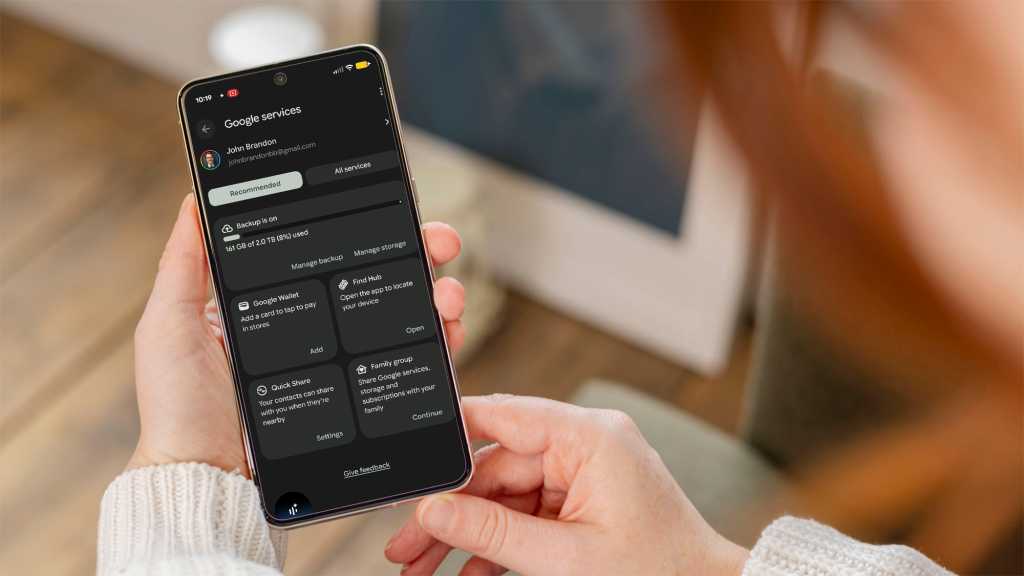
Google is enhancing data backup on Android with a new feature that offers users more control over what they back up. This update, reported by Tech Advisor, allows for individual app backup management through Google Play Services version 26.24, as opposed to the previous global settings. This change helps users save on cloud storage costs and avoid the need for Google One subscriptions.
The new feature is first being rolled out to Google Pixel devices for Android 16 and 17 users, with a wider rollout expected soon. This development follows a previous step in February towards improving data backup on Android.
With this upgrade, users can now manage backups more precisely, creating and managing backups for each individual app. Previously, users could only enable app data backups globally, meaning they had to back up all apps or none at all.
Once activated, the device backs up data to cloud storage. Users with a Google One subscription are guaranteed at least 15GB of storage space, provided they have registered their phone number. Selectively backing up only essential apps and data can potentially help users avoid the need for additional storage space.
It is crucial to note that enabling and then disabling cloud backup for a specific app will result in the deletion of all previously backed up data.
To manage backups, users can find the new backup option in their Android device’s settings under Google Services > Backup > Backup details. The list of suggested apps that can be backed up is sorted by storage usage, with an advanced view available for all other apps. Users can also choose whether data should be backed up via Wi-Fi only or via mobile data, keeping in mind the potential for high data usage while on the move.
The new backup feature is gradually being rolled out to users on Android 16 or Android 17, starting with Google Pixel smartphones. The update is part of Google Play Services version 26.24, which most users will receive automatically. Users can check their current Google Play Services version by navigating to Settings > Apps > All apps > Google Play Services.
This article was originally published on PC-WELT and has been translated and adapted from German.










Game Devs Fearful of Copycats: A New Era of GenAI Gloom

Embracing the Mundane: Finding Beauty in the Ordinary Unicorn

Apple’s Strict Guidelines: Crackdown on Nudify AI Apps

Exclusive: Apple Website Leak Reveals iPad mini 8 Release

Unleashing Potential: Overcoming Limitations

Uncovering the Bystander Problem: Insights from a Former AWS Security Engineer on Amazon’s Bee AI Devices

Arizona Sunshine: Unleashing the Doggy Co-op Mode in January

International Collaboration: Surrey, Sheffield, and Melbourne Join Forces on £3.2m Project to Create Provably Secure Sandbox for AI Agents

Tech Advisor Announces Samsung Galaxy Phones Now Available on Google Play Store

EU Takes Action Against Instagram and Facebook for Violating Illegal Content Rules

Warning: Facebook Creators Face Monetization Loss for Stealing and Reposting Videos

Facebook’s New Look: A Blend of Instagram’s Style

Facebook Compliance: ICE-tracking Page Removed After US Government Intervention

Facebook and Instagram to Reduce Personalized Ads for European Users

InstaDub: Meta’s AI Translation Tool for Instagram Videos

Reclaim Your Account: Facebook and Instagram Launch New Hub for Account Recovery

Meta discontinues Messenger apps for Windows and macOS

Breaking Updates: Meta Connect 2025 Unveils Latest Developments

Finally Fixing my Wi-Fi – Zyxel Multy X!

$25,000 Gaming Setup – EVOLUTION!

The Maze Alpha X is HERE!

Cool Tech under $100 – December!

MYSTERY UNBOXING FROM GOOGLE!

TOP 6 Smartphones from Companies you NEVER Expected!

A Surprise Smartphone from EE!

DOOGEE MIX 2 VS DOOGEE MIX 1!

INCREDIBLE Smartphone Gadgets on Amazon!
-
 Facebook12 months ago
EU Takes Action Against Instagram and Facebook for Violating Illegal Content Rules
-
 Facebook1 year ago
Warning: Facebook Creators Face Monetization Loss for Stealing and Reposting Videos
-
 Facebook10 months ago
Facebook’s New Look: A Blend of Instagram’s Style
-
 Facebook1 year ago
Facebook Compliance: ICE-tracking Page Removed After US Government Intervention
-
 Facebook10 months ago
Facebook and Instagram to Reduce Personalized Ads for European Users
-
 Facebook1 year ago
InstaDub: Meta’s AI Translation Tool for Instagram Videos
-
 Facebook11 months ago
Reclaim Your Account: Facebook and Instagram Launch New Hub for Account Recovery
-
 Apple12 months ago
Meta discontinues Messenger apps for Windows and macOS
