
AI-Powered Visual Design: The Ultimate Tool for Creating Stunning Graphics

Introducing Google Pics: A Game-Changer for Workspace Users
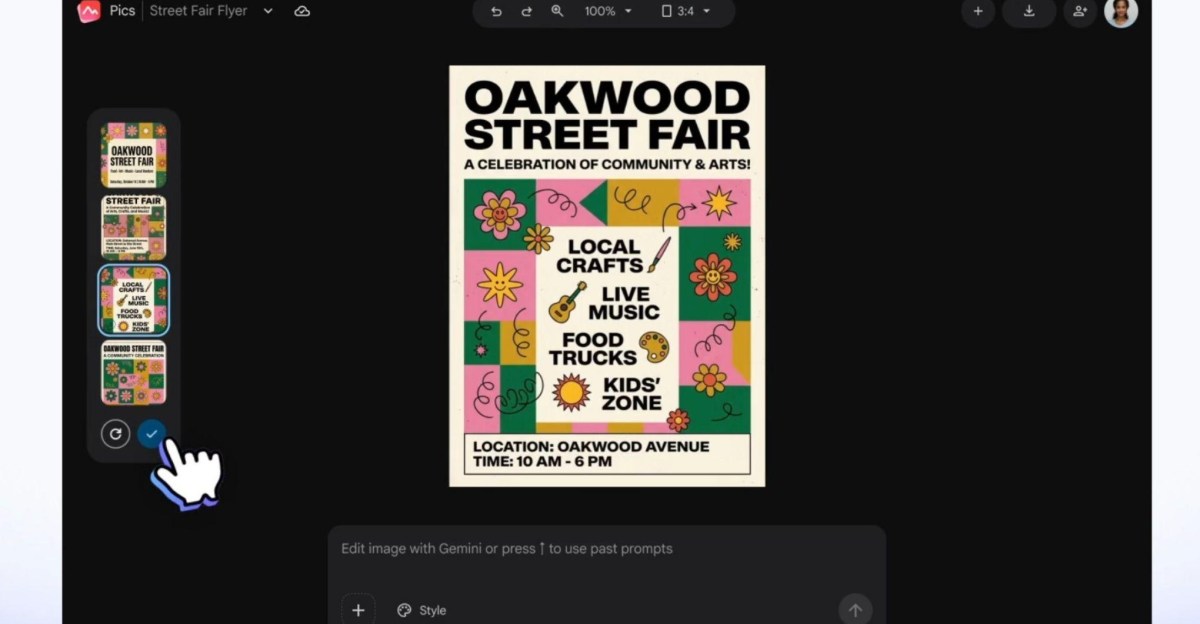
Google has recently unveiled Google Pics, a revolutionary suite of creative design tools tailored for Workspace users. This innovative tool aims to streamline the process of editing and generating AI images, making it easier for businesses to create “professional-grade” visuals. Powered by the Gemini and Nano Banana generative AI model, Google Pics offers users more control over prompt-based image creation and manipulation. Users can now pinpoint specific objects or text within an image and provide detailed descriptions of desired changes, thereby reducing the risk of unsightly results often associated with automated image generation tools.
The Challenge of AI Image Generation for Businesses
In a blog post announcing the launch of Google Pics, the tech giant highlighted the struggles faced by teams when attempting to create high-quality images for marketing campaigns, customer presentations, and product storytelling. The traditional approach to AI image generation, while popular in personal use, often falls short in a business context. Teams encounter inconsistent results, endless trial-and-error processes, and cumbersome workflows across multiple applications.
Features and Integration
Google Pics is being launched both as a standalone Workspace app and as an integrated feature for Google Docs and Slides. The tool will soon be available on Google Drive as well. With these integrations, users can seamlessly edit images within their documents and presentations using Pics’ comprehensive suite of precision AI tools.
Google Pics offers a range of powerful features that enable users to create images from scratch, edit individual objects within images using descriptive prompts, upscale images to 2K or 4K resolutions, and quickly crop images for various platforms. Collaboration is also made easy with the ability to share designs with colleagues and friends.
Competition and Unique Selling Points
While platforms like Canva and Adobe Express offer similar features and AI tools, Google Pics sets itself apart by focusing on ease of use for designing posters, flyers, and social media posts. Google aims to empower users with the confidence to create stunning visuals without the need for extensive graphic design skills, potentially reducing reliance on third-party services for basic creative work.
Availability for Workspace Users
Following its initial release to testers post Google I/O in May, Google Pics is now gradually rolling out to Workspace users on Business Standard, Business Plus, Enterprise Standard, and Enterprise Plus plans. The tool is also available for Google AI Pro and Ultra personal plans, as well as the Google AI Pro for Education plan.











Xbox’s Return to the Office: Four-Day Work Week Mandate

End of an Era: Bioware’s Closure Marks the End of Mass Effect Development

Apple’s Strategic Plans for Surging Demand

The Evolution of Customer Discovery: Adapting to AI Search for Small Businesses

5 Common iPhone Slowdowns and How to Speed Them Up

Chery’s Luxeed: The Ultimate Luxury People Mover Arriving in Australia in 2027

Microsoft Welcomes Stripe Co-Founder John Collison to Board as Two Directors Step Down

Enhanced Edgerunners: New Quests, Dual Wielding, and Blade Customization in Cyberpunk 2077

Staying the Course: A27 Tech Advisor’s Continual Success

EU Takes Action Against Instagram and Facebook for Violating Illegal Content Rules

Warning: Facebook Creators Face Monetization Loss for Stealing and Reposting Videos

Facebook’s New Look: A Blend of Instagram’s Style

Facebook Compliance: ICE-tracking Page Removed After US Government Intervention

Facebook and Instagram to Reduce Personalized Ads for European Users

InstaDub: Meta’s AI Translation Tool for Instagram Videos

Reclaim Your Account: Facebook and Instagram Launch New Hub for Account Recovery

Meta discontinues Messenger apps for Windows and macOS

Breaking Updates: Meta Connect 2025 Unveils Latest Developments

6 Value for Money Tech Products you NEED to try!

iPhone X Helicopter 1200ft Drop Test!! + Mous Case Review

7 UNBELIEVABLE Smartphone Magic Tricks!

Oneplus 5T vs Oneplus 1 – 3 Years Later.

Top 20 BEST Smartphones of 2017!

5 Amazing Upcoming Smartphone Features – 2018 / 2019

ULTIMATE Power Banks / The Best Power Banks (2017-2018)

TOP 5 BEST UPCOMING SMARTPHONES – 2018!!

How to Apply a Screen Protector
-
 Facebook12 months ago
EU Takes Action Against Instagram and Facebook for Violating Illegal Content Rules
-
 Facebook1 year ago
Warning: Facebook Creators Face Monetization Loss for Stealing and Reposting Videos
-
 Facebook11 months ago
Facebook’s New Look: A Blend of Instagram’s Style
-
 Facebook1 year ago
Facebook Compliance: ICE-tracking Page Removed After US Government Intervention
-
 Facebook11 months ago
Facebook and Instagram to Reduce Personalized Ads for European Users
-
 Facebook1 year ago
InstaDub: Meta’s AI Translation Tool for Instagram Videos
-
 Facebook11 months ago
Reclaim Your Account: Facebook and Instagram Launch New Hub for Account Recovery
-
 Apple1 year ago
Meta discontinues Messenger apps for Windows and macOS
