
Mobile Tech
iOS 26 Wishlist: 5 Android Features We’re Dying to Have

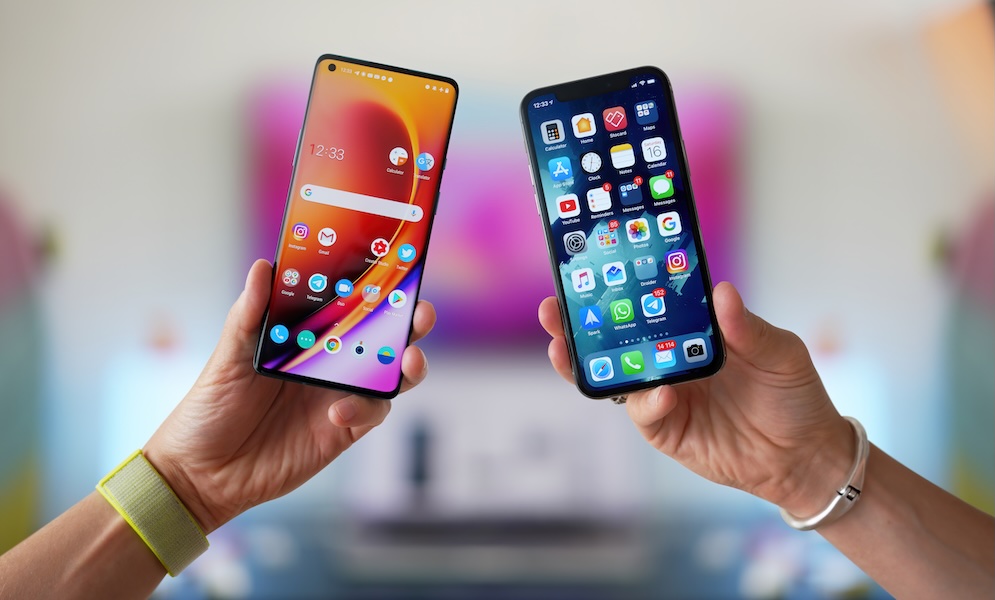
The debate between Android and iPhone has been a hot topic since the beginning of the smartphone era. Some say Apple’s restrictions make the iPhone worse, while others think that the lack of polish, quality, and optimization makes Android the lesser smartphone.
However, the truth is that neither platform is inherently better than the other. Each has its pros and cons, and the competition between devices can actually be beneficial for us, the users. Since both tech companies want folks to buy their smartphones, they have to keep giving us more new and cool features.
Not only that, but tech companies are often forced to copy each other’s features to avoid falling behind, which is also great for us, as we’ll have most of the other platform’s key features eventually.
With that said, Apple likes to take its time when it comes to adding features. Because of that, Android still has a handful of genuinely practical features Apple hasn’t fully matched on the iPhone yet.
However, with Apple’s Worldwide Developers Conference (WWDC) just around the corner, there’s still hope we might see Apple “borrow” some more features from the competition. Here are just a few Android features we’d love to see on the iPhone.
True Split-Screen Multitasking
One of the biggest Android features the iPhone still lacks is true split-screen multitasking.
Android has supported a multi-window mode on phones for years, including split-screen layouts where two apps can share the screen at the same time. That means you can keep a chat open while checking a website, compare two documents side by side, or keep notes visible while reading something else.
The iPhone still doesn’t offer that kind of dual-app multitasking. Apple’s biggest multitasking feature is still mostly built around Picture in Picture. That’s handy for video and FaceTime, but obviously not the same thing. Watching a floating video while using another app is useful, but having Messages and Safari open at the same time is a completely different level of flexibility.
This would be useful enough on a regular iPhone, but it would really shine on the larger iPhone Pro Max — not to mention the much-rumored foldable iPhone that we’re expecting this year. Once you’re carrying around a large phone, it’s not unreasonable to want to look at more than one app at a time. The extra display space is there. The processing power is there. And for people who do a lot of messaging, research, planning, or document reading on their phones — aka “pro” users — split-screen support would cut down on a lot of constant app switching.
It’s not like Apple pretends not to know about this feature; the iPad has had it for years. It makes no sense that we still don’t have it, so maybe we’ll see it in the future.
A Real Desktop Mode When You Connect Your Phone to a Monitor
This is probably the most ambitious feature on this list, but it’s also potentially the most exciting. Some flavors of Android have long supported desktop-style capabilities when connecting to an external display, and Android 16 expanded that to a much wider range of devices, with Android 17 expected to push it even further.
This allows you to connect a supported Android phone to an external display to give you a taskbar, pinned apps, and multiple apps running side by side in freely resizable windows. At that point, the phone starts feeling a lot less like a phone mirroring its screen and a lot more like a lightweight computer.
To be fair, the iPhone does have some capabilities like that. Supported iPhones that are connected to a display can use your keyboard and mouse as if they were a computer. But the changes pretty much stop there. It still feels like you’re using an iPhone — just on a larger screen. On Android, desktop mode works way differently, and on some devices, you can use your smartphone and your “computer” for different tasks at the same time.
For a lot of people, this would be one of the most useful upgrades Apple could make. Imagine traveling with only your iPhone, then plugging it into a monitor at a hotel, desk, or shared workspace and getting something that feels closer to a real desktop interface.
You wouldn’t replace your Mac for every kind of work, of course, but you could absolutely cover email, messaging, docs, browser tabs, files, and basic productivity tasks much more comfortably than you can now.
Android is already pushing in that direction. While there were some rumors of this coming last year with a Stage Manager-like interface, they never materialized. For now, Apple seems more comfortable keeping the iPhone locked into being an iPhone even when it’s attached to a much larger display. Of course, that may not be too surprising; unlike Android makers, Apple already has the iPad and the Mac, and it would probably prefer folks to buy one of those devices in addition to their iPhone.
Notification History
Almost everyone who has used a smartphone long enough has had the same annoying experience: A notification comes in, you swipe it away without thinking, and then five minutes later, you realize it was something important.
On Android, notification history gives you a pretty elegant answer to that problem. It can show snoozed notifications, recently dismissed alerts, and a history of the day’s notifications.
The iPhone still doesn’t have a true equivalent. Apple gives you notification grouping, summaries, and better customization than before, but there’s still no official system-wide history page for dismissed notifications. If you clear the wrong alert, you’re often stuck hoping you’ll get another alert or that you find the update yourself.
This is one of those small Android features that ends up being much more helpful in real life than it sounds. It isn’t flashy, and it probably wouldn’t even be showcased during Apple’s WWDC.
Are you aware that the iPhone has the potential to solve a common everyday problem that you may not have realized you needed a solution for? Apple has been focusing on features like notification summaries and focus tools to help users manage incoming alerts. However, there is still room for improvement, such as helping users recover notifications that were swiped away too quickly.
One feature that Android has and Apple has yet to bring to the iPhone is the ability to have multiple users on a single device. This feature allows for separate app data, settings, accounts, and personal spaces for each user. Additionally, Android supports a guest profile, which is ideal for temporary use without compromising your personal information. It would be beneficial if Apple could introduce this feature to the iPhone, as it opens up a world of possibilities for users.
Another feature that Apple fans have been requesting for years is easier app installation outside the App Store. Android users have long enjoyed the ability to install apps from sources outside of Google Play with just a few clicks. This flexibility allows for easier access to niche apps, developer betas, regional software, and alternative marketplaces. While Apple has made some progress in this area, it is still limited compared to Android’s capabilities.
Despite the controversies surrounding outside app installations, Android has shown that it is possible to implement this feature while maintaining security measures. A more open installation model would benefit both users and developers, but it may not align with Apple’s strict control over its ecosystem.
These features are no longer just concepts on paper; Android has already implemented them in practical ways. With Apple making strides in addressing long-standing requests from iPhone users, there is hope that some of these features may be introduced in future iOS updates. As we anticipate the upcoming WWDC, we can only wait and see what surprises Apple has in store for us, possibly including some of these coveted features.







International Collaboration: Surrey, Sheffield, and Melbourne Join Forces on £3.2m Project to Create Provably Secure Sandbox for AI Agents

Tech Advisor Announces Samsung Galaxy Phones Now Available on Google Play Store

Exploring the Boundaries of Physical AI: Insights from an Nvidia Veteran Turned Investor

The Latest Updates on Apple’s iPhone Duo

Google Unveils Revolutionary ‘Universal’ Online Shopping Cart for Seamless Shopping Experience

Upgrade Alert: HomePod Mini 2 and HomePod 2 Set to Become Default Mac Speakers

Finally Fixing my Wi-Fi – Zyxel Multy X!

Lost in the Living Maze: Unraveling Hidden Terrain Magic Through Copy-Paste

Samsung Unveils Exclusive Galaxy Z Fold 8 BTS Edition

EU Takes Action Against Instagram and Facebook for Violating Illegal Content Rules

Warning: Facebook Creators Face Monetization Loss for Stealing and Reposting Videos

Facebook’s New Look: A Blend of Instagram’s Style

Facebook Compliance: ICE-tracking Page Removed After US Government Intervention

Facebook and Instagram to Reduce Personalized Ads for European Users

InstaDub: Meta’s AI Translation Tool for Instagram Videos

Reclaim Your Account: Facebook and Instagram Launch New Hub for Account Recovery

Meta discontinues Messenger apps for Windows and macOS

Breaking Updates: Meta Connect 2025 Unveils Latest Developments
Finally Fixing my Wi-Fi – Zyxel Multy X!

$25,000 Gaming Setup – EVOLUTION!

The Maze Alpha X is HERE!

Cool Tech under $100 – December!

MYSTERY UNBOXING FROM GOOGLE!

TOP 6 Smartphones from Companies you NEVER Expected!

A Surprise Smartphone from EE!

DOOGEE MIX 2 VS DOOGEE MIX 1!

INCREDIBLE Smartphone Gadgets on Amazon!
-
 Facebook12 months ago
EU Takes Action Against Instagram and Facebook for Violating Illegal Content Rules
-
 Facebook1 year ago
Warning: Facebook Creators Face Monetization Loss for Stealing and Reposting Videos
-
 Facebook10 months ago
Facebook’s New Look: A Blend of Instagram’s Style
-
 Facebook1 year ago
Facebook Compliance: ICE-tracking Page Removed After US Government Intervention
-
 Facebook10 months ago
Facebook and Instagram to Reduce Personalized Ads for European Users
-
 Facebook1 year ago
InstaDub: Meta’s AI Translation Tool for Instagram Videos
-
 Facebook11 months ago
Reclaim Your Account: Facebook and Instagram Launch New Hub for Account Recovery
-
 Apple12 months ago
Meta discontinues Messenger apps for Windows and macOS
