
Microsoft
Microsoft Streamlines Windows Search Experience

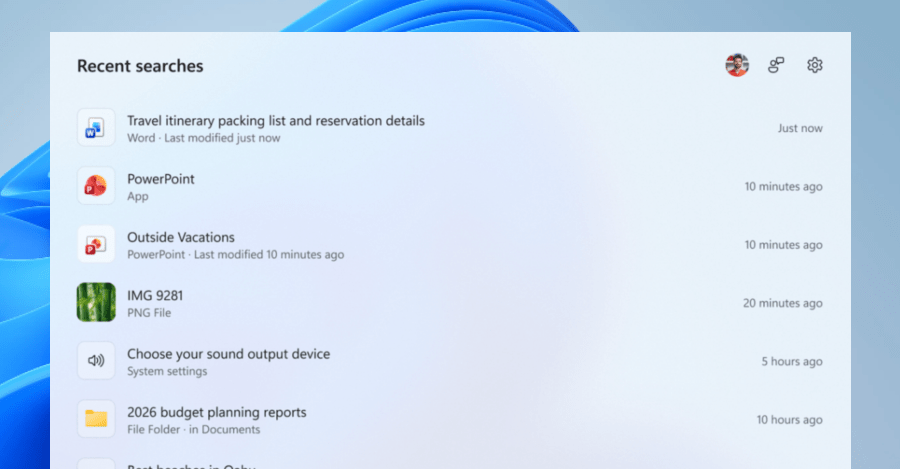
Microsoft Introduces Cleaner Windows 11 Search Menu
In an effort to enhance user experience and regain trust, Microsoft is currently testing a decluttered version of the Windows 11 search menu. This new update removes recommended content and ads, providing users with a more streamlined search experience. The company announced this exciting development in a blog post on Monday, stating that the decluttered Search Box will be rolled out to Windows Insiders in the Experimental channel.
Revamped Search Homescreen
One of the key changes in the updated search menu is a redesigned search homescreen that now only displays recent searches. Previously, opening the search menu would present users with distracting tiles on the right pane, including the image of the day, daily quizzes, trending searches, and game recommendations. The new layout aims to provide a more focused and efficient search experience.
Enhanced Web Results
Microsoft is also cleaning up web results in the search menu by prioritizing the “most relevant answer” over related products and promotions. This change is intended to help users find the information they are looking for more quickly and easily.
Other Notable Improvements
In addition to decluttering the search menu, Microsoft is testing several other enhancements. These include clearer metadata display, file previews in the right pane, and prioritizing results from local files, apps, and settings. Testers also have the option to disable web and Store recommendations from the Settings menu, providing more customization options for users.
Quality-of-Life Updates
Microsoft has implemented various quality-of-life updates to improve the search system. These updates enable the system to better handle typos, extra letters, and partial words, while also offering performance improvements. Overall, these changes aim to make the search experience on Windows 11 more efficient and user-friendly.













Protect Your Investment: The Importance of AppleCare+

Revolutionary Lexus LFA EV: Emulating Sequential Gearshifts

Fortnite’s Linux Launch: Easy Anti-Cheat Update and Steam Deck Speculation

Introducing Three Affordable Sky Sports Packages: A Game Changer for Sports Fans

Oppo Find X10 Pro Max Camera Review: Stunning Sample Shots from Tech Advisor

The Top Five Contenders: Meet the Companies Battling in the Startup Battlefield Finals at Disrupt 2026

The True Cost of Apple HomeView Wall Mount: Uncovering Hidden Expenses and Sacrifices

MYSTERY UNBOXING FROM GOOGLE!

2027 BMW i5: Enhanced Range at Same Price

EU Takes Action Against Instagram and Facebook for Violating Illegal Content Rules

Warning: Facebook Creators Face Monetization Loss for Stealing and Reposting Videos

Facebook’s New Look: A Blend of Instagram’s Style

Facebook Compliance: ICE-tracking Page Removed After US Government Intervention

Facebook and Instagram to Reduce Personalized Ads for European Users

InstaDub: Meta’s AI Translation Tool for Instagram Videos

Reclaim Your Account: Facebook and Instagram Launch New Hub for Account Recovery

Meta discontinues Messenger apps for Windows and macOS

Breaking Updates: Meta Connect 2025 Unveils Latest Developments
MYSTERY UNBOXING FROM GOOGLE!

TOP 6 Smartphones from Companies you NEVER Expected!

A Surprise Smartphone from EE!

DOOGEE MIX 2 VS DOOGEE MIX 1!

INCREDIBLE Smartphone Gadgets on Amazon!

10 Android Apps you NEED to try in 2017 / 2018

The Most Bizarre Smartphone we’ve seen all year.

Best Tech under $2000 – December 2017 / January 2018!

This could be your next Smartphone.
-
 Facebook12 months ago
EU Takes Action Against Instagram and Facebook for Violating Illegal Content Rules
-
 Facebook12 months ago
Warning: Facebook Creators Face Monetization Loss for Stealing and Reposting Videos
-
 Facebook10 months ago
Facebook’s New Look: A Blend of Instagram’s Style
-
 Facebook12 months ago
Facebook Compliance: ICE-tracking Page Removed After US Government Intervention
-
 Facebook10 months ago
Facebook and Instagram to Reduce Personalized Ads for European Users
-
 Facebook1 year ago
InstaDub: Meta’s AI Translation Tool for Instagram Videos
-
 Facebook10 months ago
Reclaim Your Account: Facebook and Instagram Launch New Hub for Account Recovery
-
 Apple12 months ago
Meta discontinues Messenger apps for Windows and macOS
